What I Actually Started Using AI For

I’ve been writing about my AI journey for a few posts now, and I’ve talked a lot about which tools I use and how much I trust them. But I haven’t really gotten into what I’m actually doing with them day to day. That’s what this one is about.

Trip planning was one of the first things that clicked. When you’re searching for flights and hotels, every website limits what details you can give it. With AI I could be hyper specific. If I’m flying with just the kids it’s this configuration. If my wife is with us it’s that one. These are the types of hotels we like, these are the amenities we need. It could actually hold all of that and work with it.

It didn’t book anything, but it helped me build out exactly what we were looking for and where to go look for it.

Then it evolved. I used to use Trello boards to track trips day by day, reservations, what we were doing when. Now I do all of that inside the AI itself. It exports as a YAML file I can save and reload if I need to start a fresh chat. Since privacy matters to me I’ll delete a chat when I’m done with it, but the file means I don’t lose anything. I have a general preferences file I keep updating, and then a separate file for each trip. It works really well.

I did something similar for days out with the kids. I took a week off last August and it was just me and the girls. I built out a history file of things we’d done and liked, threw in our preferences, and used it to plan the week. On Tuesday we have this, I need to figure out Wednesday, here’s a restaurant nearby that fits. I’d already been doing some of that in a neglected Trello board, but this way it was all queryable and easy to update.

Date nights with my wife got the same treatment. I’d go through our preferences, confirm them with her, and then present her with suggestions. I’ll be honest, I wasn’t exactly hiding where the ideas came from. More like, hey, I told the magic box what we like and this is what it came up with. Sometimes it was completely off. Sometimes it was genuinely spot on.

More recently it’s been helping with meal planning for the kids. Mine are picky eaters, so it was a lot of back and forth on what might actually work. It helped me land on a couple of new meals and then built a schedule to track them. Basic stuff on the surface, but genuinely useful in practice.

One that I found unexpectedly cool was using it to wrangle my Trello data. I have boards for things to watch and books to read. When I tried to pull that data into an AI the file was massive. So I had the AI help me write some scripts to strip out everything I didn’t need, took a two meg file down to about 50K, and then I could actually work with it.

Which brings me to audiobook recommendations. I was a little cautious about feeding it my reading history since it builds up a fairly personal picture of you. But I write about what I read anyway, so it felt like a reasonable trade. I’d give it what I read, when I read it, what I thought of it, and ask for recommendations.

Hit or miss, honestly. Some suggestions were weird and when I pushed back on them it would just fold immediately. That should always give you pause. But when it got it right it was actually pretty useful, and interrogating the reasoning often got me somewhere interesting even when the initial answer was off.

Which is a good lead in to something I want to dig into a bit more. It does some genuinely impressive things, but it’s far from perfect, and that part matters too.

The Case for a Private AI

So when I started paying for ChatGPT, I’d hesitate before putting anything into it. I had to make conscious decisions about what I was okay sharing and what I wasn’t. In some cases it was easy. I don’t care about this, so fine. In others it was something I did care about, but the convenience won out and I’d bend my own rules a bit.

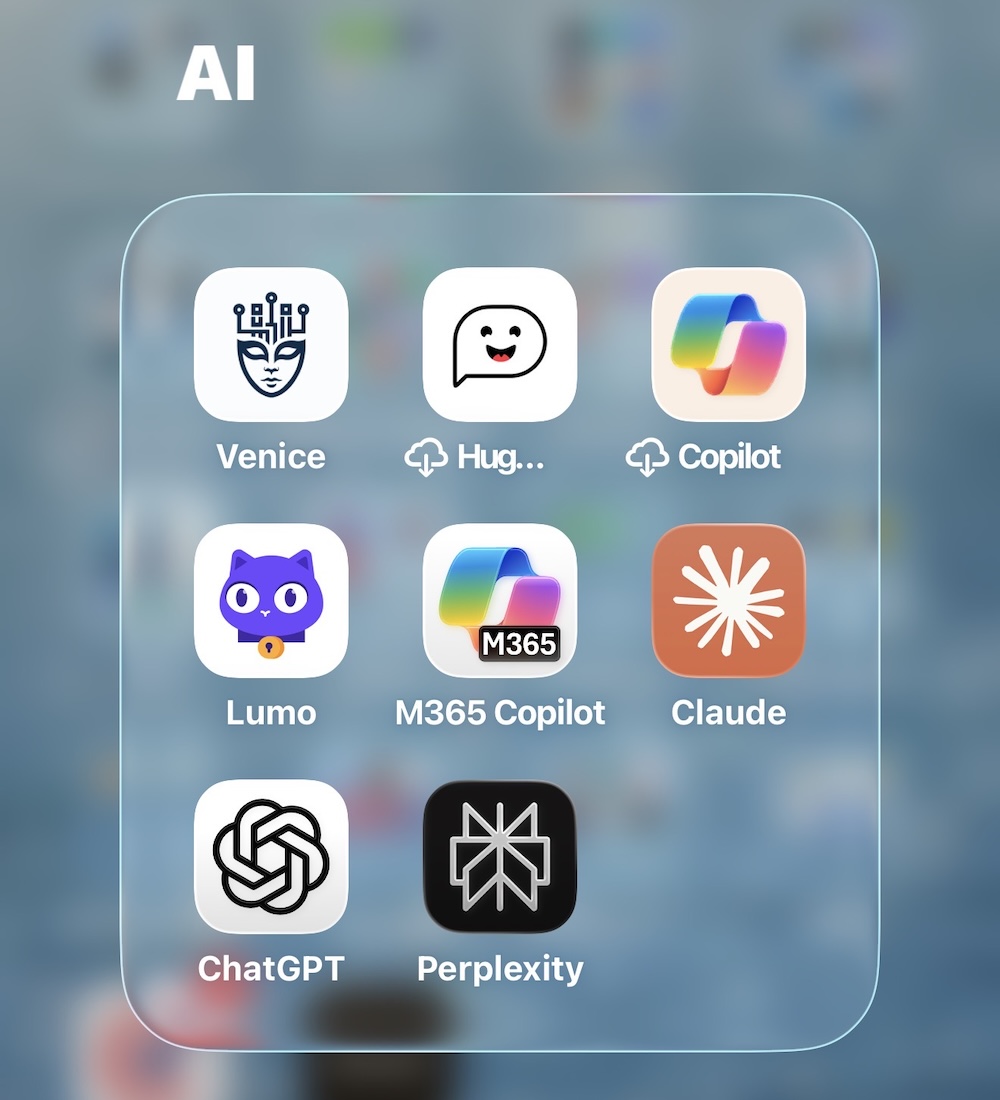
Come May or June 2024, I read about Venice.AI. It was intriguing because I wanted a private AI, and what these guys had built was designed from the ground up around privacy. Nothing stored, no logs kept. Yes, there’s still that moment in time where they’re processing your data, but they’re keeping nothing after that. Their entire business model is built on trust.

Are they 100% trustworthy? No. The only way to truly guarantee that is to run your own model. But they were offering something real, so I was intrigued.

The reason I hadn’t gone the local model route already was my hardware. I had an M3 MacBook Air with 16 gigs of RAM. I could download LM Studio and run stuff, but it was slow and clunky. Just not the experience I was looking for. I looked into cloud-hosted GPU options too, the kind of thing a friend had mentioned, but it was a lot of configuration and effort I just didn’t want to deal with. Funny enough, nowadays I could probably have Claude Code help me set that up in an afternoon. But I’m getting ahead of myself.

So when Venice came out with a pro plan at $49 a year as their introductory offer, which has since tripled, though as of my last renewal I was still grandfathered in, I figured for that price it was worth trying. It’s definitely more rudimentary than ChatGPT, but the privacy confidence is real. I’m still careful about what I put in it, but I’m more willing to share certain things there than I am with the public models.

They’ve since launched different models with different privacy levels, which is worth knowing. Some are fully private, some are anonymised but not fully private. You have to pay attention to which is which.

Fast forward to summer 2025. Proton, who I’ve been writing about for over ten years now, and at this point calling them just my email provider doesn’t really cover it, they do storage, VPN, and a bunch of other stuff, launched Lumo, their own privacy-focused LLM. I gave it a try.

The free version was pretty limited, so I added their paid tier for a few months while waiting for my main Proton plan to renew in December. The jury’s still a bit out on it. It did some things okay. From a pure trust perspective I probably trust it more than Venice just because I’ve been a paying Proton customer for a decade. But the way Venice has architected things, it’s actually more private. Lumo is more convenient though, and private enough for most of what I need.

One of the trade-offs with Venice’s full privacy mode is that nothing persists. No data moves between devices or browsers when you log in. Lumo does sync, but you’re trusting that it’s still zero-knowledge on their end.

I’ve actually been using Lumo recently for some things that are genuinely private, things I wouldn’t put near a public model. My logic is simple. I’ve been paying Proton for years to store sensitive documents privately. So why not use that same platform’s LLM to process those same documents? I’m not going to get into specifics here for obvious reasons, but it’s been useful.

The broader point is that I don’t always trust the public models, and honestly you shouldn’t either. But over time I’ve become more relaxed about certain things. It’s a constant cost-benefit calculation. The privacy models are getting better, and even the public ones will sometimes tell you that for certain tasks you don’t need high-level reasoning anyway, so a privacy model is probably fine.

The hard part now is knowing which model to reach for. Which is a whole other post.

As with the first post in this series I used AI to generate my banner image. I am not saying it’s good. I am just saying what I did.

From Sceptic to Subscriber: Beginning of My AI Story

I can’t believe I’m only now really starting to talk about some AI stuff, and ChatGPT launched in November 2022.

Looking back, I really didn’t do very much with it for over a year. The first six months was kind of like, okay, that’s cool, fine. I did a lot of reading about it separately, but I really didn’t do a heck of a lot until February 2024.

So over a year later, things were mature enough that I decided to take the plunge and try one of the paid services. Through the summer of 2023 I was definitely doing things here and there, but I was sceptical on what it could do. I was sceptical on its privacy. Well, I’m still sceptical on its privacy. But I didn’t pay for anything, and I was what you’d consider a light, casual user.

February 2024, I upgraded to Copilot. I also upgraded the family to the Microsoft 365 family plan at the same time, which you kind of need for Copilot Pro, or don’t, I forget. But there was a reason I did both at the same time. I treated it like a trial. Paid for it, but gave myself 30 days to see if I’d actually use it.

And I liked it. But the main reason I’d gone with Copilot was for the Microsoft Office integrations. That’s what sold me on it for personal use. In practice though, they just didn’t meet expectations at the time. And once I started talking to friends about it, the logic became pretty clear. Copilot is powered by ChatGPT anyway, and ChatGPT at the time had more plugins and a lot more flexibility. So why was I paying for the middleman?

I only used Copilot for about a month before switching to ChatGPT in March 2024.

I started using that on and off. In the beginning I’m not sure I really got my money’s worth, but it was worthwhile to have something and actually use it. I was able to use it for things like tutoring the kids — there’s literally a way to set it up so it won’t just give them the answer, it walks them through the problem. Stuff like that. A whole bunch of different use cases.

But what became apparent straight away was that there were things I was very hesitant to do with it, because it was, and still is, unclear what they actually do with your data.

For context I ran this story through an AI image generator to get a banner for this entry and after 3 tries it came up with what I used.

The Great Hotel TV Failure

hotel tv media centre

This is an older story from April 2024. We were visiting M’s parents and staying at an Aloft Marriott. Pretty good hotel, actually. Kids didn’t like the breakfast, I did. There was a pool. Close to the in-laws. Great value overall.

There were a couple days where M had the car and it was just me and the girls at the hotel. We decided we’d watch a movie, which kicked off the classic “how do we get the thing on my device onto the TV” problem.

I’ve debated traveling with an HDMI cable. It works. It’s just annoying to bring, and I never feel like packing it. So when I noticed the TV actually had an AirPlay option in the menu, the tech part of my brain started geeking out. This felt like one of those rare moments where hotel tech was finally catching up with reality.

At least in theory.

In practice, it refused to work. At all. I tried everything. And as someone who works in tech, there’s always that moment of “I cannot be defeated by a hotel TV,” but eventually you either give up or swallow your pride. I called their support guy. He came upstairs. He didn’t even know the feature existed until I showed him the menu for it. Still no luck. Completely dead.

So now it’s me, two kids, and no movie.

My workaround? I ended up ordering a Chromecast through DoorDash. Someone literally drove to a store, picked it up, and brought it to the hotel. Kind of wild. I don’t even know if that’s a thing in the UK. If it is, I’ve never tried it.

The Chromecast itself was tiny and cheap and came with its own little HDMI tail. Plugged it in, powered it up, connected it to my phone, and that was that. The hardest part was waiting for the movie to download on the hotel Wi-Fi. After that, everything just worked.

We watched Ghostbusters: Afterlife. The kids loved it so much we ended up seeing the sequel in the theater later.

The bigger point here is that the fancy casting feature Marriott advertised was a complete fail. Maybe they’ve fixed it since. I hope so because letting people cast from their own devices is safer and easier for everyone. I’m definitely not signing into a hotel TV with my Netflix credentials. No thanks.

I still have that little Chromecast. I don’t use many Google devices anymore, but this one is so small and so useful that I keep it around. Do I actually remember to travel with it? No. Should I? Probably. But whatever.

Downsizing the Pi Network

I keep a blog idea board in my Trello app so I can track all the things I want to write about, because I’ll come up with an idea for a post and then promptly forget it. Of course, sometimes I also add it to the board and still forget about it for years. By the time I rediscover it, the topic isn’t relevant anymore, or I’ve already written something similar. But I digress.

One of those old notes was about the state of my Pi network. I wrote it down a year ago, maybe updated it earlier this year, and now I’ve finally made enough changes that it’s worth revisiting.

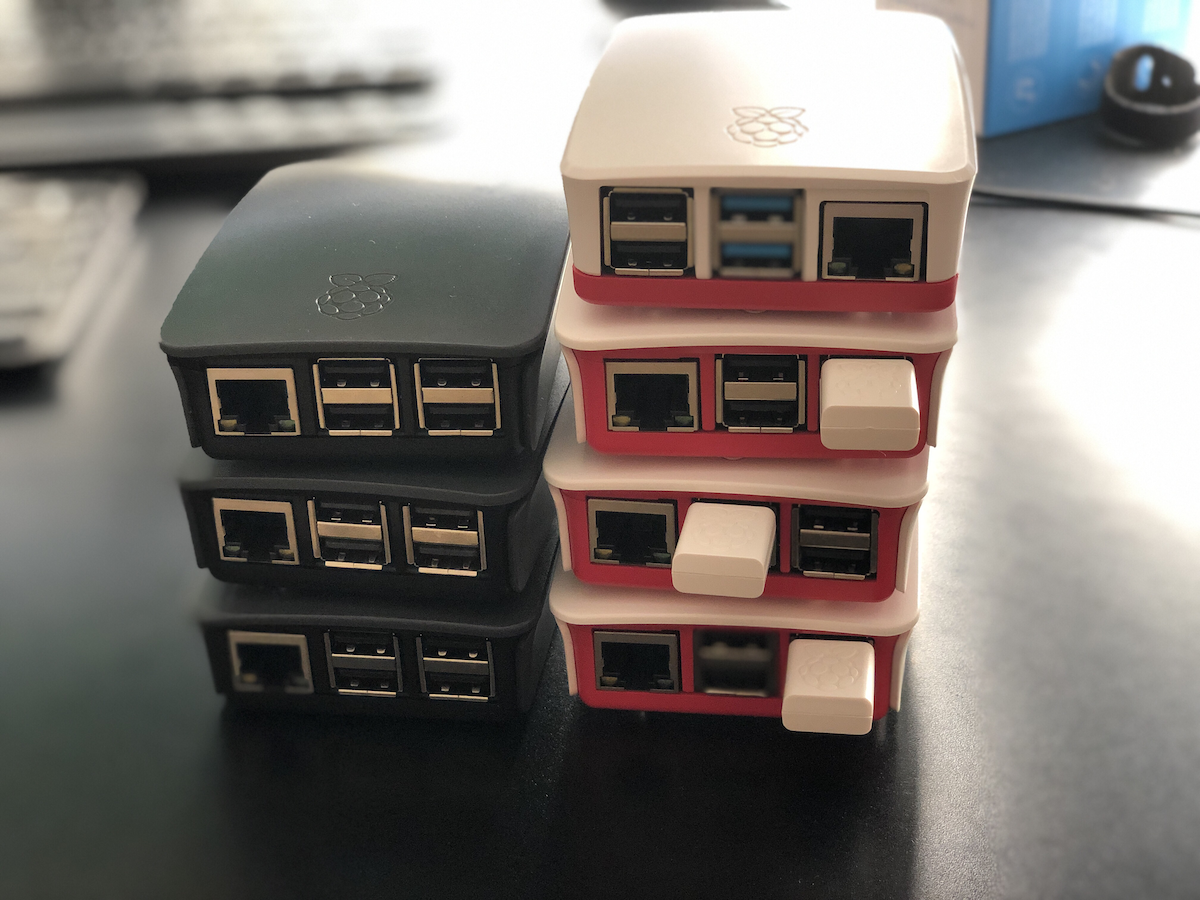
I’ve owned pretty much every generation of Raspberry Pi. Actually, I think I’ve owned all the main variants from each generation, not the tiny ones or the 400/500 models that are built into keyboards, but all the standard boards. I bought the original Raspberry Pi 1, set it up, played with it, and then never really deployed it for anything meaningful. By the time I wanted to, the Pi 2 had already come out, so I bought one of those. At some point I got rid of the Pi 1, maybe gave it away, but I’ve kept just about every other one since.

The backbone of my original home network was built on Raspberry Pi 2s. I had five of them running my early private cloud backup network. Over time, I upgraded them with new cases, official Wi-Fi adapters, and less reliance on Ethernet. Then the Pi 3s came out, and I added a few of those for compute jobs. Then came the Pi 4s, and I gradually shifted everything over again.

Eventually, I stopped using the 2s and most of the 3s, and my little network of Pis became mostly 4s. I think I had around four or five of them running various workloads. When the Pi 5s came out, I didn’t jump immediately, but I have about four of them now.

Funny thing is, I’m using less compute now than ever. The main purpose of the Pi cluster used to be my Docker setup, which ran parts of my media center, a Minecraft server, and Homebridge for connecting Ring cameras to Apple HomeKit. Most of that has since moved or shut down.

I replaced the Ring cameras, so no need for Homebridge. Plex moved to my Synology DiskStation because the transcoding works better there. The Docker stack was easy enough to migrate, so that freed up another Pi.

These days, I’m really only using:

One Resilio Sync node for backups One BorgBackup setup for immutable backups One Pi as a Tailscale exit node And a Raspberry Pi 4 running Pi-hole for DHCP and DNS in the house

Everything else runs on Pi 5s, though even that’s more power than I need. When I built out the 5s earlier this year, I decided to stop using SD cards and external drives. I got cases with SSD add-ons, most with 256 GB drives, and one with a 2 TB SSD for backups. It’s a neat all-in-one box setup.

The Pi 4, especially the 8 GB version, is still a perfectly good piece of kit, but I just don’t have enough for it to do. So I’ve started selling them off on eBay. I’ve already sold a couple of the 4s and gotten a surprisingly good return for hardware that’s several years old. I’ve sold all of my 3s and am now selling the 2s. Apparently, people still buy them for nostalgia or small projects.

A few of my old ones are in official cases, and two are even in LEGO cases with camera kits. They look great, but I’m trying to pare everything down so I’m left with only the Pi 5s, and maybe I’ll move the Pi-hole over to a 5 while I’m at it.

Maintaining the hardware takes a decent amount of time and effort, and with what I’m doing now, renting a virtual private server is just simpler. My web hosting, where this blog lives, runs on a VPS with 2.5 GB of RAM, a single virtual core, and about 40 GB of storage, all for around $23 a year. It’s based in Dublin and does the job beautifully.

Building a Pi 5 setup can easily cost around four times that, even if it gives me more power than I’ll ever use. I’m not planning to get rid of the 5s I already have since they’re great machines, but I’ve reduced what I actually run on them. Justifying keeping all the older models sitting around isn’t really there anymore. For most of what I run these days, a VPS or my upgraded DiskStation handles it fine.

So yes, I’m officially downgrading, selling off hardware, consolidating services, and simplifying. I still love tinkering, but the Pi 5s are plenty. The rest? Off to eBay.

Please Take My Money (Sort Of): Zizzi Edition

Here’s another entry in my ongoing series about payment apps and POS systems, otherwise known as “please, for the love of all things, take my money.”

This time, it’s about Zizzi.

We like Zizzi. Pretty good for a chain, consistent, close to home. The kids enjoy it, and I’m a sucker for a solid lasagna, so it works.

A while back, they introduced the option to order right from your table. You scan, browse the menu, and place your order online. In theory, convenient. In reality, not so much.

The first time we tried it, the whole thing collapsed like a bad soufflé. I think we spent 15 minutes trying to order before admitting defeat. Then the waiter came over, who, to their credit, also had trouble with the system. When the staff can’t make the app work, that’s not a user problem. That’s a “this is broken” problem. Logging in, confirming the order, something always failed. After twenty minutes of tech support cosplay, we gave up and just ordered the old-fashioned way.

Since then, I’ve avoided the “order at the table” gimmick. My appetite doesn’t need a debugging session before pasta.

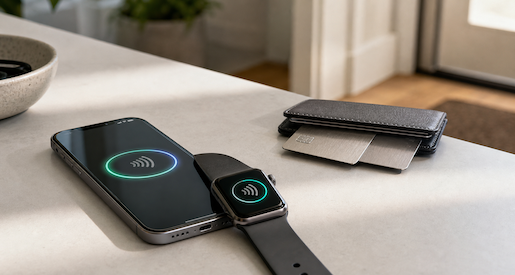
That said, Zizzi redeems itself with their payment setup. That’s where they actually get things right. You scan the QR code, pay with Apple Pay (no logins, no fuss), and it just works. Recently we had one of the kids’ birthday dinners there, large table, chaos, cake, the usual. The service was great, and paying through the app was quick and clean.

There was one hiccup: the app didn’t let us add a tip. And we really wanted to, because the staff had gone above and beyond with the birthday stuff. We ended up having to flag someone down, who couldn’t add it either. Apparently, the built-in service charge meant we were done. Nice in theory, but awkward when you actually want to leave extra.

Still, credit where it’s due. Ordering? Fail. Paying? Solid.

Zizzi gets a mixed review from me, half frustration, half appreciation. The tech that takes my money works great. The tech that takes my order? Not so much.

My Quiet Breakup with the AirPods Max

I have always been a Bose guy. For years I used their wired gel earbuds, which were way better than the old Apple earbuds we all pretended were acceptable back then. I even had one of their sound bar’s when I downsized from a full five speaker setup. Bose has always been one of those brands people either love or love to argue about, but I have always been in the “I like their stuff” camp.

About ten years ago, maybe more, I bought the Bose QuietComfort 2 noise cancelling headphones. They were around two to three hundred dollars at the time, and they were fantastic. They still work. Every now and then I would pick them up and think, “Do I really need anything better than this”

Fast forward to 2024. Apple had the AirPods Max out and I kept circling them like some kind of expensive tech craving predator. They were wireless, premium, comfortable looking, and supposedly had incredible noise cancellation. A friend of mine had a very specific problem with them, the kind of issue that only bothers a certain type of person, but still, the Max looked like a great piece of gear.

Meanwhile, I was mostly using regular AirPods for day to day things. They were fine. Good enough for the train, calls, and everyday commuting. At some point I got the AirPods Pro, but the timeline is fuzzy. Either way, the big over ear headphones were for serious travel and the little buds were for everything else.

Then my wife mentioned she was curious about noise cancelling headphones. Her use case was tiny, maybe once a month. I could not see her spending a lot on a brand new pair, so I said, “Do you want mine” meaning the Bose. And in that moment my brain went, “Well, this is the excuse I needed.” I handed her the Bose, she accepted them, and I immediately gave myself permission to finally get the AirPods Max.

And that is exactly what I did. She still has the Bose, and I walked away happy with the Max.

To be fair, they are genuinely great headphones. I used them in the office all the time. I used them on planes and they were fantastic. I never wore them while walking around because they are too big and clunky for me, even though plenty of people seem very comfortable doing exactly that. Good for them, not for me.

Eventually I started noticing a familiar problem: the glasses issue.

I have worn glasses forever and over ear headphones always put pressure on the frames. Sometimes it is fine, and then other times it slowly becomes “Why does the side of my head hurt like someone has been squeezing it for an hour” With the Bose it was manageable. With the AirPods Max and their firmer ear cushions, it became noticeably worse. My most recent pair of glasses, which might be wider, made it borderline uncomfortable. On flights I would take the Max off every so often to give my head a break. I even watched a movie without my glasses just to avoid the pressure, which felt ridiculous.

Around the same time, my regular AirPods finally died, as they eventually do. So I upgraded to the AirPods Pro. And I was honestly surprised at how good the noise cancellation was. Surprisingly good. “Maybe I do not actually need the giant expensive headphones” good.

I took a couple of trips this past year where I brought both the Max and the Pros. Every time, the Pros won. Comfort alone did it. Eventually I told myself, “If I take the Max on this trip and do not use them at all, I will sell them.”

That is exactly what happened.

Then Apple released the newest AirPods Pro that September with even better noise cancellation, and I basically bought them immediately.

So in November I finally sold the AirPods Max on eBay and I do not miss them at all.

They are fantastic hardware. They look great and sound great. But they are not comfortable for me, and I am not someone who walks around the city wearing over ear headphones every day. I tried. It is just not who I am. The amount of space in my carry on that I saved by not using them is also noticable.

Now I am down to the AirPods Pro for travel, commuting, calls, and pretty much everything else. They are basically always in my pocket. They are small, comfortable, and they do not crush my glasses into the side of my head. I keep a spare pair of old wired earbuds in my bag and that is all I need.

So yes, technically the AirPods Max are better. But the headphones I actually use are the ones that win.

Please Take My Money: Wagamama Edition

I spend a lot of time talking about bad experiences because, honestly, there are plenty to go around. But every so often, someone actually gets it right. And today, or at least initially, that someone was Wagamama, until they then later didn’t but no spoilers yet.

I like Wagamama. One of my daughters likes Wagamama. The other one… not so much. Which means we do not go as often as I would like. Recently, though, the less enthusiastic one has been a bit more open to it, which has resulted in a few bonus noodle nights for me.

The food is always good. The service is consistently fine. And it is one of those places where everyone seems slightly happier after they eat. But what caught my attention this time was not the food. It was the payment process.

After the meal, instead of trying to make awkward eye contact with a server while doing the universal “please bring the bill” hand wave, there is a small QR code on the table. You scan it and it immediately knows what you ordered. No typing. No logging in. No nonsense. Just “Here is your total.”

You can pay right there with Apple Pay, or Google Pay if that is your thing and you enjoy giving Google more information about your life. No account creation. No mysterious third party checkout flow. You can even have the itemised receipt emailed to you, which, as someone who really dislikes handing out an email address, says a lot.

It was fast. It was clean. It worked.

They also let you order food through their app or website. I am not entirely sure which one it is because I have not actually tried it yet, but it looks slick. Given how smooth the in-restaurant payment felt, I assumed they had nailed that part too.

So at that point, credit where it was due. Seamless checkout, transparent receipts, and very little friction. This is how digital payments should work.

Then we went back.

Side note first: A was totally fine with going this time, which feels like real progress and deserves its own quiet celebration.

The reason I am updating this entry, though, is that paying was not quite as effortless as I remembered. This time the QR code was still there, but we also had to enter a table number and the location name. I swear we did not have to do that before. Maybe they changed it. Maybe I forgot. Either way, it added a bit more friction.

What really stood out, though, was that even after choosing Apple Pay, I still had to enter personal details. Not the worst possible outcome since I did not have to register an account, but still more personally identifiable information than I would have liked. Enough that I noticed it. Enough that it annoyed me.

For what it is worth, I just used slightly inaccurate details since it did not affect the Apple Pay transaction at all. The payment went through fine. But that kind of thing chips away at the “this is perfect” feeling pretty quickly.

So yes, they still get a lot right. It is still better than most places. But it is not quite as frictionless as I first thought.

Which, honestly, is how most good systems fail. Not catastrophically. Just by adding one extra step that did not really need to be there.

Still, the katsu chicken was excellent. And I will absolutely go back.

Please Take My Money: Green King

It’s time for another round of Please Take My Money, the ongoing saga of payment systems that either make it ridiculously easy to spend money or somehow turn it into a test of patience and willpower.

Today’s contestant: Green King.

When I think back, I don’t even remember Green King having an online payment system before COVID. Maybe they did, but it certainly wasn’t memorable. Then lockdown happened, and suddenly the idea of ordering from your phone became not just convenient, but essential.

After restrictions lifted, one of the first places we went was our local Green King pub. For the first time, they had an online ordering option. I actually thought that was great. One thing the pandemic got right, if we can say that about anything, is the ability to order food and drinks from your table instead of waiting in line at the bar.

Now, don’t get me wrong, I like the charm of a proper English pub. I don’t mind going up to order a drink. But queuing to order food? Hard pass. So the fact that Green King introduced mobile ordering felt like progress.

Originally you had to register for an account. Nothing kills “convenience” faster than “please create a password.” I get that companies want to collect data and “build loyalty,” but if you’re in the business of selling me a sandwich and a beer, maybe focus on that. I don’t need another account to forget about.

Anyway, once I begrudgingly registered, it worked fine. I could order food, add my table number, and my meal magically appeared without waiting at the bar. That alone put Green King ahead of some others I’ve tried. So let’s call the early days a neutral: annoying sign-up, but decent execution.

Fast forward a few years, and they’ve clearly learned. The app no longer requires you to store your card details. You can just pay with Apple Pay or Google Pay and be done. No extra forms, no saved card nonsense, no trust fall into yet another company’s database.

And that’s the thing. Retailers love to say they “take security seriously.” The reality is that they may not be able to focus on it as deeply as a credit card company or a bank does, which is understandable. So when an app lets me not store my card details, that’s a feature, not an inconvenience. It’s basically zero knowledge in practice. If they ever get hacked, it won’t matter, because my card details were never there to steal in the first place.

These days, ordering through Green King’s app is smooth. You tap, pay, and your order’s on its way. Seamless. Efficient. Almost enjoyable.

So, after a rocky start, Green King has graduated from “barely tolerable” to “actually pretty great.” They finally figured out the assignment: make it easy for me to give you my money.

The Dot Group Problem

This post is partially channeling my wife’s outrage, but as the household tech support department, I’m equally annoyed.Here’s the story.

The .group top-level domain (TLD) launched in 2015. I know this because I looked it up after dealing with this nonsense. My wife has a personal domain name using .group. It’s short, simple, and sounded nice and professional when we registered it.

We both use a mail service that supports unlimited aliases. Every new website or service gets its own unique email address. That way, when one of them leaks or gets sold, we know exactly who’s responsible for the spam. It’s a great system.

Today, for example, I got an obviously dodgy email pretending to be from a legitimate service provider. It was already flagged as spam, but even if it hadn’t been, I could tell it wasn’t real because it was sent to an alias I’d only ever used for a different service. Case closed.

So yes, that whole “unique email per service” setup works brilliantly. And my wife has adopted it too, with some encouragement from me and a bit of technical assistance.

Now here’s where the outrage begins.

It’s 2025. The .group domain has been around for ten years. There are hundreds of new top-level domains now. And yet, there are still websites out there that refuse to accept an email address ending in .group.

She’ll try to register for something, type in her perfectly valid address, and the site throws back: “Please enter a valid email address.” Excuse me? It is a valid email address. The site’s validation code just isn’t built to handle it.

This drives me absolutely mad. I’ve built and supported web applications for years in e-commerce, corporate systems, and startup products. It’s baffling that companies still don’t invest in maintaining their websites properly. Maybe they don’t know how modern validation should work, or maybe they just haven’t prioritized it. Either way, it’s not a great look in 2025.

Our fix was simple, if slightly irritating: we bought another domain. It’s not quite as clean or memorable as the .group one, but my wife liked it, and it works. It’s a standard .uk domain, which every site on the planet seems to accept without complaint.

Problem solved, more or less. The new domain costs about five pounds a year, which is fine. The annoying part is that the .group domain, the one she can’t use everywhere, is about three times that price. But it’s tied into too many existing services to just drop.

That’s the real downside of using custom domains for email. Once you build your digital life around one, moving away from it is basically impossible.

So now, our workaround is simple. We’re keeping the .group domain active for existing logins and old services but using the new .uk address for anything new.

It’s not the fault of the .group registry. It’s just a side effect of how unevenly the web is maintained. Some companies build things properly, others never update. And here we are, ten years later, still running into “invalid email address” errors for perfectly valid ones.