
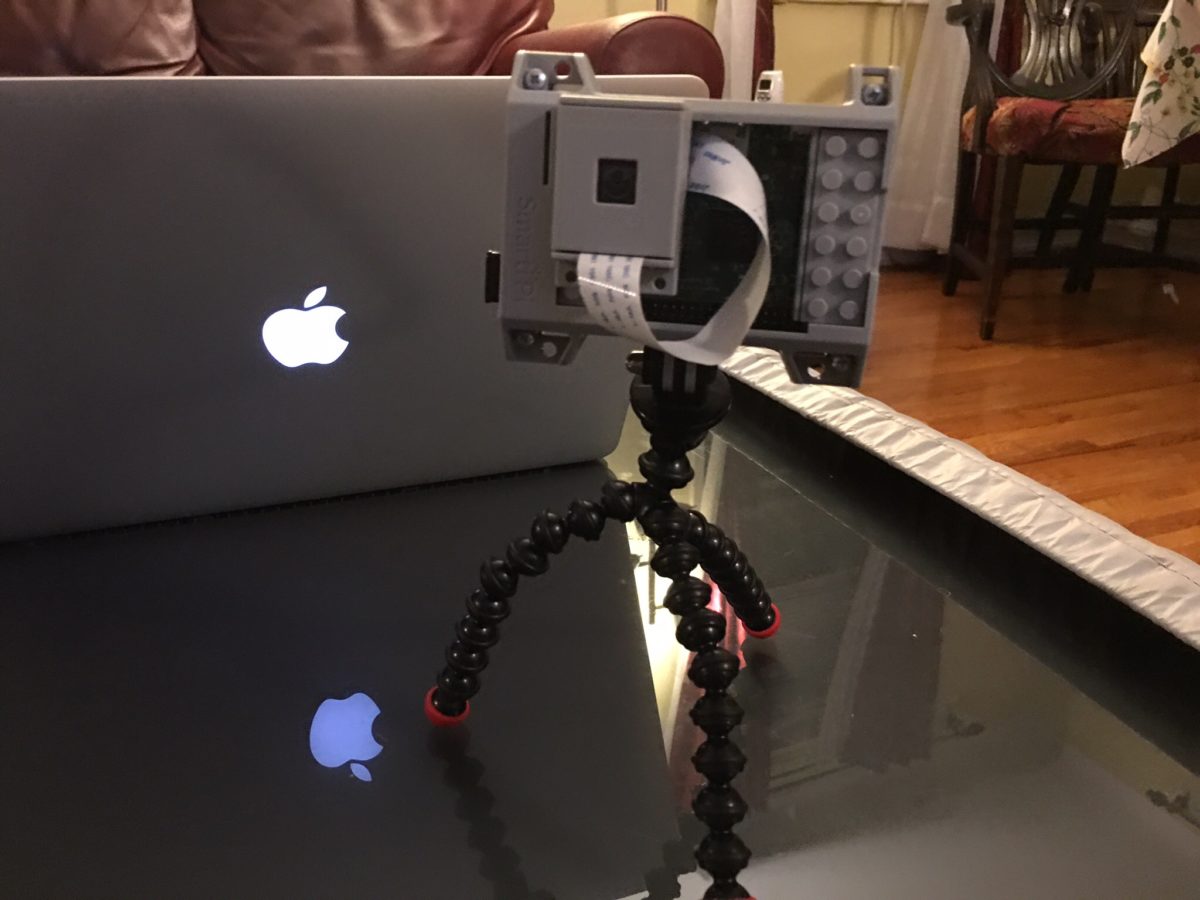
Building it was supriaingly easy. Test photos were ok. Now the hard part begins, making it work like a store bought webcam with alwys on video recording.
Webcam
Baby Tech
I do not hide the fact that I am a tech person, or that I love gadgets. If they have a usefull purpose and they are easy to use I am all for them. Tech for me was always easy. I found what I liked and just used it. When we found out we were having a baby I knew there were some tech items we would need, but I didn’t realize how much stuff we would have that would help.
The first thing I thought of when I thought stuff we needed was a video camera. My friend Jayson had one for his little ones and I thought it was the coolest thing to be able to see and even interact with them from your iPhone. When the time came to look I narrowed my search down to the Withings Baby Monitor and the Dropcam. Withings makes another device I have used and they seemed like their camera was pretty well built but it was $300. The Dropcam was half the price but it wasn’t designed specifically as a baby camera. We wanted 2 cameras anyway. One for the play area the baby would eventually play in and for her crip. I bought the cheaper camera first to try and if we didnt like it i would use it for the play area and then buy the other camera. In the end I love the Dropcam and we will be buying another one. As I write this post I have my Nexus 7 in a stand with the Dropcam app running on it. I leave the Nexus 7 by the side of my bed with the camera app running at night. MC switched from a blackberry to an Galaxy Nexus because Android devices could display the video. She also leavs her phone proped up at the side of her bed with the video on. When I am at work she props the phone up by the TV in our living room so she can see it on our couch. I have been leaving the camera site up on my computer at work so I can easliy switch over to see if Teagan is napping. We still use the audio monitor and leave the sound off since there is a few seconds delay. We do realize that we may be quick to react sometimes because we see Teagan moving on the video but not making much noise. We know now to stop and wait a bit before we go check on her but it is still a fantastic tool!
We also have the traditional baby monitor, but even thought it is a common house hold consumer electronic device it is still baby tech. I got a model that was the best customer reviewed on Amazon and the same day we got it my friend Jenn sent us one from our gift registry. Thanks Jenn, we use that thing all the time. The battery lasts all day, and we only plug it in at night when we goto sleep.
The video camera and baby monitor were both items we knew we would be buying. What I didn’t think we would ever need was a humidifier. It is very low tech, but it is still tech. We have steam heat and it gets pretty dry in the winter. Teagan was very nasal sounding almost from right when we brought her home. I have a video of her sounding like Darth Vadar. The doctor recommended a humidifier. Its a pain to clean often but it works.
Another item we didn’t think we would need was a temperature & humitity sensor. When we realized it was dry we wanted to know how bad it was and when we should run the humidifier. I bough a humidity sensor and MC put it in Teagan’s crib. We put another one on my desk were my computer is since that is near were we will setup Teagan’s play area. It tells us the humidity and temperature, and also says when humidity is high or low. We are not sure how accurate the readings are but it has been good so far. Consumer electronics have come a long way when a decent big LCD temperature sensor like what we got goes for less than $9. I can just imagine how much something like that would cost 20 years ago.
The last major item that we use daily that you wouldn’t really consider tech. My mom bought a Giraffe that plays music. It also will play sounds simulating a human heart beat. it is supposed to be soothing to the baby, and we find it great to use when putting her down for a nap. Its a stuffed animal but it is a consumer electronic device with a mini music player inside and buttons up its back for the different options. Not as high tech as the video camera but tech none the less, and we rely on it every time we put Teagan in her crip.
Other items we use are our phones to view the Dropcam, as well as my Nexus 7. I am finding I use the Nexus 7 more at home as a clock and dropcam viewer than I do taking it to work. That is due to other reasons i posted in late October, but because its around the house more I find myself using it for the baby more. When we sit down to eat dinner or watch a movie we prop it up and use it to keep taps on Teagan. When I feed Teagan in her room I will take it in and use it to play a sleep play list I made to calm her down.
It seems like a running theme for me in recent posts to point out that yes we dont need most of this tech, and things like the Dropcam weren’t really a viable option for kids as young as my 3 1/2 year old niece but they are pretty common today. Need or not, they all make caring for our newborn significantly simpler than it would have been. Raising a baby still isnt easy but it could be much much harder. I look forward to talking about more tech I get to use with or for Teagan as she gets older. I am personally waiting for the GPS tracker bracelet or neckless so i know when she is going or coming from school. i know that is a way off but she is only 6 1/2 weeks old. I have time.
We Can See You!
Today I went out and bought some iSight camera’s to test out. I have said it before, but I will say it again. Most of the time I can say I play with toys for a living and I won’t be lying. One of the business managers wanted a video camera solution so people in one of our offices can see what others are doing in another office, and vice versa. The theory is to bridge the gap between the offices by seeing a small glimpse of what goes on in each location. I thought it was a really cool idea. After looking at several options I came to believe that the iSight cameras were the best bet. Several wireless network cameras were several hundred dollars each. Plus the computers and monitors we would need to show the other offices camera on, the cost got to great. With iSight we can get a computer (Mac Mini) a monitor and the iSight camera and that is all.
To test the setup I got 2 camera’s. Jayson and I plugged them into our Powerbooks and we took them for a spin. The picture looked good in full screen mode on my 19″ LCD. Jay took it a step further and plugged his Powerbook and iSight into the 42″ Plasma we have in the office and went full screen. It looked good enough that we can use 23″ LCD TV’s for this project. The picture in general looked really good. Granted we were on the same LAN, but we have decent bandwidth between both offices so it should work fine.
What is even cooler is we were able to use the video chat functions of Jabber, and not even use AIM. After showing that we can use these iSight cameras for the solution I went out and looked to get the computers. At first I was going to get the really cheap $499 mini’s but then I realized we need the wifi for one setup, and maybe need it for the other one as well. It was worth the extra $100 to have it ready if needed. I love that this stuff just worked. I plugged in the camera and the software immediately said there was an update ready for download. I clicked ok to download it, and in less than 2 minutes and one OK click later I was chatting via video. Not bad for an OS that has less than 5% of the market!
Now that we know the cameras will work for this solution I now want them to use for day to day video conferencing between the people in my department in my office and the other one! That would be really nice!