

Building My Own Custom GPTs

With some downtime on the bank holiday Monday, I finally tackled something I’ve been wanting to do for a while: creating several custom LLMs. I’ve been tinkering with agents for work and figured it was time to apply similar customizations for personal use.

Lately I’ve been bouncing between ChatGPT, Perplexity, Venice.ai, and even the new Proton AI for privacy. ChatGPT now lets you build custom GPTs, so I gave it a try. While we were on holiday, I had jotted down some customization requirements for a handful of GPTs I wanted, and this felt like the right time to build them.

For the past six to eight months, I’ve been planning holidays with different LLMs. The main frustration has been having to restate all my preferences every time I opened a new chat. Starting with a custom GPT just made sense—especially since I’ve got several term breaks to plan for over the next school year. Programming the GPT was straightforward. I haven’t used it to plan a full trip yet, but I’ve got the base built and I’ve started tinkering. High hopes for this one.

I also put together, though haven’t tested, a CISSP study guide helper. I want to sit for the test but don’t have a study buddy, so I figured why not make one?

Then there’s a slightly different use case: a custom GPT for days out with the kids. Same idea as the travel planner, but without flights and hotels—it’s more about what’s going on in London. I’m actively planning a week with the girls now and most of it is set, but I’ll see if this new GPT adds anything useful. The hardest part here was integrating the data I’ve been tracking on a Trello board with all the activities we’ve done or still want to do. I wanted the GPT to be able to use that context, but I’m cautious about sharing too much personal information with ChatGPT. That’s why I also use Venice.ai, which is a privacy-protecting, open-source based AI. Still, I experimented with exporting the Trello data to JSON and importing it into ChatGPT, and after some trial and error I finally got it working. In this case I had to use ChatGPT since I ran into file size limits with Venice.ai.

I’ve got a few more ideas I want to play with, but for now the three or four GPTs I’ve already built will keep me busy. I need to actually use them and see how they perform before I go any further. Early impressions are promising. Even so, as I remind colleagues and my kids, quoting the Doctor from Doctor Who: the AI lies. Don’t ever trust it completely. If you keep questioning it, though, the results can be pretty good.
Random Finds From America

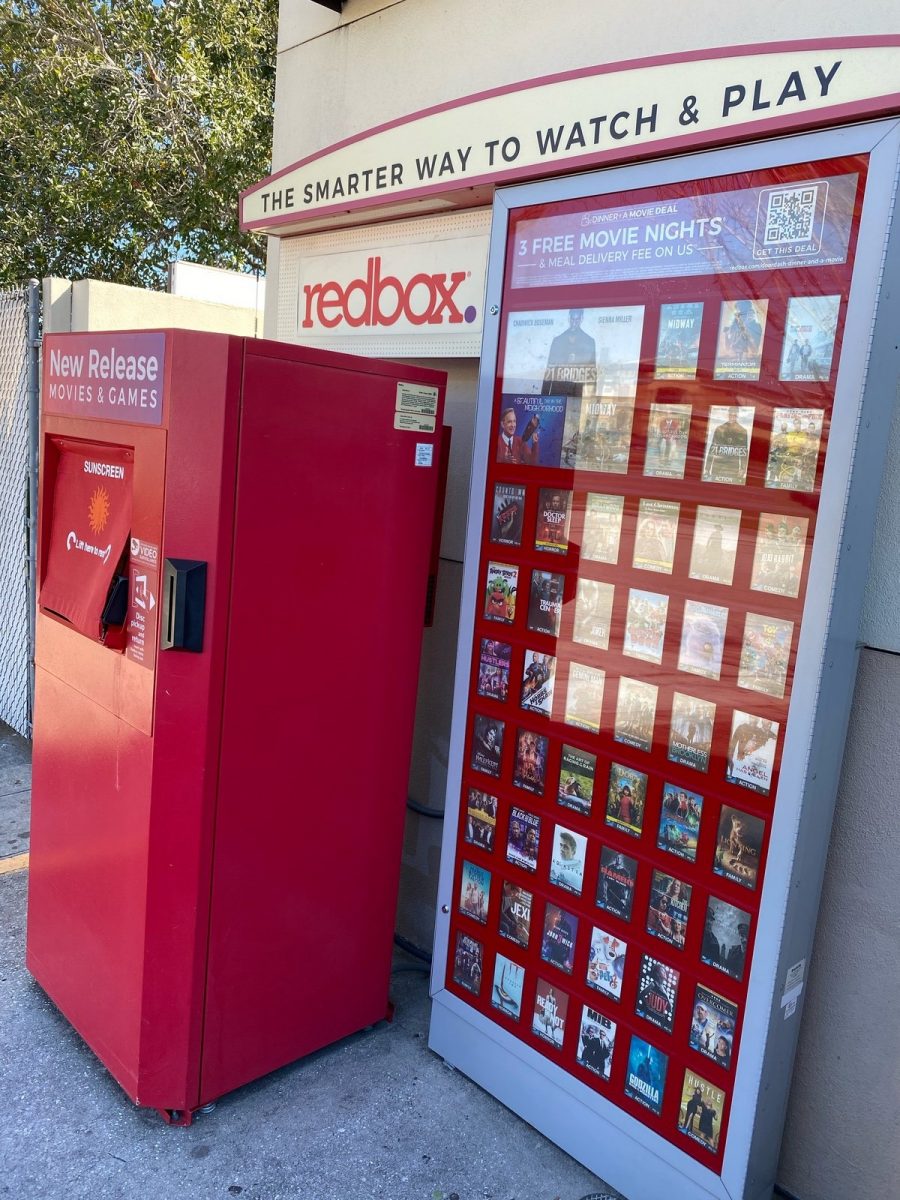
Last week we were in Florida before and after a cruise. While at a 7-Eleven outside Orlando Florida I saw a Redbox. My first question was do these really still exist? Then it dawned on me people may still actually use DVD’s. Even though I remember my DVD collection I thought the idea of DVD’s in 2020 to be pretty old school. Then again the term “old school” may be dating me.

My Parents Are Becoming So Tech Savy It Scares Me Sometimes

We live in a very technical world now a days so I don’t know why it surprises me that my parents are slowly embracing modern tools. I am less surprised by my dad than my mom but it sometimes still takes getting used to.

My dad at least has a long history of having useful gadgets. He was the first person I remember to have a PDA. It was an old Sharp Wizard that I eventually inherited. I get my love of gadgets from him, but I think I take it to a whole new level. Of course there is alot cooler stuff out now.

My mom on the other hand is not tech savvy at all. I still get calls from my mom for help doing basic stuff on my dad’s GPS. Of course my sister who once programed for a living also calls me just as frequently about similar issues so I shouldn’t judge.

What is funny recently is that my dad had been dead against a smart phone for ages. At one point I got him a Treo 300 that he used for a year or so, but didn’t like the small keyboard. He ended up going back to a regular phone and an old style Palm handheld. He has had a palm handheld (minus the time with the Treo when it was Handspring) since they first came out in 1996. Recently, well actually over the past few years he has been asking about an all in one phone/PDA. The problem is he doesn’t like the little keyboards. Because of that he hasn’t switched his setup, but has really wanted to ditch his phone, PDA, and pager (yeah he still has one) for one device. His work was going to give him a Blackberry a while ago but he turned it down because again he didn’t want a keyboard. I showed him the iphone when I got it and we decided it wasn’t for him since he would have a problem with the lack of feedback on the virtual keyboard. Recently he has been wanting a new phone again, so he went to the Verizon Store (his carrier). I was surpassed when he came back and said he wanted a Blackberry Storm. He liked the feedback of the virtual keyboard, and the phone did everything else he needed. He even wanted to get the data plan to get work email. He spent about an hour with sales guy and ended up buying one. I now need to go over and migrate his palm data to the Blackberry. In some ways I am not surprised he got that phone and in others I am a bit surprised he has a phone as advanced (arguably) as the one I have!

My mom also surprised me with technology when she started asking me about the Amazon Kindle. Apparently Operah had a special about it and she was interested. My sisters mother in law gave my sister a Kindle and my sister lent it to my mom for a cruise she went on a few months ago. She really liked it since she didn’t have to pack a bunch of books. She took a while to get over some issues with it but apparently got the hang of it. For a while I was pondering upgrading to the Kindle 2 and she asked if she could have my old one if I did. At first I wasn’t going to upgrade. For me the price of the Kindle 2 was too much to be worth the upgrade from the first version. My mom’s birthday is coming up and I couldn’t figure out what to get her (and I still owe her a mothers day gift) so I asked if she wanted my Kindle for her birthday gift? She said yes, so I ordered a Kindle 2 for myself. The new one would be a waste for her, so I don’t feel so bad giving her the generation 1 version. I am excited for the new Kindle and hopeful my mom doesn’t run into any problems using the Kindle the next time she uses it.

In a later post I might write about part two of this post, about my progress at weaning both my mom and dad off AOL. They still use it for email. I setup a mail domain on Google Apps and created accounts for both of them. I just need to show them how to use the Gmail web interface and get them to tell people the new addresses.

We Can See You!

Today I went out and bought some iSight camera’s to test out. I have said it before, but I will say it again. Most of the time I can say I play with toys for a living and I won’t be lying. One of the business managers wanted a video camera solution so people in one of our offices can see what others are doing in another office, and vice versa. The theory is to bridge the gap between the offices by seeing a small glimpse of what goes on in each location. I thought it was a really cool idea. After looking at several options I came to believe that the iSight cameras were the best bet. Several wireless network cameras were several hundred dollars each. Plus the computers and monitors we would need to show the other offices camera on, the cost got to great. With iSight we can get a computer (Mac Mini) a monitor and the iSight camera and that is all.

To test the setup I got 2 camera’s. Jayson and I plugged them into our Powerbooks and we took them for a spin. The picture looked good in full screen mode on my 19″ LCD. Jay took it a step further and plugged his Powerbook and iSight into the 42″ Plasma we have in the office and went full screen. It looked good enough that we can use 23″ LCD TV’s for this project. The picture in general looked really good. Granted we were on the same LAN, but we have decent bandwidth between both offices so it should work fine.

What is even cooler is we were able to use the video chat functions of Jabber, and not even use AIM. After showing that we can use these iSight cameras for the solution I went out and looked to get the computers. At first I was going to get the really cheap $499 mini’s but then I realized we need the wifi for one setup, and maybe need it for the other one as well. It was worth the extra $100 to have it ready if needed. I love that this stuff just worked. I plugged in the camera and the software immediately said there was an update ready for download. I clicked ok to download it, and in less than 2 minutes and one OK click later I was chatting via video. Not bad for an OS that has less than 5% of the market!

Now that we know the cameras will work for this solution I now want them to use for day to day video conferencing between the people in my department in my office and the other one! That would be really nice!

Why Am I Still Sick

If you have been reading this blog you will have noticed that I have been complaining of being sick on and off since October. Well this is disturbing since I normally get sick with a cold once or twice a year and that is it. Well I have counted what can be 3 cold’s and the flue since October. Needless to say I am not happy.

This whole week I have been coughing allot and had a stuffy nose. It is weird, some colds you just feel like crap and don’t want to do anything. This one I just coughed like crazy and sounded like crap, but I was able to work. Thankfully I had off Thursday and Friday. I left a bit early from work Wednesday and started taking Tylenol PM. I have been in a haze ever since. I woke up this morning and wasn’t tired anymore but I could not concentrate at all. I ended up watching movies and lying in bed most of the day. I couldn’t do anything else if I wanted to.

Late this afternoon I felt a bit better and decided to rearrange my desk a bit. I took my Athlon XP desktop out of the closet and set it up on a corner of my desk. I totally cleared off my desk when I got my iMac but I decided that I had some use for my XP desktop to be out. So I shifted the iMac over and placed the monitor for the XP box in the corner. I have less desk space now and things look a little more cluttered, but it isn’t that bad. If I don’t use the computer I can always put it back in the closet with my server.

I am also giving the apple pro speakers that came with my mac a try. They don’t use a subwoofer and so at first I didn’t want to use them since my creative speakers have a subwoofer. The only thing the apple speakers have going for them is they don’t take up much space. They don’t actually sound so bad now that I have been listening to music on them for the past 2 hours.

The only problem I have now is that I think half of my computer table is not level. it is not visible when working on it, but I know that it is, so it is driving me crazy. I am to much of a perfectionist…

This entry was written while listening to Unwell from the album “More Than You Think You Are” by Matchbox 20