

The ISP That Operates Like a Tech Person Designed It

When I was building out my OPNsense router, I had a decision to make. Keep running Pi-hole for DNS and DHCP, or switch over to the built-in AdGuard on the router itself.

I’d been using Pi-hole for a while and the functionality was genuinely compelling. But if I was critical of my own uses, I wasn’t really using most of it. The main thing I got out of the Pi-Hole was ad blocking at the DNS level, and I can get that from a privacy-focused DNS provider like Mullvad anyway. So I made the call to consolidate everything onto the router.

Turns out that decision had a nice side effect.

My ISP is Andrews & Arnold, and they give me an IPv6 block along with a dedicated IPv4 address for my router. There were some limitations with Pi-hole when it came to properly handing out public IPv6 addresses to devices on the network. Could be a Pi-hole thing. Could be me never having quite sorted it. I am not really sure. Either way, moving everything to the router cleared it up. Now every device on my network gets its own real, internet-facing IPv6 address.

Do I need this? Absolutely not. But the network engineer version of me from the early 2000s would have been beside himself.

Which brings me to Andrews & Arnold, because I don’t think I’ve written about them directly before and they are pretty awesome. Also it feels like they are a bit unique in terms of internet providers.

I first used them when we moved to the UK and I needed a DSL connection. They were great, but the Openreach copper line quality at the time was a problem and the speeds weren’t there, so I ended up switching to Virgin for a few years just to get something faster. Then Openreach rolled out FTTP to our neighbourhood and I went straight back to A&A.

They are not outrageous, but they are noticeably more expensive than the value options out there. When I first signed up for FTTP I had to pick a usage tier, which I have a moral objection to on principle, and I ended up needing to go above the one terabyte plan pretty quickly. To their credit they’ve since moved their higher tier to unlimited, so that’s sorted itself out eventually.

But here’s why I pay it. Their documentation literally has sections like “want to run your own DNS server? Go ahead, we don’t mind.” When you place an order you have to acknowledge that you’re getting completely unfiltered internet access. Your static IP address comes on a little plastic card in the box like a hotel key, which I know is just a piece of plastic, but the confidence of that gesture still lands.

I was at a talk a while back where someone was explaining the steps they’d gone through to get their own IPv6 block registered in their own name rather than their ISP’s. They they went on to discuss their ISP assigning it for their use at their house. The process sounded painful and involved. I could tell from the context it was a UK audience, and I quietly suspected I knew which ISP they were using. Afterwards I asked the guy. Yep, Andrews & Arnold.

I priced out EE recently for comparable or even higher bandwidth plans. Substantially cheaper. But online the answers about what restrictions they actually impose are, charitably, murky. With Andrews & Arnold I know exactly what I’m getting. And what I’m getting is an ISP that operates like a tech person designed it. From what I have read that is because it was founded by tech people.

Still well worth the money.
A Note To My Future Self On Why I Do Not Use Android Phones

In July before my trip to Bangkok i picked up a mid range Android Phone. I opted for the Motorola G7 since it offered dual SIM cards. I got the phone for less than 200 pounds. An iPhone that would do that was several times more than that. My need was for a dual SIM phone so i could keep my UK SIM and have a Bangok one. Then when I went to NY for most of August I would also have a US SIM and my UK SIM card.

My intentions mostly worked out the way i wanted it. As much as I prefer iOS for many reasons the new Android was ok. I liked the big screen for a cheap price. I wasn’t happy about some of the security trade off’s however i was letting that go and being in deial about it.

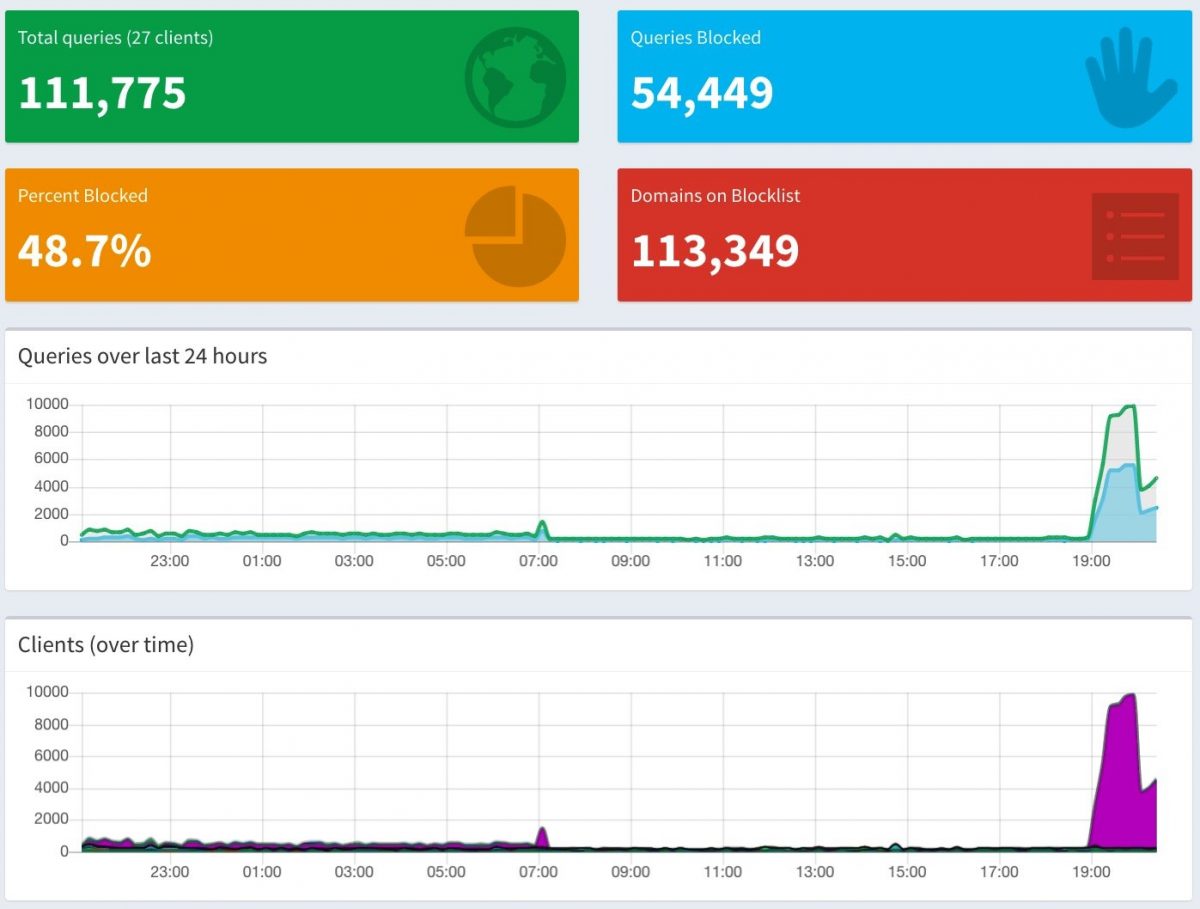
I then put in a Pi-hole as my DNS at home. Looking at the metrics from that made it impossible to be in denial as to how bad my Android phone probibly was to violating my privacy after i clicked on agreeing to whatever terms and conditions. The cover photo is a graph of my entire DNS queries in my house for a 24 hour period. The part on the right where there is a huge spike is purely my Motorola G7 making calls out to the internet. Doing what i am not 100% clear since i wasn’t using the phone. It just got on wifi and started phoning home alot.

The photo below shows that the same Android phone is one the chattiest device on my network at home and also gets its requests blocked more than any other device. For a phone that i dont use alot and wasn’t in my house for most of the 24 hour period measured that is pretty creepy. To put it in context M and i have iPhones and iPads and none of them get blocked or “talk” on the internet that much if we are not using them.

The Motorola G7 in question is being reset to factory defaults and wiped as I write this article. It will get sold on ebay shortly. This entire episode highlights why I had reservations about Android as a technology in the first place. It is slick however the trade off on my privacy is not worth it. i would rather save longer and keep using iOS.

Possible Name, Server, & Mail Changes

Making some back end changes to this site and my other server systems. The biggest achievement was moving my mail server. Basically a cut and paste of files and registry entries from one server to the virtual server I am using to host much of my site now a days. The DNS changes to the mail happened very fast. I was happy not to have much of a lag.

Free DNS And Bad Cable Modem’s

Today I stumbled upon a free provider of DNS. I have seen a few before, but they have been really slow or unreliable. This one so far looks good. It is called xname.org. They were a snap to setup, and so far they seem to be working. My problem (until now) has been that I like godaddy.com, but they do not provide DNS for domains I register unless I pay a fee. If I want DNS included in my annual domain name fee I can continue to use Register.com but they are over 3 times as much as Godaddy. Other than the DNS options there is no real difference to me what registrar I use. So would you pay 3x the amount for just DNS? I don’t want to. If I had 1 domain name maybe I would pay. In fact I pay for dynamic DNS hosting of my Scott.ac domain. I just don’t want to pay for all the other domains I own. I have like 10 of them. If xname works I have no reason to continue using Register.com for any domain names. Other options for me would be to have friends host my DNS, etc. I just like being able to make changes to my zone files when I want to. And every so often I do make changes.

Another issue I came across today was that my cable modem provider RCN does not allow inbound access to port 80. That means I cannot host a website on my machine at home even if I wanted to. And I kind of wanted to. Miguel lets me host a site on his server, but until recently he did not have much space on it. I had a ton of photos that I wanted to host. I guess I will just have to use his box for it, or pay for hosting. Since I am paying for the blog (and I think it is worth the money) I don’t want to pay for web hosting when I have all the tools at my disposal to do hosting. If I had less morals I would just put up a web server in my companies DMZ and use that as my webserver, but I won’t. Dam morals!

Monday morning I have to get Miguel to fix some configuration issues on my site on his box so I can once again host a site on his box, or I need to find a cheap web hosting company. There are several out there that look good. I just need to do some research.