Bedtime Stories For Grown-Up’s

A few years ago I download the app Headspace. I didn’t do much with it at the time. I had tried a few meditation apps and haven’t really done very much with them. About two years ago I decided to really focus on things I could do to calm down and be more focused. I made a leap of faith and spent some money on an discounted annual subscription to headspace. I have been using it ever since. That’s not what I specifically want to talk about in this post. It is just the background.

A friend of mine who I sat next to in the office till about year ago was talking with me one day. He asked if I had the Headspace app. I told him I did. He asked if I’d ever tried their bedtime stories. I had seen them however I had not every tried them. He proceeded to tell me how awesome they were. He summed it up by saying basically you start listening to some story they tell you and wondering what the hell is this. Is this really going to do any thing for me? The next thing you know he said you wake up the next morning surprised that it worked.

Since I already subscribed to the app I figured I would give it a try. For years I have used a white noise machine when I was in New York. Since the machine wouldn’t travel to London I have been using a simulated raining sound from my Amazon Echo. I still figured this wouldn’t hurt to try to get me to sleep.

My friend was right. The first night I tried it my experience pretty much went the way he explained it. I have been using it ever since. There are a bunch of different “Sleepcasts” you could choose from. Some are more appropriate in certain weather or seasons. I do have some favourites. Headspace claims that they are suddenly different each night. And they are different. If you listen to some of them enough and do not goto sleep right away you can tell that much of the difference is that the segments of the story are presented in different orders. There are enough of the Sleepcasts that I like to keep the variety going. The good news is every few months the release three new ones. Almost always I will fall asleep before the story ends. Sometimes if I am unable to sleep I will get to the end and the story will stop. I could tap my phone and say I am still awake and it would play more. I haven’t done that yet. I usually just tried to fall sleep on my own after that. In almost all cases though I don’t make it to the end of the story. There are many nights I don’t remember getting passed the wind down in the very beginning of the story.

The headspace Sleepcasts are now my new Grown-up’s bedtime stories. M thinks I may be using them as a crutch. She does not believe in really using aids to get to sleep. She felt that way with the sleep sounds as well. She is cool with me doing it though. And sometimes is curious to what we will listen to. I do not care how much of a crutch it is if it helps consistently i will keep using it.

My Never Ending Qwest for the Perfect Task App

Some would say i am a pretty organized person. I sometimes it doesn’t feel like that, however most of the time I would say i am generally pretty organized compared to most people I know. My problem has sometimes been my tracking of what i need to do has gotten too complex.

For several years I had been trying (and sometimes succeeding) at following the Getting Things Done approach to taking care of my actions. I had been using a web service called Remember The Milk to do that. I have written about it a few times in the past.  RTM has iPhone and iPad apps that made it easy to take my actions lists with me and edit them offline. I was content using it for several years but sometimes I dabbled with other systems trying to find something better. I never really found anything and always ended up back with RTM.

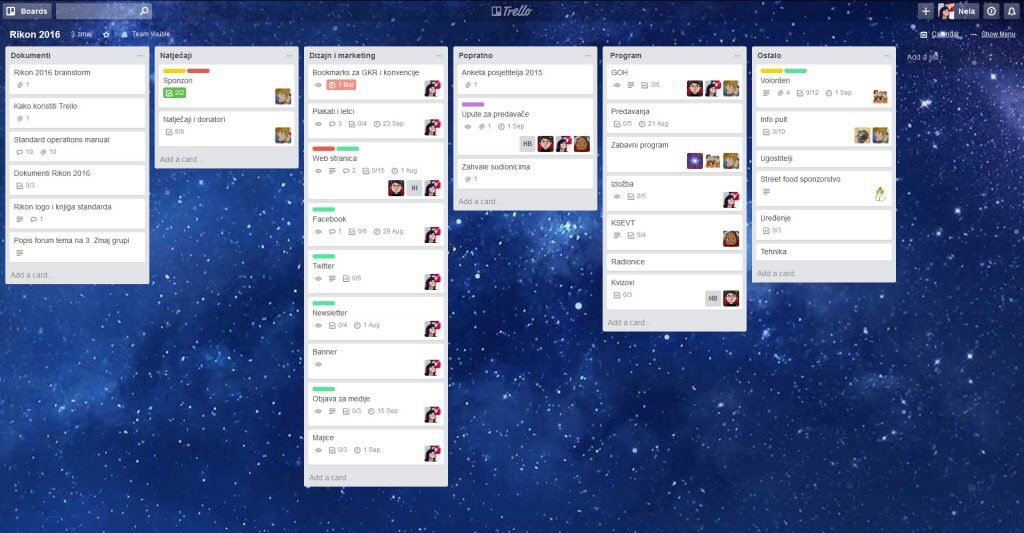
Back in 2014 I started implementing a kanban approach to some procedures we do at work. Reading up on kanban has gotten me to think adopt some of the concepts to my personal life.  That line of thinking got me to branch out from RTM. A big part of kanban is visualizing your work. RTM just generates basic lists. I tried having several lists to denote different steps on a personal kanban system but it was lacking a lot of the visual element when i couldn’t see all the steps at the same time. I also had challenges with sorting projects in RTM. I could create them but that required a smart list for each project. That caused me to have a ton of different smart lists that i had to look at in order to see my tasks. RTM also had a limitation in that they didn’t offer sub tasks for a task so in order to group several actions together i had to create a project even if it was small and could be represented by one “card” and several sub tasks.

In searching for several different options I came across Trello. After testing and playing around with several similar applications I settled on  moving my work and personal task management to Trello. Since the summer of 2014 my use of Trello has exploded. Not only do I use it for personal and work boards. I track meeting agendas in it. At one point we had a training schedule at work using it. For personal projects such as planning for vacation we use it. I have a board for places we want to try or like to go to for lunch at work. The board I like to show as an example of how to use it when people ask is my Mixology board. There I clipped from the web recipes of mixed drinks that I want to learn or have already mastered creating. I try to share a few family boards with my wife however she is not as big on task organization as I am.

The biggest drawback to Trello originally was the fact that there mobile applications didn’t really handle off-line synchronization. In the past year however they’ve added that functionality so while I’m on the subway I am able to update a board or individual cards and they sync up to the cloud when I get network signal. There are some small limitations to this however not something that has prevented me from using it. Things like checklists don’t load when you open the card without network signal.

I’ve been happy to pay the five dollars or so a month in their Trello Gold subscription. I almost want to pay for the full $15 a month professional plan however no one else I interact with does that so functionality would be limited.

In the several years that I’ve been using Trello (I didn’t realize it has been over 3 already) I have tried to look for alternatives. Not because I’m unhappy, just because I’m always looking for the next great option. Folks at work have used the GIT task board. I have played with Microsoft office 365’s  task boards and neither of them come close to ease-of-use or functionality. So for now Trello it is.  Until at least Atlassian messes it up now that they own it. Here’s to hoping they don’t.

Mac Quicken Update

I’ve been using Quicken 2016 on my Mac for a few weeks now. I have had less issues regarding duplicate transactions than I did with Bankify. That’s the good news. There are some growing pains however. Not everything works as well as I would like. There’s one stock that the system won’t find so I have to manually updated if I want to get the correct values.

I haven’t had as much problems with reconciling my accounts as I did with Bankify however it hasn’t been all roses and rainbows. I’m not sure if it’s just issues I didn’t catch in the migration or issues in downloading of the data. It is definitely easier to reconcile however than the old system. So my main objective has been successful.

Other challenges I’ve had with finding things. Editing a payee or category wasn’t a straightforward as I thought it would be. There is no menu option to go to payees. You have to start typing in a payee and then click on the edit button to bring you up all of the payees in window to edit them. If you don’t know that it’s frustrating. The iOS app didn’t seem that useful however I haven’t played with it that much. Of course I haven’t played with that much because it didn’t seem that useful.


All in all I’m hoping Quicken improves with a new Quicken 2017 soon however my challenges are not enough to want me to go back to Bankify. I’ll see how things are going in another month or so.

Hello again Quicken, goodbye Bankify

For the past few years I’ve been using iBank / Bankify for my personal financial management. I documented my move to iBank in a previous post. Finding a Mac compatible financial application was the final app that I needed to completely go Mac only not require a virtual machine for my personal use.
I’ve been generally okay with iBank now Bankify however there been some lingering challenges. First and foremost I keep getting duplicate transactions even after I downloaded from my bank. What that means is I sometimes have to spend hours each month trying to reconcile my accounts because a single transaction might have three or four transactions in my register. It also might turn out that several of those transactions if the account transfers might show up as a transfer to the wrong account thus throwing off balances across multiple accounts.
This year one of my financial goals was to automate bimonthly banking and bill payment as much as possible. This bug has caused challenges to completing the objective. This month I had a renewed desire to find an alternative. I tried you need a budget however the downloading of transactions from my bank seemed to be clunky. It also focuses on budget only. That’s important to me however I need an app that can do more. My sites then turned to Quicken since their 2016 Mac upgrade it seems to have been a big improvement over the 2015 one. I know it doesn’t have all the same features as the Windows version however I wanted to stay native Mac. I did contemplate trying the Windows version however I don’t think I need some of the advanced features that the Mac version does not offer. That is why today I bought Quicken for the Mac 2016.
The import process went surprisingly painlessly. My export from Bankify went over without any problems. The import of that file to Quicken also appears to of been painless. I need to go through each account and confirm the balances make sure everything is correct. For now it looks like this is the easiest migration I’ve had to do. In the past I went from Quicken for Windows to Mac and then back again. Then I went from Quicken to Bankify. Each of those migrations was painful and took a lot of time to validate things right or to tweak the process in order to get a good copy of my data. Part of my problem is trying to keep and migrate 16 years of data. I don’t need it but I want it and since it’s all in one file should be straightforward to migrate. I do have an additional eight years of data in other files that I don’t migrate but I have all of my financial transactions going back to my freshman year in college in some sort of backup or another. At some point soon I need to archive old transactions to an off-line backup so I don’t have all of it on an Internet connected machine. That’s my next step.

Pi Net Upgraded

I have been challaged with figuring out an easy way to upgrade the Bittorrent Sync software I use to replicate my files on my Raspberry Pi’s.  The upgrade process on my mac is super easy.  The upgrade process on Raspbian should be easy however the person who has been maintaining the easy to upgrade package hasn’t updated his package in 9 months.

The internet is a small world.  Every single how to i find on the internet about installing Bittorrent Sync on a Pi (I found at least a half a dozen) point to this one repo.  I found instructions on how to setup everything manually however it was not a simple process.  Right as I was reviewing the steps to do the manual install I stumbled accross someone who forked the original package and is maintaining the latest update of the sync software.

After testing the install process on a clean Pi, I ran an upgrade on one of the two Pi’s I currently have at home.  The upgrade worked great.  I just ran the upgrade on the other local Pi and then on the remote units with no major issues.  This new repo says they are in sync with Bittorrent Sync’s release schedule by about 24 hours.  Hopefully I will be able to stay up to date from now on.

I am hoping my upgrade (from 2.0.94 to 2.2.7) solves some minor bugs I have been experiencing with one location.

This was the first major upgrade to all my nodes on my private cloud.  I was a bit cautious however in the end the system didn’t get corrupted and functioned as it should.

Next up I am thinking about another remote node location.

Pi Net Back to Full Power

After a few weeks of running in a degraded state I have all my Sync nodes back online.  Some very basic maintenance at my parents for thanksgiving got me working with my problem node.  I ended up swapping out the Pi at my parents place for a Mac Mini that I stopped using after I got my latest Apple TV.  That mini had a replica copy on a larger hard drive so the swap out was less about any issues with the Pi vs I took the opportunity to upgrade while i was there.

I need to call my sync network something other than Pi Net since right now the majority of the nodes are not Raspberry Pi’s.

My Personal Private vs Public Cloud Debate

I have been pondering my 321 Backup strategy for several months now.  Even before I had a near catastrophic issue with my Sinology DiskStation back in April I knew I wanted a more robust data management plan for my personal files.  I had been using the Sinology Cloud Station software but in my original configuration I was limited since all my data centered around my apartment.  This is convenient but not the safest approach.  I also only really had 2 copies of most of my data.  A really rock solid strategy has 3 copies across 2 sites, and if possible different media types.  I knew i wasn’t doing things good enough.

One solution I toyed around with was BitTorrent Sync.  Back in March I tried it out and had big problems with the UI on my desktop and the web interface on my DiskStation not loading regularly.  I didn’t feel the solution was ready for me to use yet.  I wasn’t confident in the Cloud Station software anymore since I ran into a data integrity issue with it in March.  I had uploaded photos I took in march and noticed that they hadn’t gotten to my Diskstation when they were saying they were syncing off my Desktop.  To make things more confusing the files were syncing to my laptop but not the Diskstation.

That problem lead me to the BitTorrent Sync option and the decision to upgrade to a beta version of the Synology software.  That in turn lead me to some problems I had an my near fatal event with the Diskstation.  So basically in a mission to solve my backup strategy problem i caused an event that a better backup strategy would have solved.

My near loss of all my data on the DiskStation was my wake up call that I needed to really figure some working solution out.  After I recovered (barely) from that incident I focused large amounts of time on solving data strategy.

After my trust was shaken with the Cloud Station data integrity problems I experienced I began to look at public cloud solutions.  I am very concerned about security so I discounted many public cloud providers.  Dropbox, and pretty much any American based solution is just not trustworthy with todays laws.  Dropbox employee’s can even get into your files if they need to regardless of the safeguards they claim to have I do not want anyone being able to get into my stuff unless I let them in.  That security concern lead me to MEGA.  They weren’t US based and they don’t have a way into your data.  Their plans were more expensive than most cloud providers however their 2TB plan more than covered my needs.

One downside was that MEGA didn’t have any built in backup solution for the Diskstation.  That meant I could backup my data to the cloud but the Diskstation wouldn’t be my main data source.  I could still use it as a home server but not the home of my data.  I wasn’t really pleased about that however I couldn’t really find an alternative that worked.  So earlier this spring I jumped into using MEGA as my cloud sync / backup solution.  It had a lot of what i wanted but it wasn’t perfect. It was the best of what was available that worked for me.

I spend a few weeks seeding and confirming my data was correct in MEGA before trying to make a sync copy onto my Laptop.  That was when I ran into issues.  What i noticed was after a while syncing files I would get to a point were the MEGA agent would freeze.  Sometimes after only 70-100 files downloaded.  I would restart the agent and it would do the same thing and copy a few more files and then stop.  I couldn’t really figure it out.  I tried reinstalling, putting the agent on another machine, checking their online help but i was unsuccessful at finding a solution.  This was an issue on top of a general annoyance I had were it would take 5-10 minutes for my admin page on the MEGA site to load.  I don’t know what it was doing but in any browser (chrome, firefox, or safari) i would have the same issue.  that wasn’t a show stopper however add to it that i can’t download a replica of my data onto my laptop I was very concerned.

After a week of tinkering I gave up and had no choice but to revert my decision and go back to Cloud Station software by Synology.  I didn’t want to bother calling MEGA.  I had a confidence issue and even if they could fix the issue in 10 minutes with my level of technical knowledge and online tools i should be able to figure it out.  If i can’t i have concerns about their service.  It wasnt like my problem was complex.  The system just stopped syncing data after a few files.

I wasn’t pleased however MEGA was never the perfect solution for me.  I knew that going into it but thought i could make it work.  In the end I couldn’t so I went back to Diskstation as my primary data store and used Cloud Station to sync.  I kept an eye on the data i synced to make sure i didnt have a repeat issue.  My plan to build another DiskStation and leave it with a friend was back on the table.  That was until about a week ago.

I don’t know what got me to look at BitTorrent Sync again however I installed it again.  I knew they were actively releasing newer versions so I had hoped that what happened the last time was an issue that was solved after a few months.  I was pleasantly surprised to see after some brief testing that the UI display issues appeared to be solved.  I slowly over a few days turned off syncing via Cloud Station and enabled BitTorrent Sync.  I made backups before my changes just in case.  The UI consistently worked on the desktop.  For the web interface on the DiskStation what i learned was first safari wasn’t so great for it.  Second that clearing my cookies for the site typically solved the issue.  With that issue resolved I moved most of my shares over to the BitTorrent Sync app within a week.  I was originally going to try out the system for 30 days and then decide if i wanted to pay for the Pro version.  After going over the 10 share limit for the trial i opted to pay for the 1 year Pro for $39.

As of right now I have my desktop, DiskStation NAS and laptop all replicating data with the new Sync software.  I am at a steady state like were i was back in March.  This steady state took a lot of research and trial and error however now is the harder part.  Now I need to finish this project and meet my objective of a true private cloud with data located in multiple locations.

Using BitTorrent Sync gives me a few options I didn’t have with the Synology centric Cloud Station.  My remote backup locations do not need to have a DiskStation.  I have two old Mac Mini’s that I could provision with external hard drives and drop them in remote locations.  That was my original idea at least. Now I am thinking bolder and cheaper.  If I am successful I will have a prototype to talk about soon.

Raspberry Pi Cloud Node Prototype

The first phase of my BitTorrent Sync project is mainly complete.  I now have the Sync software running on my Diskstation, Mac Mini desktop and my Macbook Pro laptop.  I have replaced my Sinology Cloud Station app and all files are kept up to date using BitTorrent Sync.  That change gets me to a point were I was before with Cloud Station.  I have access to all my files everywhere however I do not have a complete backup solution since most of the data is only current in two places.  Those places are 15 feet from each other and not really giving me much disaster recovery.

The next phase of my backup / cloud strategy is to have offsite copies of my data or large parts of my data in case of anything happening at home.  I originally planned to do this with a 2nd Sinology Diskstation somewhere.  The costs were very high and that solution limited me to one other location.  When I was thinking of using Cloud Station software from Sinology that solution made sense, however now that I got BitTorrent Sync to work I have other options.
Raspberry Pi & Drive

is bit torrent sync my answer to sync situation

My Evolving Use of Cloud Storage

Last year I canceled my pay Drobo subscription. I still have the service but with a lot less storage. At the time I wanted to build my own “cloud” storage system.  In reality I wanted to take my data at home and make it syncable via the internet like a cloud storage provider to my devices were ever i was.  Originally I bought a Transporter that I had hopes would take a 1TB drive and let me sync data to my computers.  That dream lasted about a week.  Their sync software was problimatic for me.  Instead I opted for a Synology NAS DS412+.  The added app’s functionality and redundant storage allowed me to move all my data to the Synology and no longer rely on my aging Drobo(s) as my primary storage system.  The Synology also allowed me to move some multimedia functions i did on my mac mini off to the NAS.  So far I have been very happy.  The Synology Cloud Sync app gives me Dropbox like functionality with my personal stuff.  The other file access options the Synology offers gives me access to all my data.  To do that with any other provider would be prohibitivly expensive because of the amount of data stored on the NAS.

The timeing for this change to self hosting my data was perfect.  I couldn’t realistically do what I am doing now earlier because when I had Time Warner my upload speeds were horrible (1.5mb).  After I moved to Fios my upload speeds jumped to between 25-35mb.  I have no problems using the Synology.

The problem with the Synology is that as much as the NAS itself is designed to last and has some drive resiliance in it, I do not have an offsite backup.  I used to copy my data manually for a while but now a days that is not a good idea.  it is also not feasable with the amount of data i have now.

After leaving Dropbox I read more and more about the potential issues with public cloud providers.  Such as Dropbox knows what you upload and wont keep a duplicate copy of a file of music if others have it.  That means they can (and i believe they have) removed content if there is a DMCA request.  I am also increasingly uneasy about US based hosting providers and the easy the government can get access to data.  I am not a criminal and don’t really have anything to hide in what I am storing however those are not reasons why I should be ok with the ease of government access to my data.  I will talk about that more in another post.  In relation to cloud storage I am glad I do not use Dropbox, however I put myself in the same situation with another provider.

Because I have so much data and I need to really be thinking about a 321 backup sceme I started using Crashplan and Amazon Glacial.  Crashplan I recently canceled because I was having problems with my copy of data on my Drobo that i would sync to Crashplan.  The crashplan app kept thinking that the drobo was disconnected and would keep creating new copies of my data.  When it takes weeks to sync a backup using crashplan having a new copy get created every so often is not good.  With that issue and the fact that the Crashplan Synology app caused my Synology to perform super slow to the point that I uninstalled it I gave up on Crashplan and canceled it.

Amazon Glacial has been good so far.  The challanges with Glacial is that the cost per month varries by how much i use it.  It is also much more expensive than Crashplan for the amount of data i have.  Another challange is getting data out is expensive in the event of a major issue.  Thankfully i havent had to worry about that yet but it is a concern.  The most current concern I have is that Amazon is a US based company and my data is hosted on US servers.  For now I am living with that risk.  My rational side says I dont do anything to warrent the government to want my data however I would rather that not even be an option.

One alternative to Dropbox I have been looking at is Mega.NZ.  They don’t have any access to my data once it is uploaded.  They offer 50gig free.  It is good to replace dropbox for some files i have and to give my most important stuff an offsite backup but it is not enough to backup my music, videos, and photos.  Their 1tb option is doable for me but even that isn’t enough to backup everything.  For now I will continue with Glacial as my backup.  I am investigating working with a friend or two to replica sync our Synologies between each other.  The cost of that may not be worth it but it is an interesting idea.

My 2nd Attempt at an iMovie Did Include Babies and Animals

After our trip to Jayson & Gretchen’s we had a ton of video of Teagan.  I wanted to share it with our family but some of it was long clips with not much action and then we had several clips that were very short.  Lauren’s awesome job of putting together my dad’s 70th birthday video got me to finally try iMovie a week or so ago.  It went so well that I wanted to take the footage we had of Teagan with Jayson’s dog and clip it together.  By doing that I learned that 1, it is pretty fun and cool to do.  2, its a huge time sink.  Thankfully it was only 3 minutes of video i created in the end but i can see even slightly more elaborate videos sucking up my time.  I already want to go back and make a montage video of Teagan’s first year, but I just dont have the time to do that right now.

Maybe i didnt try the software enough but I don’t remember iMovie being that easy a few years ago.  I know Final Cut Express was not very easy and after trying both of them I gave up on video editing for a while.  I am glad I gave it another try.  These video’s wont be my last that I work on!