
Switching My Apple ID (Finally) to The UK

In early June I finally decided to address an annoyance I had since I moved to London. I took my Apple ID I used in the US and ported it over to the UK. The final straw for me was that I wanted to try out Apple Music (again). Since when I tried it out originally and now they decided to play nice with Amazon Echo’s. That was one of the big reasons not to sue the service. Then I remembered I could not use Apple music the way I wanted to if I switched between Apple IDs to download stuff. Previously I have had to switch between my US and UK accounts on my IOS devices. Lots of things I have were tied to what was my US account. I did not want to use it for new stuff since I wanted to be using UK app store. Every time you switch App Stores on IOS I would lose my downloaded music if I was not logged into the store and had my Apple music account tied to it. That was one of the major drivers for switching to Spotify in the first place.

The hold up for me switching was I had subscriptions that according to Apple’s knowledge base I needed to wait to cancel before I could move. I also wasn’t sure what was really going to happen to all my stuff. After using the UK store more I was pretty confident but not 100% the most of what I had would be working fine. I just was not sure what was going to happen to my photos and I cloud when I switched over.

Since the longest subscription I had wasn’t expiring until next February I decided to call Apple and see if there was anything I could do. After speaking to one person I got escalated to someone else. She asked me to just switching countries to see the error I would get. When I called I was planning on just asking some questions and have the conversation be a mainly academic one. I figured it would be information gathering. On some level I was not ready to pull the trigger. Talking to the lady on the phone gave me some confidence so I took a leap of faith and tried to make the switch. There were one or two challenges that she addressed however surprisingly within 30 minutes my account was moved over to the UK app store.

Prior to the move I had to break my family share with M. Setting that back up and confirming everything had moved was pretty straightforward and didn’t take anywhere near as long as I thought it would.

The only hiccup I had was some odd errors on my iPhone related Apple music that didn’t exist on any other device. A day or two later or reboot or two later the issue is fixed. I’m not sure really what resolve the problem.

My iCloud data and photos seem to have seamlessly moved over. I spot checked one or two applications I purchased and they also seem to be working just fine. I haven’t bought media from the Apple store and I do not know how long so I am not that worried about any of that not working. I have long since been buying music from the Amazon MP3 store when I bought music. Now I mainly use spotify or other streaming services. I never really did download many TV shows or movies and what we have was for when the girls were much younger so I’m not worried if some of it’s not available.

I know at some point many months from now there’s going to be some gotcha that I didn’t realize until then. For now I was impressed with how seamless the switch was. Many of the reviews online talked about horrific experiences making the change. I am only assuming that in recent years Apple made it easier to do this.

The next thing I have to address is that I still have another UK Apple ID where I have a subscription. I have one software subscription tied to it. I get a good deal on it having previously bought the app before they went to s subscription model. I am not sure how to transfer that over to my main Apple ID. Of course I’m not sure if it matters that separate other than it being a moderate nuisance.

I also have to set up a new US Apple ID in case there is one or two things that I cannot get in the UK app store. There already is one free app that annoyingly is not available. That’s a minor inconvenience though. All in all one major technical debt issue I had from moving to England is now solved. It only took me 2 1/2 years to have the courage to try it.
iOS 11

It is that time of year. The time after the Apple announcement listing release dates for iOS and when it actually is available for the general public. The thing is if you are in the beta program you can get the General Master version now. I dabble in the beta versions but so not put them on my iPhone. With the GM out it is always a question of do I install it on all my devices. It is always a question yet I usually do install it.

So far in the past 24 hours I have installed it on my iPad Pro and thought it was great. That got me to install it on my work iPhone. Once I knew that was stable in installed on my personal iPhone. Now either everything will stop working together or I am set!

Next up do I play with a late beta of macOS on my laptop?

My New Mechanical Keyboard

I am finding it pretty funny that society in many cases has conditioned us to think new and shiny stuff is better. A few years ago I started reading about getting shaves the old-fashioned soap and a brush. That led me to buying old school one blade safety razors for a time. Since then I’ve evolved to a more expensive and more modern twin blade. My point though is the technology from the middle of last century for me works better than any of the modern stuff. Today I get a better experience with the twin blade and shaving soap and a brush then I ever did with a fancy Mach 3,4, or 5.

Taking that lesson learned I should have come to the same realization on certain technologies. About 9 or 10 years ago Apple released their new style keyboards. It mimics for had a similar movement to keyboards on their laptops. At the time I thought that was the coolest idea that we give me seem typing experience when I work directly on my laptop or when I worked at my desk. The new keyboards were nice and shiny white. The best part was they had a small wireless version was pretty nice size compared to previous wireless keyboards.

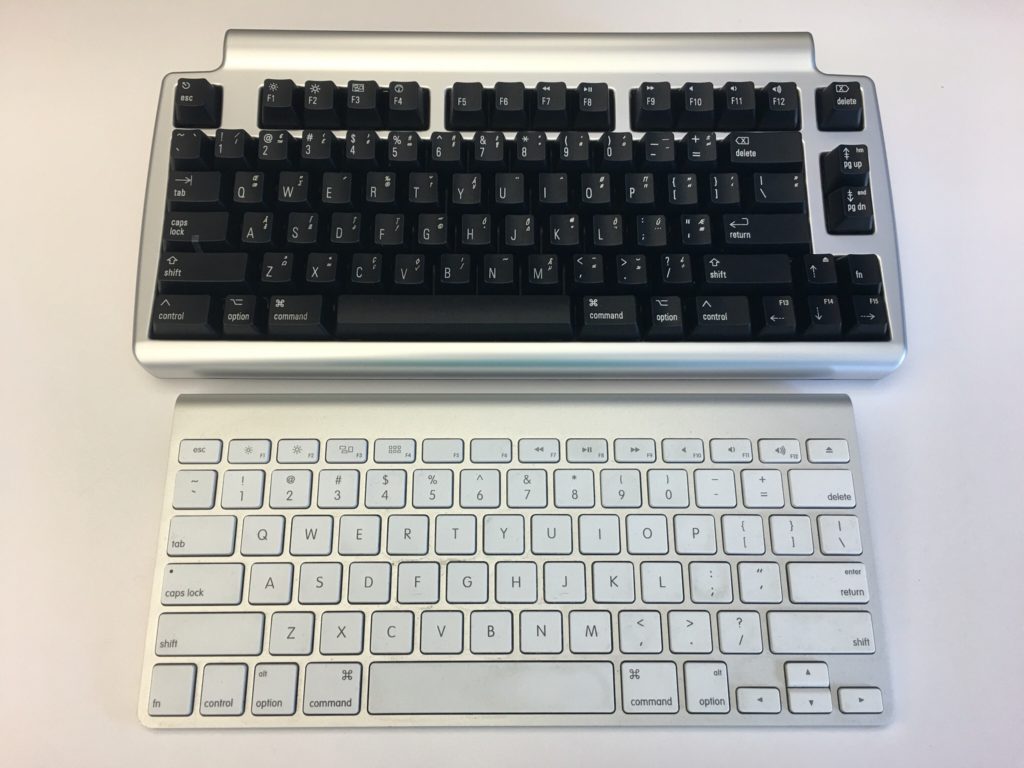
At that time I had been using a White Apple Keyboard 109 Keys A1048.  I wasn’t that impressed with those keyboards and I’m not really sure why I got rid of my prior keyboard the Apple Pro Keyboard (M7803). Those were really good. I think it was related to the fact that at the time I was using an iMac and they came with the white 109 key keyboard. I likely would’ve sold the Pro keyboard when getting rid of a PowerBook. Looking back that was probably a huge mistake. At the time I thought the upgrade to the laptop like sleek mobile keyboard would be a smart move for me.  Even after I had the new keyboards for years I was relatively happy with them.  Flash forward nine years and I saw an article talking about the highlights of a Bluetooth wireless mechanical keyboard that also muffles mechanical movement sound (the Matias Laptop Pro Keyboard for Mac). Even though I was interested, I thought that at the time that I was generally happy with what I had so it wasn’t worth the money.

The idea of the keyboard was still pretty cool yet I was still interested in trying to help my hands make it through the day of typing. I have had repetitive stress issues with my hands on and off for a while. Well I think that’s what it is. Let’s be honest the one Tyler brought up to my doctor he said just rushed her hands and you’ll be fine since the issue seemed very mild.  That being said on some days towards the end of the day my hands feel really tired from the typing. That has been a major driving factor for me to use the dictation.

A few weeks ago the topic came up with someone at work. I think we were either discussing wrist pain or that he was building a vintage computer that the discussion on old-school mechanical keyboards came up. As it turns out he had done a lot of research on the topic and was able to geek out with me on the different mechanical movements of old-school keyboards. I showed him the link to the Matias and we did some basic research on it. Turns out the Matias is based on the same Alpine mechanism that the Apple Pro keyboards were that I liked so much. With that knowledge and a renewed focus on my typing comfort I splurged on the keyboard.

When I first got it I was concerned that it would take me some time to adjust. I’m always worried that during that adjustment. I’ll get set up and just not like it. That leads to returning or not using the device in question. With the Matias keyboard however within an hour or so I realized its value. It felt that I could type faster with it then I was on my old one. It also immediately felt comfortable to use. On both counts I was extremely pleased.

The only drawback I’ve noticed is that I have to tell it to connect to my laptop every morning. It’s more of a minor inconvenience than anything else. There were one or two days in the past month where it didn’t connect and I needed to go into Bluetooth settings and reset it. The only other issue I’ve had is only once or twice there was some lag from when I typed something to when it went on the computer screen. Reviews of the Bluetooth keyboard reported similar issues however it’s not a major problem for me at this point. I like a wireless keyboard over a wired one however if I need to buy another one might pick up the wired version.

Since I do most of my typing at work this keyboard home at present is in my office. It is so much nicer to use this mechanical keyboard versus the new Apple rechargeable wireless keyboard that I have at my desk at home. I bought one of the rechargeable keyboards and it came out since using or chargeable batteries in the old blue two keyboards were pain. They weren’t keeping charges. I was also curious at the time if the new keyboards would be more comfortable to use then the old ones. It wasn’t. I was surprised at how much worse the new one felt to type on. At this point I think I’m gonna save and buy another one for home.

If this was a product review I would likely give it five stars.

A New Mac Mini Please…

My desktop computer at home is a 2012 Apple Mac mini. At the time I got the slightly upgraded version with the fusion drive and 16 gigs of RAM. Four years later it is starting to show its age. For most people it would probably still be a perfectly good computer however there are certain functions I’m noticing I need more power.

I would love to retire this Mini and relegated to act as a backup node on my Bittorrent Sync network. The challenge that I have is that the current Mac Mini model is from 2014. I cannot justify myself to buy a brand-new computer with technology that’s two years old to replace a four-year-old computer. My choices then are either purchasing iMac, build myself a Windows 10 or a Linux machine. My only other option is to wait for the mini to be refreshed.

For me Windows is not practical. I haven’t used Windows as my primary computer for work or professional life in years. I use a Windows computer when I need to at work and I have virtual machines for when I need it however living on one at home day in and day out just doesn’t seem like something I want to do. I have been wanting to build a Linux desktop however today it doesn’t offer me all the software I would need to replace my Mac. The iMac is compelling however I have not been a fan of the all in one computers. I’ve owned several iMacs and had challenges with some of them. Every time I think man those are cool I remember my burn in issues I had on to back to back iMac’s. Other reasons to avoid an iMac is I have been eyeing a bigger monitor than my current 27 inch. I would love a 34 inch widescreen however the current mini I have cannot support the resolution for one. If I do end up getting a second desktop running Linux I would want to plug it into the same monitor. I’m trying to stay is future proof on whatever I buy now as possible.

Since I haven’t been able to come up with a solution I am happy with I continue to wait. Every Apple announcement I hope they will refresh the Mac Mini and then sadly they don’t.

I know the one last option I have that I didn’t mention prior since it is super expensive is the full Mac Pro desktop. The cost alone is a nonstarter for me. Add to that it has not been refreshed as long or longer than the mini makes it not a viable option for me.

As Tom Petty says the waiting is the hardest part. Now I wait some more…

LCD Burn in and Why I am Not Happy With Apple Right Now

I own a 24″ iMac since March. For me going to a desktop as my main computer was a big deal since for years I had a laptop as my main computer. In recent history that has been either an Apple Powerbook or Macbook. When I calculated the cost of a new 24″ or larger LCD and a new computer I made sense to just get an a desktop. With my current job I was using the company issued laptop anyway so I needed portability less. The new 24″ iMac was a logical choice. It wasn’t as expensive as going with a dedicated computer and a large monitor. It also packed enough power that I would be happy for the time being.

Before the summer started I started to notice issues with the display on my iMac. At first i thought it was me. Then over time it looked like there were horizontal lines on the display. I thought something was wrong with the display but didn’t want to deal with calling in for support and then being without my computer for a while so I did what any good procrastinator does I put the issue off a bit. By the middle of the summer the issue started to bother me more and more. Partly because I was noticing it, and partially because for the amount I paid for this computer it should be working normally. But my annoyance aside I noticed something else with the display. It wasn’t that I was just seeing lines on the screen. At some times I was seeing burn in of items that are no longer on the screen. If you don’t know what burn in is, it is when you leave something on the screen long enough that even when you move it there is still a remnants or ghost of the object on the screen. It was an issue way back when with old CRT monitors, and is a problem with Plasma TV’s today. Up until this computer I have never seen it with an LCD. I am someone who has managed hundreds of desktop installs (with flat panels of all types and sizes) for companies, and I have owned at least a half a dozen or more flat panels personally over the past 9 years so I hope I know what I am talking about.

Surprised by what I found I put a note down to call Apple and see what I can do to get this fixed. The computer is after all just 6 months old as of this writing. After some more procrastination I finally called Apple last weekend. After two or three troubleshooting attempts by the support guy on the phone it was determined that he can’t do anything for me and I should take the computer to an Apple Store so they can look at it. I wasn’t too happy about that since this thing is not something I can throw in my bag, but I scheduled an appointment with the Apple Store in Soho and took it in on Saturday.

After a few minutes of seeing what I was talking about the tech went away for a few minutes and came back to tell me that the issue is in fact burn in, but the warrantee does not cover that since it is preventable. I was a bit surprised by that so we discussed the issue for a bit and he offered to bring his supervisor out to discuss. For one I will give them points for that. Usually getting a manager or supervisor is a painful task. The lead came out (I have their names but I am leaving them redacted for now since this is an ongoing issue) and we talked about the issue. They both claimed that burn in does happen on LCD’s but is rarer than with Plasma. I told them that is great but I have used flat panels like the way I use my iMac for years and never had this problem. Now with my iMac I can have a window up on screen and only after a few hours does it burn in. I have left my LCD tv on pause for hours before without any issues. It is an LCD! I explained my previous work and personal experience with LCD’s and how I am very surprised by this. They insisted the issue was preventable with power management and screen savers. Now I use a screen saver (maybe i could turn the settings from 30 minutes to 5, but come on) and whenever I don’t use the computer I have the top left corner as an action to put the display to sleep so I don’t know how I can do more.

After hearing what they had to say I questioned them that basically my normal day to day use of this computer will cause burn in, since when I am working from home I will use it from 8-10 hours a day and during that time I have IM windows and a twitter feed up on screen all the time, yet according to their assessment that is enough time to burn in the display (and my usage has shown that to be true) and they claimed that to be the case, and their recommendation was for me to minimize windows I am not actively using. Now I thought that was a total cop out answer. Come on. I have personally done the same exact things on many other LCD displays with NO issues. Heck when I go into the office at work I the exact same thing with no issues. Why is it that this is such a major issue but only affecting my 24″ iMac. I have another iMac I use for a media center and I don’t have the same issue with that one. I am still baffled by their stance on this.

The two gentleman I spoke to offered to escalated the issue to their engineering team. I asked them if that was possible and they took my information and are in the processes of doing just that. I will give both people I dealt with credit. They were helpful, and friendly the entire time I spoke with them. After I articulated my issues with what they were saying they offered to escalate and so far are doing so. I just can’t believe that Apples stance is basically I am using the computer wrong.

I am writing this on Monday evening. As of yet I have not heard back from Apple on the escalation. I will follow up tomorrow. Since my visit to the Apple store Saturday I went online and did some research about LCD burn in. Apparently it is not totally uncommon but still seems like a rare thing. I tried something that Apple themselves suggested to counter act the issue and it worked a little but the problem is still there. I also worked from home today and noticed that for a while I could see a bit of burn in from a window I had open for maybe 3 hours that day. No one can tell me that 3 hours of something being on the screen is acceptable for burn in to happen. It just blows my mind that is what I am being told! I await an update from Apple, and will update this post or create a new one when I do!

Apple Are You Kidding Me?

I have been a huge fan of Apple and the iPhone. I have always had my criticisms of the company. I have also said that I love my iPhone but would love to find another phone to replace it due to the restrictions Apple puts on the iPhone. This latest stunt by Apple may just get me to drop the iPhone and get something (anything) else. GV Mobile is an app I have used since it came out. It is an app that works with Google Voice. Before GV Mobile I used Grand Dialer that did similar things with the old Grand Central before Google turned it into Google Voice. Why then did Apple just decide to pull all apps that work with Google Voice? I paid for this app, now basically it is killed off? Yeah it will still work for a while but if anything in the OS breaks the app it wont work. This is crazy. How is this not big brother that Apple (or AT&T through Apple) just come in and turn off an app? And why, because it mimic’s iPhone features? So what, I choose to use those mimicked features. Thoughts are it is more likely that AT&T doesn’t want to lose revenue by free SMS via these apps. So can someone explain to me how App Stores are better for the consumer if the handset maker and the provider say what can and cannot be put on my phone? I prefer the day when i can find an app, download it and run it on my smart phone. Worked for years with Palm, Blackberry, and Windows Mobile. Now everyone has their own app stores. How is this progress for the consumer?

I was tempted to pre-order an Android powered My Touch with T-Mobile today. The only thing that stopped me was the fact that the My Touch doesn’t offer Wifi Calling (no android phone does yet). Apple / AT&T get your act together or you will lose a good customer, and I bet I am not the only one.

On a related note I was kind of pissed about what I consider similar crazy tactics by Amazon regarding the Kindle. At least Amazon apologized about what they did, and it doesn’t look like they will do it again. Apple you should learn something from Amazon!

UPDATE 7-31-2009: Finally the FCC is doing something. Questioning Apple, AT&T & Google about what is going on.

iPhone 3GS First Thoughts

I got my iPhone 3GS on Friday. I was eager to get it when they announced it, but when it arrived I didn’t even want to rush home to take a look. I usually can’t wait to play with new electronic gizmo’s. Either I now have luke warm feeligns about it or I am getting older. I hope I just have low expectations of the new device. In any event I have had the device for a few days and I have early impressions since I can be opinionated about my gadgets.

One major reason to upgrade for me was the doubled capacity that I get with the 32gig unit. I would have gotten a 64gig one if they offered it. I wanted 32gigs last year when I bought my 3G. Ironically since I purged many videos from my 3G before upgrading I don’t even need the entire 16gigs I had. I know that in a few weeks I will use up the new space I have but right now it is weird seeing all that free space in the bar graph when I sync the phone.

I haven’t done that much to notice the speed improvements. Every once in a while I think it might be a bit zippier, but nothing major just yet. The camera is a great improvement, but still didn’t do so hot for me in low light when I was out on Friday. Video was nice, and I used it a few times with Zachary on Sunday but to be honest I am not going to praise that since a phone of iPhone’s class should have had that function already.

I have to say I am not a fan of the cut and paste function. I know I want it when I need it, and it is another one of those things that should have been around for some time, but I have problems with Apple’s actual implementation of cut and past. I have selected text to cut and paste while scrolling through items i was reading. It is actually very annoying. The amount of times that has happened vs actually using the cut and paste function is making that feature more of a detriment to me than a bonus.

The compass function was neat, but i haven’t really had a chance to use it. One downside I did notice was when I brought up google maps when I got out of the Lincoln tunnel on Sunday the Google Map app started spinning around and I had a semi-transparent warning box telling me that the compass couldn’t work and i needed to get away from interference. This wasn’t good since i couldn’t see where i was (approximately) on the map, where the old version on the 3G would at least just give me a blue circle that showed my margin of error. With the map spinning around and the warning box I couldn’t really estimate my location. Hopefully this was a fluke but I am not so sure I saw the last of that message especially in Manhattan.

So far you might conclude I don’t like the new phone. That is not true. It is a great piece of equipment. In my opinion it has unfortunately it has yet to live up to the cost I paid for it. What will improve my opinion is seeing all the new software that utilizes the push technology in the 3.0 software. I know I could have gotten that with my old 3G, but this new functionality on top of the new hardware was the reason for me to upgrade. For now I have to wait since it seems the hardware is a bit ahead of the software written to utilize it. Once a true push IM client comes out, and other nifty new apps such as the Zip Car app and the Tom Tom GPS app then the new phone will start paying for itself. I am also waiting for a push version of Facebook, and a twitter client (Tweetie I hope since I like it and paid for a copy). It is still a great media device that I take with me everywhere. That hasn’t changed, but for an incremental upgrade it has a bit to go before it becomes worth the upgrade.

For now the new iPhone 3GS is just like my iPhone 3G. I love it, it is probably the best phone I ever had, but I would love to get rid of it if I could. What I mean by that is it is a fantastic device but Apple is still too restrictive on the OS, and I would love for someone to come out with something that truly rivals it (Android, and S60 are nice but not there yet by far and I have tried both). Till then I await updated software for my 3GS!

iPhone 3GS Conundrum

When the iPhone 3GS was announced I was very interested. It solved many but not all of the issues I have with my 3G. When I found out I could pre-order one and have it delivered to me on the day it comes out I went and ordered one from Apple. I was slightly aggravated after my order went in to read that they estimated my order would ship on the 19th (the day it comes out) and not arrive on that date as the original statement said. This was about an hour after they announced the phone so I wasn’t too worried about it being sold out, but I was a bit miffed by the delay.

About a day or two later I received an email from apple telling me they are sorry for the mix up but I would in fact receive the new phone on the 19th like they originally said. The odd thing is that my order status page still says ships on the 19th. What is also concerning is that on my status page it says “custom configuration”. That makes no sense since it is a phone. It comes in one option. When I click on details it says the custom configuration is “With AT&T Rate Plan-Upgrade”. Not sure what upgrade it means. The plan on the order is the exact plan I currently have. Now I could simply ignore all these facts and wait for the phone Friday since I have a nice reassuring email from Apple, but I wont because I have dealt with enough computer systems like this. When something smells fishy it tends to be fishy. Other anecdotal evidence that I wont be happy on Friday is reading that others who are supposed to receive their order on Friday already have received tracking information.

Now waiting the weekend isn’t the end of the world, and I don’t need the phone first thing Friday. On the other hand I want it Friday and I only ordered it online because I was told that is when I would get it. If I knew I would have to wait I wouldn’t have ordered it online. I would have gone to the 5th Ave Apple Store and wait like I did last year. If they are shipping units to people I assumed the purchase process this year would be allot easier. Unfortunately the conundrum is that I can’t cancel my existing order and goto the store to buy it on Friday. I now have to wait and see what apple system is right? Will the phone arrive on Friday or simply ship out on Friday?

On the plus side it is only a phone and either way life will go on. It would be cool to have a new toy (productivity tool) to play with this weekend. Let the waiting commence.

Its a Netbook

I tried out an Asus eee 10000H back in August. I wasn’t a huge fan. The keyboard was too small and the battery layout was a bit awkward. Those reasons and the fact that at the time my main use for it was minimal I ended up selling the eee PC to Jayson. He loves it and uses it every day on the train to and from work.

With my new job I have had more of a need to have a really small computer that I can throw in my bag for chat and emails when I am out and about. The Thinkpad T61 from work is great (for a windows machine) but it isn’t so great to carry around unless I am going to and from work. For that reason I went back to looking at Netbooks. I looked at the Dell Mini 12, and the HP Mini 1000. The Dell wasn’t available to ship until January (come on dell) and I wasn’t sure if the 12″ netbook would be too big. That was my dilemma. I want a small machine, thus looking at a netbook in the first place, but I also have bad eyes. I want the biggest screen i can get. I think the Dell 12″ would be borderline too big. The keyboard on the HP Mini 1000 also got fantastic reviews for how good it was. I also looked at the Macbook Air. It was still light even though it was physically bigger than the other netbooks I was looking at. The Air did have a 13″ screen. The final deciding factor not to get the Air was price. It cost more than my regular laptop.

I opted for an HP Mini 1000 with a 60 gig hard drive and bluetooth from Amazon.com. Amazon Prime is great. I ordered the computer on Friday and for $3.99 it was at my house on Monday. Along with the Netbook I also picked up a Verizon Aircard for internet anywhere. I opted for the USB dongle device. I could have gotten a built in card for the mini but I wanted the option of using the device on my Macbook or Thinkpad also. So far the combo has worked out. I took the HP to work yesterday and got great signal on the Verizon Broadband.

I have yet to try out office or any real intense applications on the computer yet. One of the guys on my team did try loading videos from YouTube yesterday and said it worked great.

I am giving the computer a run for its money this week when I take it as my only computer to Jayson & Gretchen’s for a few days.

Read more

How Some Hardware Companies Can Confuse Their Customers

I wonder sometimes what Technology companies are thinking sometimes. A few months ago I bought a Microsoft Bluetooth Notebook Mouse 5000 to use when traveling with my Macbook. It is a good portable mouse. I had no real complaints about it. That is why when I needed to use a portable mouse with my Thinkpad T61 I wanted to configure the mouse for use with it. The Thinkpad has bluetooth. That is when my problems started.

It turns out that the Thinkpad does not have the control panel option for Bluetooth even though the driver is installed and working. Some forum searches later and I discovered that this is unfortunately common for SP-2 + installs of Windows XP. I can’t really setup a bluetooth mouse without that control panel applet. I then figured I could download the latest Microsoft drivers and mouse software for the Notebook Mouse 5000. I was hoping that maybe I could configure the mouse using the Microsoft Mouse software. This is when things got interesting. When I went to Microsoft’s Hardware site to download the drivers I couldn’t find the mouse I own in the list. I verified that I have the right mouse type and I still couldn’t find it anywhere on the Drivers & Download page.

I then decided to search the internet for references to drivers for this model mouse. After about 15 minutes searching I found several references to the same problem I was having of not finding the drivers. One of the posts was actually on a Microsoft Forum. The answer blew me away. Yeah, there aren’t any drivers to download. According to someone who seems to be working at Microsoft said that since it is a generic Bluetooth Mouse there is not specific driver set for this model. My response to that is, oh I am sorry that I the end user didn’t know that. How can you expect a consumer to figure that out? You sell someone a product but when you can’t find that product listed on support and download lists it is kind of frustrating. I can understand that I don’t need a driver or special software for the mouse. Wouldn’t it have been a good idea to have this model in the list of models to choose from on the support site and when you select it you get a notice about not needing to download anything special for it? Come on Microsoft you can do better than this.

In the end my problem is still not solved since I don’t have any way to pair the mouse to the Thinkpad. Lenovo hasn’t been very helpful either. I am still working on the issue but I thought my little story was odd enough to take a few minutes and write about it