My New Apple TV

Just in time for me to give up on my Mac Mini running Kodi the new Apple TV arrived.  It doesn’t solve all my media center problems however it is a step in the right direction since it now runs Plex.  The setup is much more reliable than what I was experiencing with my Kodi build.

The main issue i have with the Apple TV is i cannot currently run HDHomerun to watch live TV streaming from my cable card HDHomerun device.  My current work around is using my old Google TV.  Thankfully that device has an app that runs the live tv streaming.  It isn’t the greatest but it is reliable.  I plug the Google TV into the Apple TV and it can run as an overlay on the Apple TV.  The benifit of that is I don’t need to change the TV inputs to watch live TV.  that is a big win since switching TV inputs with the Logitech Harmony has been less than reliable recently.

I am hoping an app comes out on the Apple TV that solves the limitation however until then I at least have a reliable if not clunky (too many remotes ) solution.

One Remote to Rule Them All

One of the major challanges I have had with my TV / Media Center setup has been that in order to use Plex and my Google TV device for my media archive I needed to have two remotes.  One universal remote (Harmony One) for all my compoents except for the Sony Google TV.  This has been a minor annoyance for me however MC would prefer a simple setup.

She has been ok with the 2 remote setup but as I attempt to get rid of our Tivo and move to a different way to watch and record live TV i want to ensure we simplify and get everything down to one remote control.  I have settled for now on using Kodi for everything TV related.  Kodi has a plug in for Plex to allow me access to my media library.  It also has a plugin for HDHome Run to allow live TV streaming from the cable card HDHomeRun PRIME.

I got harmony home control to work with Kodi on Mac using Flirc and my tv with Bose.  Getting everything to run on one remote proved challenging but I got it working well enough to be ready to turn off the Google tv / TiVo setup I have.

Pi Net is Live

At 19:28 Local time today My Pi Net node Epsilon came online at my friends house and started syncing with the rest of the network.  This is the first remote node in my private cloud network. This note was built using a raspberry pi 2 and a 1 TB USB hard drive that I had lying around. For my data replication I am using BitTorrent Sync 2.x. In order to get the Pi working I had to learn a bit of Linux. This is the first major milestone in my project to ensure my personal data is backed up offsite from my apartment using a secured private cloud and not leveraging any potentially insecure public clouds.

Next up in building out this network will be a second off-site location. I need to finish setting up second Pi and have that node live to have the network be complete.

My Personal Private vs Public Cloud Debate

I have been pondering my 321 Backup strategy for several months now.  Even before I had a near catastrophic issue with my Sinology DiskStation back in April I knew I wanted a more robust data management plan for my personal files.  I had been using the Sinology Cloud Station software but in my original configuration I was limited since all my data centered around my apartment.  This is convenient but not the safest approach.  I also only really had 2 copies of most of my data.  A really rock solid strategy has 3 copies across 2 sites, and if possible different media types.  I knew i wasn’t doing things good enough.

One solution I toyed around with was BitTorrent Sync.  Back in March I tried it out and had big problems with the UI on my desktop and the web interface on my DiskStation not loading regularly.  I didn’t feel the solution was ready for me to use yet.  I wasn’t confident in the Cloud Station software anymore since I ran into a data integrity issue with it in March.  I had uploaded photos I took in march and noticed that they hadn’t gotten to my Diskstation when they were saying they were syncing off my Desktop.  To make things more confusing the files were syncing to my laptop but not the Diskstation.

That problem lead me to the BitTorrent Sync option and the decision to upgrade to a beta version of the Synology software.  That in turn lead me to some problems I had an my near fatal event with the Diskstation.  So basically in a mission to solve my backup strategy problem i caused an event that a better backup strategy would have solved.

My near loss of all my data on the DiskStation was my wake up call that I needed to really figure some working solution out.  After I recovered (barely) from that incident I focused large amounts of time on solving data strategy.

After my trust was shaken with the Cloud Station data integrity problems I experienced I began to look at public cloud solutions.  I am very concerned about security so I discounted many public cloud providers.  Dropbox, and pretty much any American based solution is just not trustworthy with todays laws.  Dropbox employee’s can even get into your files if they need to regardless of the safeguards they claim to have I do not want anyone being able to get into my stuff unless I let them in.  That security concern lead me to MEGA.  They weren’t US based and they don’t have a way into your data.  Their plans were more expensive than most cloud providers however their 2TB plan more than covered my needs.

One downside was that MEGA didn’t have any built in backup solution for the Diskstation.  That meant I could backup my data to the cloud but the Diskstation wouldn’t be my main data source.  I could still use it as a home server but not the home of my data.  I wasn’t really pleased about that however I couldn’t really find an alternative that worked.  So earlier this spring I jumped into using MEGA as my cloud sync / backup solution.  It had a lot of what i wanted but it wasn’t perfect. It was the best of what was available that worked for me.

I spend a few weeks seeding and confirming my data was correct in MEGA before trying to make a sync copy onto my Laptop.  That was when I ran into issues.  What i noticed was after a while syncing files I would get to a point were the MEGA agent would freeze.  Sometimes after only 70-100 files downloaded.  I would restart the agent and it would do the same thing and copy a few more files and then stop.  I couldn’t really figure it out.  I tried reinstalling, putting the agent on another machine, checking their online help but i was unsuccessful at finding a solution.  This was an issue on top of a general annoyance I had were it would take 5-10 minutes for my admin page on the MEGA site to load.  I don’t know what it was doing but in any browser (chrome, firefox, or safari) i would have the same issue.  that wasn’t a show stopper however add to it that i can’t download a replica of my data onto my laptop I was very concerned.

After a week of tinkering I gave up and had no choice but to revert my decision and go back to Cloud Station software by Synology.  I didn’t want to bother calling MEGA.  I had a confidence issue and even if they could fix the issue in 10 minutes with my level of technical knowledge and online tools i should be able to figure it out.  If i can’t i have concerns about their service.  It wasnt like my problem was complex.  The system just stopped syncing data after a few files.

I wasn’t pleased however MEGA was never the perfect solution for me.  I knew that going into it but thought i could make it work.  In the end I couldn’t so I went back to Diskstation as my primary data store and used Cloud Station to sync.  I kept an eye on the data i synced to make sure i didnt have a repeat issue.  My plan to build another DiskStation and leave it with a friend was back on the table.  That was until about a week ago.

I don’t know what got me to look at BitTorrent Sync again however I installed it again.  I knew they were actively releasing newer versions so I had hoped that what happened the last time was an issue that was solved after a few months.  I was pleasantly surprised to see after some brief testing that the UI display issues appeared to be solved.  I slowly over a few days turned off syncing via Cloud Station and enabled BitTorrent Sync.  I made backups before my changes just in case.  The UI consistently worked on the desktop.  For the web interface on the DiskStation what i learned was first safari wasn’t so great for it.  Second that clearing my cookies for the site typically solved the issue.  With that issue resolved I moved most of my shares over to the BitTorrent Sync app within a week.  I was originally going to try out the system for 30 days and then decide if i wanted to pay for the Pro version.  After going over the 10 share limit for the trial i opted to pay for the 1 year Pro for $39.

As of right now I have my desktop, DiskStation NAS and laptop all replicating data with the new Sync software.  I am at a steady state like were i was back in March.  This steady state took a lot of research and trial and error however now is the harder part.  Now I need to finish this project and meet my objective of a true private cloud with data located in multiple locations.

Using BitTorrent Sync gives me a few options I didn’t have with the Synology centric Cloud Station.  My remote backup locations do not need to have a DiskStation.  I have two old Mac Mini’s that I could provision with external hard drives and drop them in remote locations.  That was my original idea at least. Now I am thinking bolder and cheaper.  If I am successful I will have a prototype to talk about soon.

Rasplex

IMG_2941After I setup my Raspberry Pi 2 Saturday I did some research on media center options for the Pi.  My primary objective with my Pi was to setup my own media center set top box to replace my aging Google TV.  I was never a fan of the Google TV however at the time it was the only device that would let me run Plex with a UI that looked any good.  The Roku was horrible and still isn’t so good.  Apple TV I used for a while but keep having trouble with the Jailbreak.  A few simple searches lead me to Rasplex.  Resplex looked easy enough and appeared to have everything I want in Plex client.

Saturday night when I checked my mail I also saw my Pi 2 case had arrived.  The Pi 2 case looked much nicer than the original aftermarket clear case I got for my original Pi.

I used nap time Sunday to attempt to set it up.  The install was even quicker than my plain vanilla Raspberry Pi install.  I had my media content running on my Pi in very quickly.  I didn’t get a chance to try out the software more than a few minutes but I liked what I saw enough to move onto the next challenge using a Pi as a media center brings me.

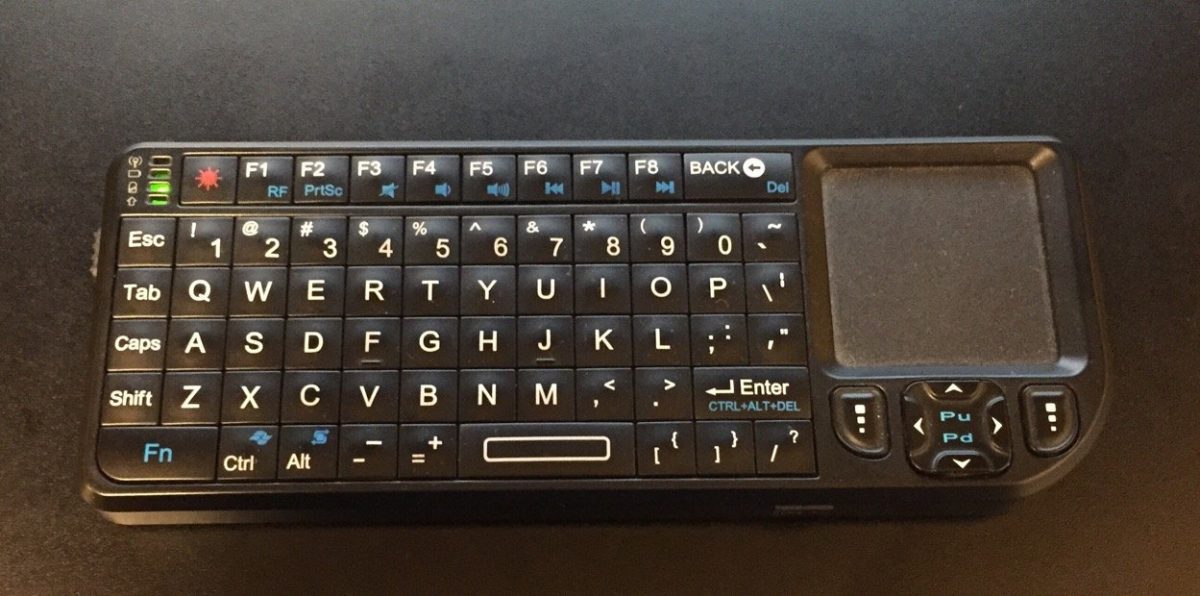
I do not want to use my mini keyboard to control the Pi.  I set out to find a Pi compatible IR receiver so I can use my Logitech Harmony One remote with it.  That was something I cannot do with my Sony Google TV.  It annoys me and MC doesn’t like two remotes.  I found a USB IR receiver that what appears to be the perfect solution for me.  I also bought a bluetooth USB adapter for the Pi.  With those two additional adapters I think I have all the accessories I need to leverage the Pi as my media center.

Once I am able to program my Harmony One to use with the Pi I will give it a test run.  All in my costs will be nearly $90.  For that price I could have gone out and bought an Android TV device or an Kindle Fire TV.  I could also have continued to use my Google TV with no extra cost however I have been actively trying to avoid using google products.  The Google TV is the last thing I rely on from Google for my personal use.  That is another reason to hope the Pi suits my personal needs.

I am also interested in some additional configurations I can try on the Pi.  For example I would like to try out OSMC a Kodi variant for the Pi.  All I need to do is swap out the memory card and I have a completely different config without messing up my Rasplex setup.  I would also like to investigate some music and video streaming options, however OSMC is up first after I bake in the Plex setup.

Building My First Raspberry Pi

I have owned a Raspberry Pi for about a year.  I had high hopes for it but never got around to building anything with it.  A few weeks ago I saw that there was an official Raspberry Pi 2 case and I got to thinking about all the things I wanted to do with my original Pi.  My mind then went wandering that since there was a newer version out and a shinny new case that goes with it I wanted to get the upgraded kit and check it out.  I ordered the Pi 2 and a wifi adapter from Amazon for under $50.  The case is on its way from a different vendor for $10.  All in a computer for less than $60 is not bad.

My new Pi 2 and wireless adapter arrived earlier this week.  Today was the first day that I finally had the time to sit down and install an OS on the Pi 2.  Amelia was napping and MC was at a party with Teagan.  My inlays were visiting but my father in law was relaxing on the couch and was interested in what I was working on so there was plenty of time to tinker.

It took some digging for me to to find a Micro SD card that had enough space on it that would work with the Pi lying around.  It only took a few minutes to download and prep the SD card and get the install going.  I was happy that i still had my old mini keyboard and trackpad that i bought when i was using my Mac Mini as a media center.  I was plugged in and installing the OS in only a few minutes.  The Pi only takes HDMI video input.  I have an HDMI to DVI adapter however I do not have any normal monitors in my apartment.  My desktop computer setup uses an Apple Cinema Display and the only other monitor I have is a USB DisplayPort powered 15″ LCD I sometimes use in the bedroom when working from home.  That meant I had to use the TV to setup the Pi.  Not a big deal and the OS setup and wireless configuration only took a few minutes.

I had some minor challenges getting a VNC server setup but once that was done I had a completely working Pi with remote access running.

My next steps is to see what media center options I have.

Apples Perception Problem

Apple has a perception problem if when I am out to dinner our waiter is arguing with me that he bought an Android Wear watch because Android is more “open” than Apple.  I am cool if you want to live Android over iOS however liking Android because it is more open means that Google is successful at spinning how their OS is perceived and Apple hasn’t been.

I smartly dropped the topic and two other friends of mine agreed it was not worth the conversation.  MC and my friends wife just rolled their eyes at us (literally or figuratively).  It did all start because MC asked him if he was wearing an Apple Watch this whole thing would never have started.  I thought the whole conversation was pretty funny.

Spacecraft Names vs Artificial Intelligence

With my new work laptop on its way I know I am a bit geeky when my thoughts on my walk to the subway home turn to what naming scheme I might use for my personal devices.  I have used NASA space craft names for years but as I was walking listening to music my mind wandered to thinking what else I could come up with that would be cool.

One thought came to mind is to use AI or Android names from popular movies or TV shows.

See this is what happens when I clear my mind.

The Apple Watch Worth it, For Me?

I have had my Apple Watch for a few days now.  It hasn’t been enough time to write an exhaustive review about features, however I am not writing a full technical review.  I am writing about my experience with it to date.

Physically the watch face looks ok to me.  The band is a nice rubber band but its still not great.  I know I bought the cheap band.  Some of the other ones look much better however no super awesome band will take away from the fact that this is still a digital watch.  The watch itself is pretty thick and boxy.  It is well built but not beveled like someone at work pointed out.  Ascetically pretty decent.  Not fantastic but overall not horrible.

Someone pointed out in a review I read that the main things people will really regularly use a smart watch for is 1, telling time, 2 activity tracking, and 3 notifications.  I generally agree with this.  The other functions are nice to have’s but not anything that I would use often. The using the watch for example as a viewfinder for the camera is nifty but i am not going to use that very much.

Using those three main functions I wanted to see how the Apple Watch fared for me.  First as a watch it wasn’t great.  I was just ok.  I personally had issue with the watch taking a while to go on when i moved my wrist to look at the time.  It isn’t a lot of time but it is very noticible.  I also don’t have the best vision so once i am looking at the watch face I have to focus on the hands to know what time it is.  Most people may glance much faster at it and then the waiting for it to light up may not be a big deal.  For me waiting for it to light up and then having to look at it and get the time was just too long.  I know I could possibly solve my issue by just using the digital time however I have been an analog watch person for over a decade now and I don’t want to change now because the Apple Watch doesn’t turn on fast enough.

As for activity tracking I am honestly still confused by the three circles that the watch uses to track me.  Move isn’t really a step count I think.  I am not sure and if i can’t easily figure that out then it is too complex.  Tracking my standing is cool however if the watch knows i am active why does it matter that it knows i am actually standing.  My Up band alerted on lack of activity.  It just seemed simpler.  In any event the activity tracker seems good enough.  The main issue with the watch as an activity tracker is that it is built into the watch.  On one hand that is great.  One less thing to wear.  Of course what if I wear another watch?  Or as in my case I want to track my sleep habits as well like i have been for a few years with my Jawbone UP.  For me if I were to keep the watch it wouldn’t be my only watch so I would need an activity tracker anyway.  My Jawbone UP24 broke last week so I just ordered a new Jawbone UP2.  I will blog about that hopefully soon.  In any event I am not giving up my dedicated tracker so the Apple Watch as an activity tracker is redundant for me.  For others it may be great or the best function now that they can get rid of another wrist band.  I for one am happy to own a basic activity tracker like the up that doesn’t have a screen on it and just tracks what i do since that is the only reason i own it.

The 3rd main reason to have a smartwatch would be the notifications.  This is where my problem lies.  The Apple Watch is good at this. Really good.  In the few days i have had it i have loved the meeting notifications and the ability to snooze them and not forget to be somewhere.  The timer is helpful also however not much easier than just dictating to Siri on my phone.  Telling me about a new text was great, however there were a few that I never got on my watch but did get on my phone.  Overall I liked the notification features of the watch.  That in lies my problem.  This watch along with all smart watches are a huge distraction or so I thought.  I initially got concerned the first full day I had it when the girls were climbing all over me to play with it.  I was concerned about the distraction.  I am trying to adhere to be here now when I am home.  Because of the distraction I was all set to return the watch.  Then I read another blogger who said the notifications on the watch were great because it allowed them to keep the phone in their pocket and actually be less distracted.  I was intrigued.  That was exactly what I wanted.  Because of that the watch got a reprieve and I will keep trying it for a while longer.