
Building My Own VPN

I started writing the background of this blog entry. I looked at my own archive and realised I had stopped using remote access software sometime in 2016. I think I got spooked by the changes that logmein did to their free plan or that it got bought by someone.  I forget.  As an alternative I started with remote SSH to remotely manage my growing network of raspberry pi’s. As my setup evolved, I eventually upgraded to OpenVPN for my home network. This way, when I was out with my iPad or laptop, I could connect to my home network and manage my media center.

When WireGuard came along, I switched to that because it was so easy to set up. I’ve been using it ever since for those rare occasions when I need remote access to my house.

Recently, I started experimenting with Tailscale, which is a mesh network implementation of WireGuard. The concept sounded great, and their free plan supports up to 100 devices across three users, which is more than enough for me. I set up Tailscale on my workstation and most of my Raspberry Pis. Now, instead of using WireGuard to connect to my home network when I want to access the media center, I just log my iPad onto the Tailscale mesh network, giving me seamless access to all my services. To make things easier, I use CNAME records with one of my domain names, so I don’t have to remember the cryptic Tailscale-provided domain names. It’s all been working smoothly.

With M and the girls away this week, I’ve had time to play around with Tailscale’s exit nodes. This feature allows me to route all my internet traffic through any Tailscale client I set up as an exit node. I found this intriguing because it lets me browse the internet as if I were at home, even when I’m out. I also experimented with setting up an exit node on my VPS in Texas, so I could route my traffic through there.

I recently noticed Tailscale offers Mullvad VPN exit nodes as an add-on. Mullvad is a solid VPN provider; if I didn’t already have Proton for other services, I’d probably use them. This add-on is essentially a full Mullvad VPN plan for five devices, allowing me to configure Mullvad exit nodes. I’ve been testing it over the past few days, both at home and on the go with my phone and iPad. Like any VPN, there’s a bit of overhead in terms of latency and bandwidth, but I’ve been using the London exit node and haven’t noticed any performance issues.

What’s great about this setup versus a traditional VPN is that I don’t have to toggle anything off to access my home network—my connections just work. This setup is letting me keep a VPN on all the time when I’m out, which I prefer. The Mullvad add-on costs an extra $5 per month on top of the Proton services I already use, but it’s been worth it so far. With a single click, I can switch the exit node to any other Mullvad location or one of my own, like my home network or VPS.

I’m actually so happy with this setup that I’m considering configuring the girls’ iPads to have always-on VPN through Tailscale.

an extra $5 per month on top of the Proton services I already use, but it’s been worth it so far. With a single click, I can switch the exit node to any other Mullvad location or one of my own, like my home network or VPS.

I’m actually so happy with this setup that I’m considering configuring the girls’ iPads to have always-on VPN through Tailscale.

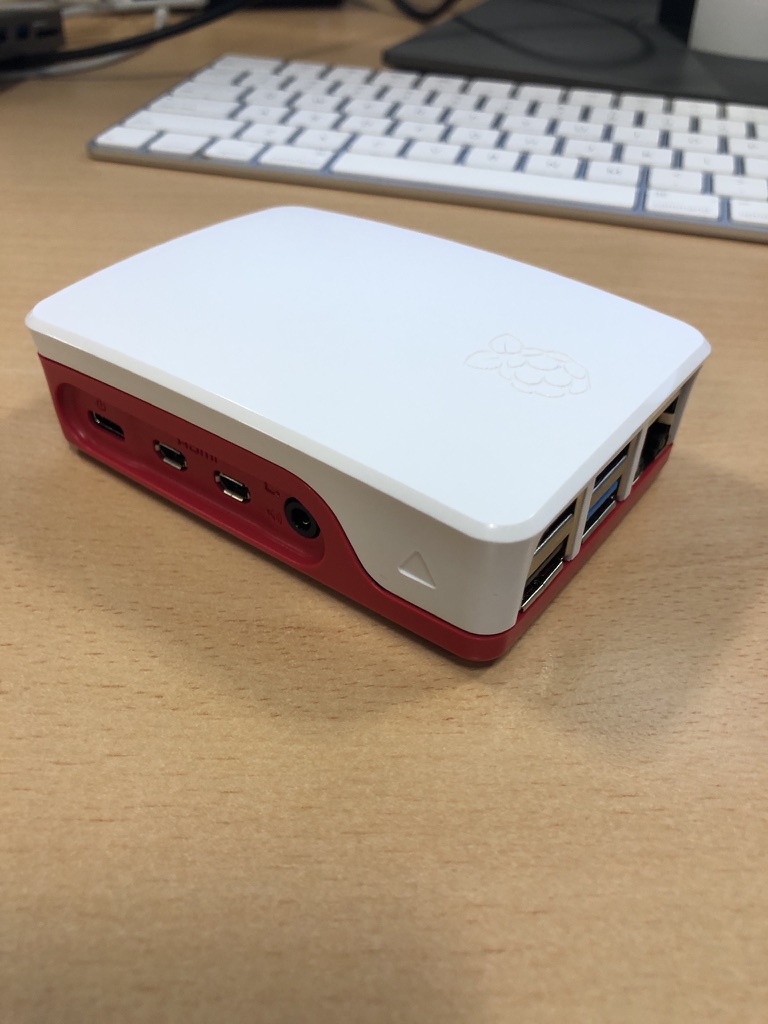
Since I had some extra free time this week, I bought an additional Raspberry Pi 4 specifically as a VPN exit node for the house. I’d been experimenting with an existing Pi 4 as the exit node while it was handling other tasks, but I ran into some routing issues and didn’t want to troubleshoot on a device already in use. So, I spent about £50 on a new Pi and case. I do have a couple of Pi 3s lying around, but I didn’t want to use them due to their 100meg network bandwidth limitations. A Pi 5 seemed like overkill for this purpose, though I did pick one up for another project (which I might write about later).

So far, I’m very pleased with my new mesh VPN setup!

Using a From Email Address as Validation is Not a Security Measure

I have been on a mission as of late to migrate all of my login details for account’s I use email from one domain name I have to another. I decided to stop using the main domain name I have been using for years. One of the main drivers was cost. It’s pretty expensive each year to own it. It is a country specific one and not cheap like a .com. It is also no longer as relevant for me.  I  loved its simplicity. It just didn’t make sense to keep having it long term.  It is paid for through 2021 or something. I have time to confirm I’ve captured every account and moved it.

In the process of doing this I am also closing accounts I don’t need anymore. It’s a great spring cleaning in the autumn. I originally wrote this in the fall of 2019.

When I attempted to change the email address I used with NordVPN I realized they do not have an option to do that in their online portal. I have  come across this issue a bunch of times going through this change process. Eventhough it’s annoying I typically open a case to request a change and its done pretty quickly.

For my own security reasons I use a unique email address for every account that I create online. This allows me to know when my information is being sold or if an email is authentic. It also protects me if one provider is compromised and the account details are sold or published online. There’s lots of times where I recieve a message that looks semi-legitimate. It is only when I look and see it’s going to a completely different email address than I gave them that I know it’s fake.

This setup makes things more secure from fishing or other exploits. The downside is it is not so straight forward to get a message via one of these aliases I setup and reply back easly.  That is because my email provider Protonmail charges for each alias you use.  To get around that I use their catchall feature.  I can have unlimited inbound email addresses. The catch is I can only reply back coming from only 5 of them. Most of the mail I get other than personal mail I don’t really need to reply to. The trade off is worth it for me most of the time.

In this instance with NordVPN I was asked to reply to the support case via email. Ussually in this situation what I typically do is I have an email program that allows me to send outbound mail and I can edit an alias to match the email address I’m using with that vendor. It’s slightly annoying however if I don’t have to do it often it’s not that big of a deal.

There were challenges in validating my account with the NordVPN. That required several emails back and forth. In one instance when I was away from my desk I got lazy and just replied from my generic catchall address. That exposed my default address to the vendor. I wasn’t that concerned about revealing that address to them however it was sloppy for me. What was silly was their reply. After two more rounds of back-and-forth I was told I need to send a response from the original email address since that was the one on file with them.

What seems silly to me is this company was relying on an email “from address” as some sort of security validation? Whenever I do send them mail  I’m literally cutting and pasting the contents to a new message and spoofing the address. Anyone can do that. Yet somehow they feel that if I  recieve their message it isn’t enough. In my case i am spoofing an address of my own so thats not bad.  What is bad is mail spoofing is super easy and this company somehow thinks its a securty function to get mail from a specific address.

If you are going to insist on a security measure why are they not having a secure ticket portal that my login to their service gets me into?  Or a built in chat system within their app amoung other things that are more secure than email.

I found this whole experience dealing with this VPN provider to be very frustrating. I am only writting about it because of the hypocritical things they said.  Do not tell me you are a security company and then rely on a “reply to” as a validation you are speaking to the right person.  Another thing they did was they wanted me to send old credit card details in cleartext email.  Yes the card was 2 years old however still dont say you are a security company and ask for PII in a clear text email.

The situations been sorted. I have updated my email address eventually. I’ve been using NordVPN provider for years. This extremely poor experience has left me looking for a new provider when this one runs out. It’s partly due to just the bad communication back and forth. And part of it is the hypocrisy of claiming that they are a security company and doing some of the most unsecure methods to communicate.

UPDATE: Just as I started to write this post in late 2019 it came out that NordVPN had two seperate public incidents where they were compromised. That along with this story got me to move providers 4 months before my contract term ended with NordVPN.

Yes Your Internet Provider Can and Might Be Spying on You

In late March Congress repealed regulation that the FCC set up that prevented Internet service providers from collecting and selling information about their customers without their consent. Rightfully many people are pretty upset over this. Security blogger Brian Krebs points out that this repeal changes nothing day today. That is because as of right now the rules that were repealed never actually took effect yet. I would go a step further and say if someone is only now concerned about this issue they likely won’t take the right steps to protect themselves anyway. 

I applaud people’s concerns. They should be concerned. That being said several people have recently asked me questions about VPN setups. That might solve issues regarding your ISP collecting data about you however it does not prevent all the other companies that are collecting data about you.

When I talk about this topic with anyone I always recommend that they watch the documentary Terms and Conditions May Apply. I’m not sure how many of my friends had actually seen the documentary. It’s a disturbingly fascinating view of how your information is being collected. Thanks to my friend Andrew who pointed his documentary out to me last year.

I just finished reading The Art of Invisibility by Kevin Mitnick. I previously wrote his book the art of deception and liked it a lot. In the art of invisibility Kevin goes over the details of what you would need to do to become invisible online. In the end there’s no way I’m going to take all the steps necessary to do that. It was disturbing just to read the extent of what you would have to do in order to become truly invisible. For me I outlined in a previous post some of the steps I do to minimize my exposure.

When people ask me about what VPN provider to get or some other way to secure themselves online the question I usually ask is what is their threat model? What’s the problem they’re trying to solve specifically? I have  a few threat models depending on the situation for my online behaviors. I know that I am light years ahead of what most people do however I’m also aware there are several key improvements I need to make in how I use the Internet.

I use a VPN however I don’t use it as often as I would like to. When out of my apartment I try to use it all the time unless I’m at work on my work equipment. At home I have set up my router to tunnel everything through the VPN. The challenge is I don’t use it. I have a consumer router running an open source firmware. It suffers from the same problem all other consumer routers do, it has a relatively lightweight CPU. When I run a VPN client from a computer of mine I may get near line speed of what I would get without the VPN. When I run the VPN the my router I was getting 4-8 times slower connection. This is all due to CPU constraints on the router. 

To solve this problem I need to either by a commercial grade router or build my own using a computer. I’m going opt to use a low-end Zotak fanless  computer and build my own router. One of the guys at work pfsense. It looks pretty good and I’m going to give it a try. Now I need to just find the time to work on it.

My recommendation to my friends is yes get a VPN. Preferably one incorporated outside of the US.  I personally have been using NordVPN for over a year and have been pretty happy with it. I have recently been trying out AirVPN.. They have less options for entry points in the US however they offer some unique features with their VPN client. I also like  the history of the organization and why they became a VPN provider.

I also recommend if you’re serious about your privacy to read one of the books I suggested or just watch the movie. Most people understand that stuff they’re doing online is being tracked however I don’t feel like most of my friends or the general public truly understands the extent at which you are being tracked.

That Time Were My Security Paranoi Might Pay Off in a Real World personal Scenario

In a recent post I wrote about how I had to wipe my Mac Mini at home due to a potential compromise in my chrome browser. The ironic thing with that issue was for months I’ve already started taking steps to minimize the chance of such an exploit. The problem likely began months earlier and didn’t present itself until recently however the damage was already done. It just justifies the extreme measures I am taking taking in regards to securing my web browsing.

At a high-level my approach is isolating some but not yet all of my browser traffic to Linux virtual machine. I know that theoretically a virtual machine is not 100% isolated. I’m willing to chance using the virtual machine over booting into TAILS using a USB key. That level of inconvenience is not something I typically want to be bothered with and I feel that my current solution will be good enough.

Within the virtual machine I installed Firefox and chrome browsers as well as the TOR browser. I also configured open VPN to use my VPN provider. I then set up a visual cue i.e. a distinct background of the virtual machine to note that when I am using it I am in a semi-isolated system.

To protect the virtual machine from most exploits I take a snapshot about every month that includes the latest patch level for all the applications in the operating system. I do not ever use the virtual machine prior to that snapshot to do anything other thank update software or make base OS and application configuration changes I want to be persistent. Once a snapshot is taken I will use the virtual machine and then when I’m done I will revert back to that clean snapshot. I might not revert back to the clean snapshot after each use however I try to do it as often as possible. At minimum when I go to update the virtual machine I will revert back to the last known good “clean” snapshot and upgrade that. Then I’ll take another snapshot.

Late last year I implemented this solution using an Ubuntu 14.04 virtual machine. In April I built new ones using Ubuntu 16.04. Because I own a copy of VMware Fusion for personal use and a work copy of Parallels I have both virtual machine flavors of the operating system image. Other than a few minor tweaks with the new image the 16.04 version is mainly an operating system upgrade. I now have a “secured virtual machine” on all the main computers that I use day-to-day.

The solution isn’t perfect however as a first pass at this I feel that it gives me the best trade-off between additional security and ease of use. The VPN gives me some anonymity. TOR And VPN gives me more. The snapshot of the virtual machine decreases the chance that the system can be infected.

Longer term I want to build a dedicated machine for TAILS or Quibs. That solution would only work at home since I need a dedicated computer setup for it.  For now I will settle for the VM solution I have implemented until I am comfortable using it and able to accept the extra effort involved in a dedicated machine configuration.
What’s interesting or disturbing to me is some corporate executives and even government representatives (NSA labels Linux Journal readers and Tor and Tails users as extremists