
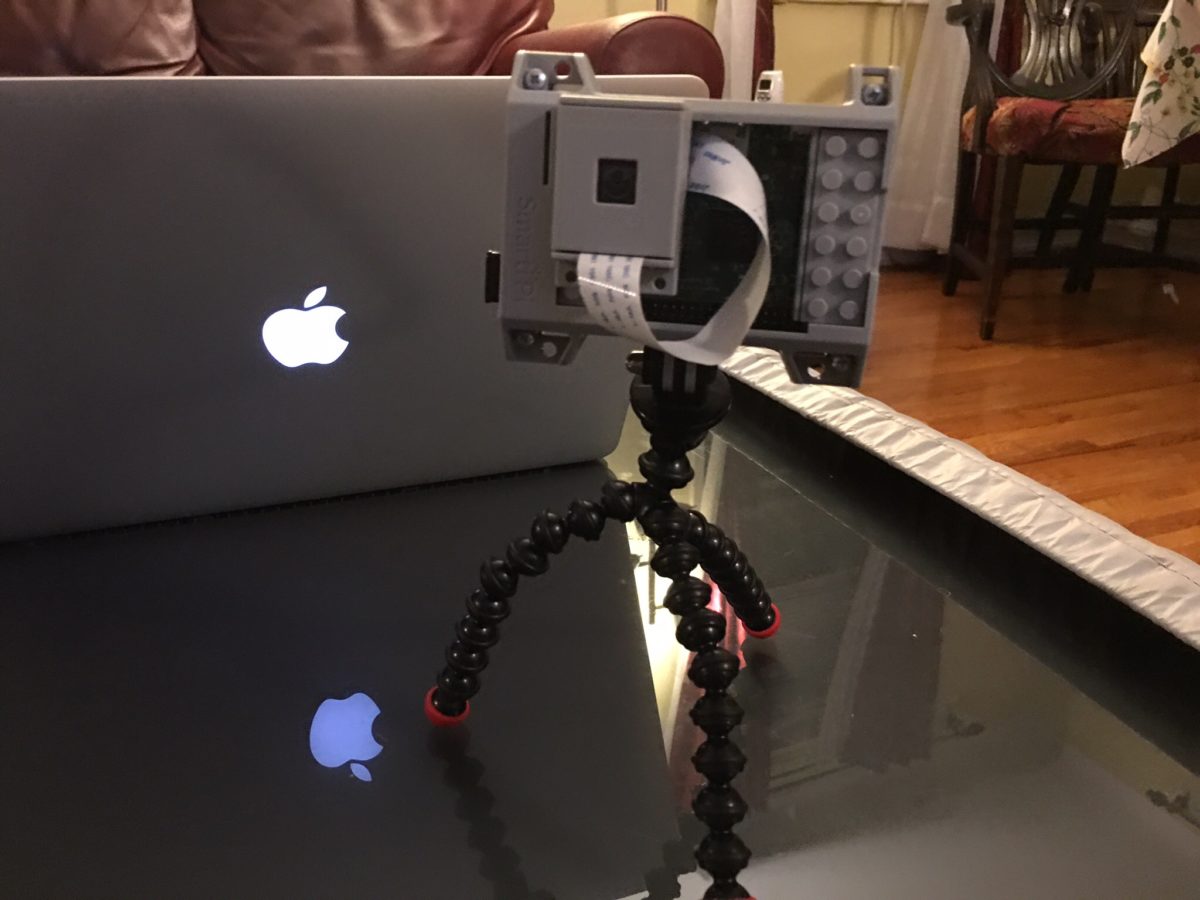
Building it was supriaingly easy. Test photos were ok. Now the hard part begins, making it work like a store bought webcam with alwys on video recording.
BitTorrent Syncy Network Phase II
Since around the new year and trying to figure out what next phase of my private cloud backup network would look like. The design was originally leveraging several raspberry pi’s however practice only one remains at a remote location. The remaining remote locations I’m using old Mac Minis. Even the one Pi I do have deployed is inoperable and needs to be rebuilt. I’m not sure if it’s the Rasbian version of BitTorrent Sync are generally anyone expelled for sync but I had several problems with the Rasbian installs losing their license identity. What happens is I then have to re-add the BitTorrent Sync pro license and reindex all my shares on that node. It’s annoying and I’m concerned though because option at some point.
At the same time I’ve been looking at ways to better secure the remote data. All of my systems are at friends and families houses so endpoint security’s been less of a concern then on the network security however when BitTorrent Sync announced encrypted folders I was extremely curious. After playing around with it for a while I have opted not to use the encrypted folders however it’s something I’m still thinking about for the future.
On a side note I’ve been contemplating a Lenox desktop to complement my Mac. I shopped around and found a nice inexpensive Zotak. I picked one up and put a 120gig SSD and eight gigs of RAM in it. I wasn’t sure if I was use it as a desktop or to replace my BitTorrent Sync Pi. Right now I’m having keep a replica copy of my data at home to test it out. I’m currently running go to 14.04. It’s been running pretty well however I did have one or two anomalies with sync folders so I am not yet ready to deploy it in the wild. My goal in a long-term is to replace all the minis with something like the Zotak. The new boot to install also increases that new to 4 TB of storage versus the raspberry Pi I have deployed with a 1 TB hard drive.
As part of my incremental upgrades I have put a 4 TB drive in one of the remote minis and the other has a 2 TB drive. That gives me some headroom since fully seated backup is around a terabyte.
Holding off on any additional drive upgrades until I can confirm that the Ubuntu based Zotak is working well. If it is I hope to pick up another one two.
The raspberry Pi’s are not going to go to waste. I’m using one of them has an extra replica copy at home for BitTorrent Sync. I have a higher tolerance for failure for that since it’s an extra copy at home of my data. I’m installing some applications on another one. Future projects for the remaining ones include a possible reverse proxy, Wi-Fi hotspot and or WebCam. I just need to find the time for all these projects. For now just want to finish my backup solution upgrade.
And if you’re reading all this thinking yourself do I really need a four node private cloud network the answer is of course not. The other answer is it’s really six nodes if you count the three I’m running at home. In the end I didn’t save the money using a private cloud since even though a lot of the equipment was lying around there was some upfront costs that I won’t realize unless I use the system for 2 to 3 years. The reason to do it however was more because I can and because I wanted control over my information. I’m glad I’m continuing to tinker with this since I’m learning a lot and a lot of fun.
iPhone 6S or Not
Ah September. Fall is almost upon us. That means iPhone upgrade season. I admit that typically I have upgraded phones annually. That ended when when the iPhone 5S came out. There was just not enough compelling reasons for me to upgrade so I skipped it. Last year the 6 was significant enough of an upgrade and I needed new phone so the decision to upgrade was simple. The harder part was deciding between the 6 or 6 Plus. The 6 won out. This year I have to ponder the same issue.
The 6S may not be enough of an upgrade however the force touch does seem nice. It boils down to I likely do not need to upgrade however I am going to anyway. I save away money every month with the assumption that I am going to upgrade and I can sell the 6 with enough resale value that I am don’t get sticker shock from the upgrade.
T and the Hand Soap
Upon visiting my parents apart a few weeks ago T declared that she liked the hand soap in the bathroom. But it was rather funny that she pointed that out however I didn’t make much of it. Then the next week when we came back to my parents she wanted to take it home with us. My mom not wanting to deny T anything told her she could. Before we left T quickly remembered that she gets to take it and ran to the bathroom to grab it. So now are the proud owners of candy cane smelling hand soap.
In our bathroom we have both the so we normally use and the candy cane stuff. When going to wash T’s hands she makes it pretty clear she doesn’t want the regular stuff.
I find it funny sometimes the thing that the kids find enjoyable.
Another Mystery Solved
It’s been on my mind that it is coming for some time. Today I realized it is already upon us. Teagan as I am holding up a can of soda while trying to talk to her goes to me “drink your soda”. The way she said it confirms she is MC & my child. I have been wondering at what age she would get sarcastic and show some level of snark. The answer the the question is almost 3 1/2. One less mystery to solve.
Still Trying to Grasp Amelia is Two Today
It feels like it Teagan was just born so grasping that Amelia turned two today is challenging to me.
It was funny to see Teagan & Amelia help MC bake a cake for Amelia yesterday. I don’t know what was funnier. That Amelia picked the yellow cake batter over the chocolate cake batter or that Teagan continued to try to change her mind to chocolate. I was hoping Teagan would be successful because sometimes you wonder if a two year old really knows what she wants. Well in this instance Amelia did know, and was insistent on the fact that she wanted the yellow cake box.
All I can say Amelia is I hope the cake is yummy later. Happy birthday to my little smiley face!
Surprised by the availability of NFC payment
I was shopping today and I was surprised at the number of locations that I went to that supported Apple Pay (aka NFC payments). Along those lines until this week I hadn’t seen anyone asking me to use the chip in my card (EMV chip) eve thought the deadline that shifts the liability to the merchant and not the credit card companies if they don’t use the chip passed in November.
Of all the places I went to today the quick scorecard I had was as follows:
- Macy’s, YES but I knew that already since I have used it before
- Lego Store, NO however what was frustrating about this merchant was that they used the same terminal as several places I have shopped at that do take NFC payments. To make things more annoying the terminal had a big NFC logo on its screen however I was told the system didn’t accept the payment type. I did have to pay using the EMV chip.
- Applebee’s, YES however I couldn’t get it to work. They still get props for the fact that check out was via a tablet at my table. It was still a regular swipe card but cool that I could have ordered food and checked out at the table.
- La Maison Du Chocolat, YES
- Card store, NO. Let’s face it this is a local Hallmark store that doesn’t even take AMEX so I didn’t expect anything. They still used the standard swipe card.
- Party store, NO, however I only bought something very cheap and paid cash.
- liquor store, NO but at least they took AMEX. For some reason I find many liquor stores that don’t take it however that is a different conversation/blog post.
Based on my experiences today counting the stores that should have worked with the NFC payments I was supposed that almost 40% of the stores supported the NFC payments. That was higher than I would have guessed. I am hopeful that 2016 will see a large increase in the number of stores accepting the chip technology.
Suck it Indiana Jones
Suck it Indiana Jones. I too have found the holy grail. Well the Holly Grail for me in relation to my media center experience. After searching for a solution that works that includes all my requirements I finally think I have it in one device. My Apple TV 4.
That device in and of itself maybe was 1/3 of the solution. For me a Media Center is not complete without my media library accessible via Plex or Kodi. I prefer Plex since that is what I use as my server however I would have settled for Kodi. Plex turned out to be available on the new Apple TV on day one. It worked great. The main other piece of the puzzle missing was the ability to watch live TV.
To save $20 a month I dropped my TiVo a few months ago. I was just not using it enough to justify the expense. MC loves her live TV thought so I needed a solution. I bought a HDHomeRun Prime. The problem has been I haven’t been able to find a good live TV streaming client that seamlessly worked on any device other than my old Sony Google TV. My home built OSMC didn’t work very well. It was very choppy video. The Kodi setup I built on my Mac Mini worked ok for the live TV however it didn’t play my Plex content very well. It also required switching HDMI inputs to get to my iTunes content. That was a challenge when the HDMI switcher didn’t work and MC couldn’t get the girls their 15 minutes of Seasami Street sometimes in the morning.
I had been using the new Apple TV with the Sony Google TV as an overlay on the Apple TV. I did something similar with the Google TV when I had my TiVo. It still required two devices and two remotes to work. It did work but is not very elegant. I also want to rid myself of all Google devices so having to rely on the old Sony Google TV is an annoyance.
Today however everything seems to have changed for me. Yesterday I got an invite for a beta program of one app that will allow me to use the live TV stream from my HDHome Run natively on my Apple TV. I setup the app today to give it a try. It worked but it is clear that the app is still beta. I am hopeful that this app will flesh out their issues and will work well.
In the mean time however as luck would have it I found another app in the Apple TV App Store that I hadn’t seen the last 3 or 4 times I browsed the store for live TV streaming Apps. This time I found “Channels”. For $15 it claimed to do everything I wanted in live TV native in the Apple TV. I figured I would give it a try. After some drama related to two step authentication and my Apple ID I was able to purchase the app and give it a test drive. From the 15 minutes of playing around with it I am pretty impressed. It doesn’t have the audio / video out of sync issues that have experienced on several platforms.
With this app if it continues to be functional I am able to par down my media center to just my Apple TV the front end, Plex running on my Synolog as my back end along with my Silicone Dust HDHomeRun for TV streaming (using a cable card).
Getting to this setup has been a multi year process of trial and error. If it proves to be reliable I will be very pleased and hopefully the configuration will be simplified enough that MC and soon the girls won’t have any problems using it.
For now I am pleased with the turn of events that gave me my holy grail of media centers!
Trying New Scotches
Recently I’ve been trying new scotches when I go out with friends. Some of my friends have pretty good taste so I’ve been getting great recommendations. One new scotch I am liking is Lagavulin 16. I had it several times when we were out and liked it. I liked it so much that I ended up buying a bottle. It was reasonably priced compared to some of the other stuff I bought.
Previously I purchased some Highland Park 12 year old. I tried the 15 when I was out and liked a lot. The liquor store near my house didn’t have 15 and at the time I didn’t remember if it was the 15 of the 12 that I liked so I just picked up a 12. It was good but the 15 was definitely better. I need to find somewhere nearby that sells it. The meantime I’m happy to drink it when I’m out.
Another scotch I found interesting was Bowmore. I can’t remember the age. I like the Highland Park better however I could see myself picking up a bottle of Bowmore in the future as well.
I hope to continue my exploration of different scotches into 2016.
Thanks For The Suggestion Ron

Thank you Ron Swanson from Parks & Rec (and Dustin from work) for turning me into this stuff. Very good and surprisingly affordable.