
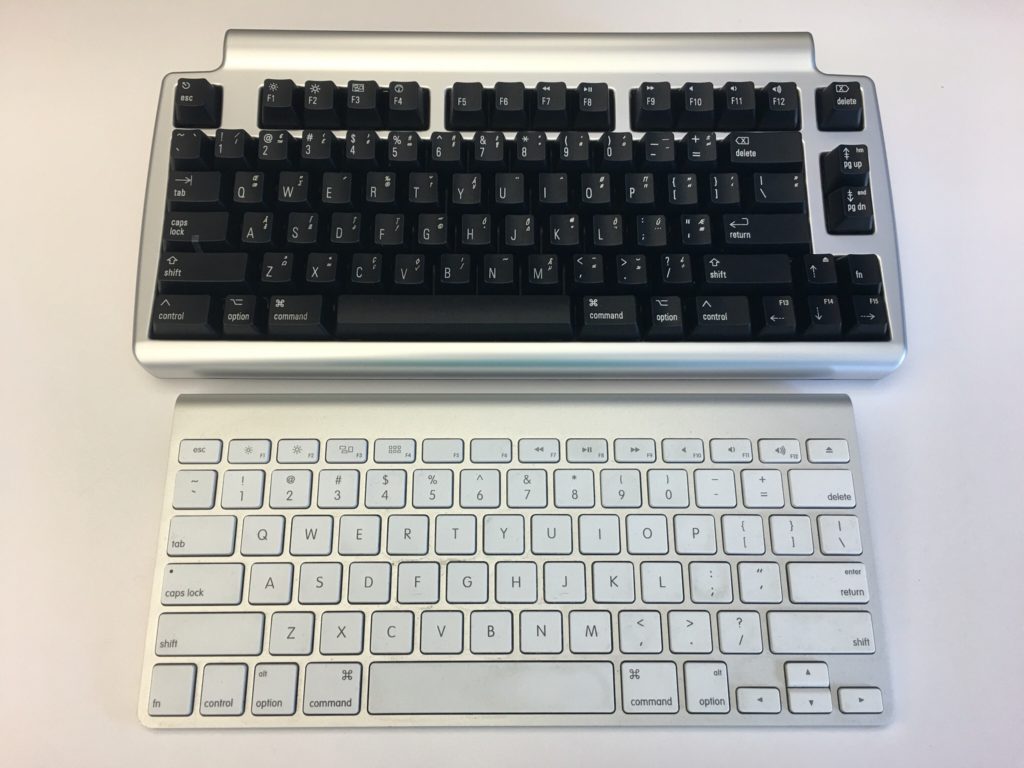
My New Mechanical Keyboard

I am finding it pretty funny that society in many cases has conditioned us to think new and shiny stuff is better. A few years ago I started reading about getting shaves the old-fashioned soap and a brush. That led me to buying old school one blade safety razors for a time. Since then I’ve evolved to a more expensive and more modern twin blade. My point though is the technology from the middle of last century for me works better than any of the modern stuff. Today I get a better experience with the twin blade and shaving soap and a brush then I ever did with a fancy Mach 3,4, or 5.

Taking that lesson learned I should have come to the same realization on certain technologies. About 9 or 10 years ago Apple released their new style keyboards. It mimics for had a similar movement to keyboards on their laptops. At the time I thought that was the coolest idea that we give me seem typing experience when I work directly on my laptop or when I worked at my desk. The new keyboards were nice and shiny white. The best part was they had a small wireless version was pretty nice size compared to previous wireless keyboards.

At that time I had been using a White Apple Keyboard 109 Keys A1048.  I wasn’t that impressed with those keyboards and I’m not really sure why I got rid of my prior keyboard the Apple Pro Keyboard (M7803). Those were really good. I think it was related to the fact that at the time I was using an iMac and they came with the white 109 key keyboard. I likely would’ve sold the Pro keyboard when getting rid of a PowerBook. Looking back that was probably a huge mistake. At the time I thought the upgrade to the laptop like sleek mobile keyboard would be a smart move for me.  Even after I had the new keyboards for years I was relatively happy with them.  Flash forward nine years and I saw an article talking about the highlights of a Bluetooth wireless mechanical keyboard that also muffles mechanical movement sound (the Matias Laptop Pro Keyboard for Mac). Even though I was interested, I thought that at the time that I was generally happy with what I had so it wasn’t worth the money.

The idea of the keyboard was still pretty cool yet I was still interested in trying to help my hands make it through the day of typing. I have had repetitive stress issues with my hands on and off for a while. Well I think that’s what it is. Let’s be honest the one Tyler brought up to my doctor he said just rushed her hands and you’ll be fine since the issue seemed very mild.  That being said on some days towards the end of the day my hands feel really tired from the typing. That has been a major driving factor for me to use the dictation.

A few weeks ago the topic came up with someone at work. I think we were either discussing wrist pain or that he was building a vintage computer that the discussion on old-school mechanical keyboards came up. As it turns out he had done a lot of research on the topic and was able to geek out with me on the different mechanical movements of old-school keyboards. I showed him the link to the Matias and we did some basic research on it. Turns out the Matias is based on the same Alpine mechanism that the Apple Pro keyboards were that I liked so much. With that knowledge and a renewed focus on my typing comfort I splurged on the keyboard.

When I first got it I was concerned that it would take me some time to adjust. I’m always worried that during that adjustment. I’ll get set up and just not like it. That leads to returning or not using the device in question. With the Matias keyboard however within an hour or so I realized its value. It felt that I could type faster with it then I was on my old one. It also immediately felt comfortable to use. On both counts I was extremely pleased.

The only drawback I’ve noticed is that I have to tell it to connect to my laptop every morning. It’s more of a minor inconvenience than anything else. There were one or two days in the past month where it didn’t connect and I needed to go into Bluetooth settings and reset it. The only other issue I’ve had is only once or twice there was some lag from when I typed something to when it went on the computer screen. Reviews of the Bluetooth keyboard reported similar issues however it’s not a major problem for me at this point. I like a wireless keyboard over a wired one however if I need to buy another one might pick up the wired version.

Since I do most of my typing at work this keyboard home at present is in my office. It is so much nicer to use this mechanical keyboard versus the new Apple rechargeable wireless keyboard that I have at my desk at home. I bought one of the rechargeable keyboards and it came out since using or chargeable batteries in the old blue two keyboards were pain. They weren’t keeping charges. I was also curious at the time if the new keyboards would be more comfortable to use then the old ones. It wasn’t. I was surprised at how much worse the new one felt to type on. At this point I think I’m gonna save and buy another one for home.

If this was a product review I would likely give it five stars.

I Can Finally Stop Tinkering With my Media Center, For Now…

I make a conscious effort to limit what personal family details I post however I do enjoy writing this blog. That means I typically focus my writing around technology. I find tech interesting and it’s a huge part of my life. Not the largest part however big enough that there are plenty of topics to write about. Looking back at my blog posts over the past few months I thought I talked extensively about my media center setup challanges. I was surprised then to realize that I haven’t written about my evolving use of my Apple TV 4 since I purchased it late last year: My New Apple TV.

I was happy that on day one the new Apple TV ran the latest version of the Plex app. The challenge I had was that Plex is only half of my media center/TV watching set up. Content purchased from the iTunes store makes up part of the other half of my use case. Live TV takes up the rest. The big roadblock after I got my Apple TV was it couldn’t stream live TV. I have a HDHome Run from Silicon Dust that takes my cable card and streams my cable TV to any networked device that can receive it. The Apple TV does not natively support this. Silicon dust does not have their own app for the Apple TV (yet anyway). Initially that was extremely frustrating. It required me to maintain other device just so we can watch live TV. That complicated media center use for my wife. Ease-of-use is critical for her and I. For her she just wanted it to work reliably. For me I don’t want to get frantic calls or texts that my daughters can’t watch curious George because something hokey is going on.

Luckily for me after the new year I stumbled across not one but two applications in the Apple TV app store that supported streaming TV from an HDHome Run. I got into the beta program of one app however there were some challenges with the audio being out of sync with the video. That was a problem that I had with my Kodi Media Center on my Raspberry Pi. I then found the second app which cost about $15 buy however it was out of beta and it looked too promising not to try it. I am so glad I did. It worked perfectly. Now I was able to have Plex, iTunes, and live TV all on my Apple TV. That enabled me to simplify the media center substantially and thus make it easier to use.

The streaming TV app works pretty flawlessly. I was able to clean up the cables and devices in my media Center when I no longer needed my android TV, Raspberry Pi OSMC, and Mac Mini running Plex. All those devices at one time or another were testbeds that failed in one way or another. I still have one Raspberry Pi plugged into an HDMI cable in my media Center however that is usually just for when I’m building something. My media center experience is not dependent on it though.

Experimenting and finding the most optimal set up for us for TV/media consumption took a pretty long time. I am glad the technology caught up to to the requirements that I was looking for. The setup has been pretty stable for the past several months. I haven’t made any major changes to it since getting the T streaming app. I have been adding additional apps to the Apple TV however the basic configuration doesn’t change. I do want to try getting a game controller and seeing if there are any good games on the Apple TV.  I no longer have an Xbox 360 so at present nomgaming platform of any kind. Of course I haven’t played an Xbox game in four years don’t miss it all that much most of the time.

A New Mac Mini Please…

My desktop computer at home is a 2012 Apple Mac mini. At the time I got the slightly upgraded version with the fusion drive and 16 gigs of RAM. Four years later it is starting to show its age. For most people it would probably still be a perfectly good computer however there are certain functions I’m noticing I need more power.

I would love to retire this Mini and relegated to act as a backup node on my Bittorrent Sync network. The challenge that I have is that the current Mac Mini model is from 2014. I cannot justify myself to buy a brand-new computer with technology that’s two years old to replace a four-year-old computer. My choices then are either purchasing iMac, build myself a Windows 10 or a Linux machine. My only other option is to wait for the mini to be refreshed.

For me Windows is not practical. I haven’t used Windows as my primary computer for work or professional life in years. I use a Windows computer when I need to at work and I have virtual machines for when I need it however living on one at home day in and day out just doesn’t seem like something I want to do. I have been wanting to build a Linux desktop however today it doesn’t offer me all the software I would need to replace my Mac. The iMac is compelling however I have not been a fan of the all in one computers. I’ve owned several iMacs and had challenges with some of them. Every time I think man those are cool I remember my burn in issues I had on to back to back iMac’s. Other reasons to avoid an iMac is I have been eyeing a bigger monitor than my current 27 inch. I would love a 34 inch widescreen however the current mini I have cannot support the resolution for one. If I do end up getting a second desktop running Linux I would want to plug it into the same monitor. I’m trying to stay is future proof on whatever I buy now as possible.

Since I haven’t been able to come up with a solution I am happy with I continue to wait. Every Apple announcement I hope they will refresh the Mac Mini and then sadly they don’t.

I know the one last option I have that I didn’t mention prior since it is super expensive is the full Mac Pro desktop. The cost alone is a nonstarter for me. Add to that it has not been refreshed as long or longer than the mini makes it not a viable option for me.

As Tom Petty says the waiting is the hardest part. Now I wait some more…