Always Blame The Tools, OK Seriously Do Not Do That

I wrote previously about my motivations or lack of motivations on writing.  With all that I wrote being true an added issue was recently writing was just harder to do.  I do a lot of my writing by dictating to Siri.  Previously to that i was using Dragon Anywhere and Dragon Dictate by Nuance to dictate.

Since I write when i have a spare moment that often is when i am away from my computer.  That means I leveraged Siri a lot.  I wrote about why I went with Siri vs Dragon Anywhere.  For a while before i wrote that post I was really not using Dragon on my phone.  Siri was working great so I couldn’t justify the costs.  I am not sure if it is my location (London wireless is as good or better than NY) or issues with the newer IOS versions however Siri isn’t as good as it was when I wrote that post.

Around mid May I decided to sign up for the Dragon Anywhere trial again.  I was able to blast out the bulk of what would be my first blog post really quick.  I was also able to write a detailed journal entry for the day I downloaded the app.  That was enough for me to be happy to pick up the subscription again (for now).  In the end i could have just used the dam dictation software I pay for on my Mac.  It is much less convinenentq than having it on my phone.  It happens to be better to use.  Just not that much better to make me sit down at a computer worth my while.

With the real or perceived obstacle of not being able to dictate out and about removed I am hopeful I can continue my fledgling writing/dictating streak.

It’s A Microphone Not A Speaker, That’s Why I Talk Into It

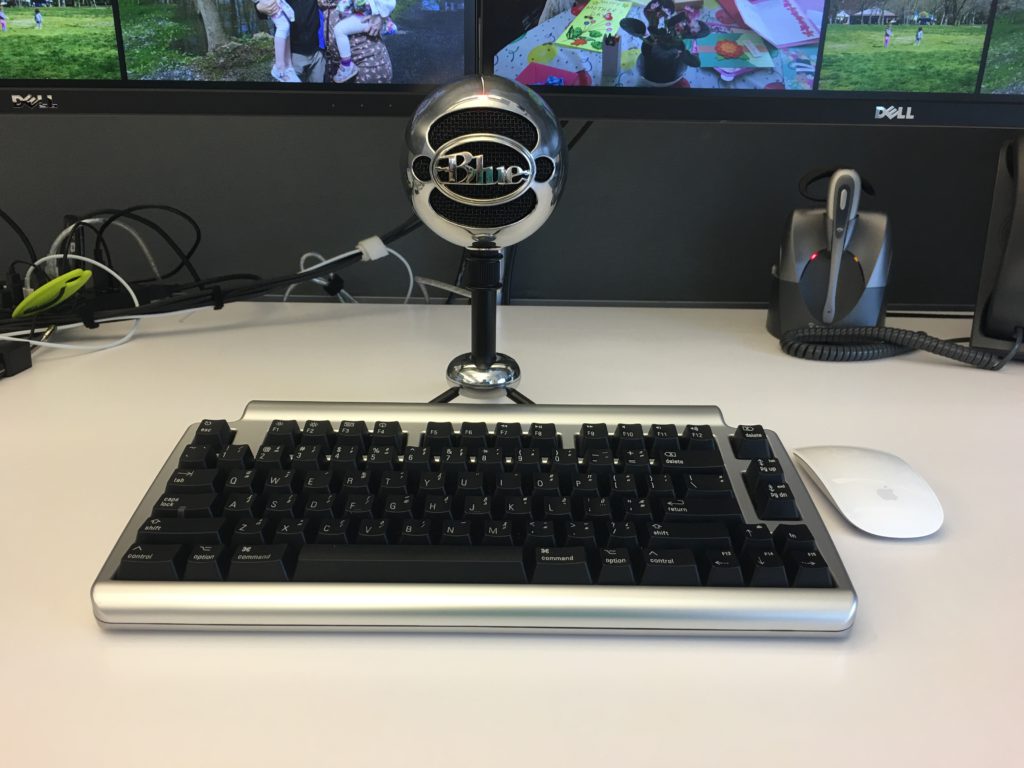
Say hi to Snowball. Pretty much everyone that sits near me believes that this is a speaker. They are usually pretty surprised when I tell them that it is in fact a microphone. I would think the people that immediately sit near me here my dictation however maybe I’m more self-conscious then I should be.

What’s cool about the snowball is that with a keyboard command I can turn on my Dragon Dictate app and dictate something pretty clearly and then turn off the listening mode of DragonDictate. I was hoping for and what ended up happening is that this microphone enables me to use the Dragon software more often throughout the day. Before that I would have to put a headset on and take it off every time I wanted to dictate. That was annoying. I also couldn’t listen to music at the same time I want to dictate anything because I couldn’t have two headsets on at the same time.

A guy at work who was dabbled in blogging owns a better model microphone by the same company recommended it. The reviews on Amazon were also pretty good so I splurged a little bit and picked this mic up a few months ago. I’m glad that I did. It is not as accurate as My headset mic right up against to my face however it gets the job done a lot better than any other alternative.

Anything that allows me to decrease the amount of typing I do, the happier I am. I do find however that for longer documents or messages I need to write I prefer to take my laptop and headset and go into huddle room to dictate. I think that is more around being self-conscious then performance of the snowball.

Overall this was a great purchase.

Dragon Anywhere

By the looks of my posts on this blog it would seem like I’m not writing much for some time. In recent months as far back as February I’ve started to journal more. The difference I guess is that the journals are private. The fact that I am writing at all is a positive for me.

I wanted to write more in general for some time. I’ve also wanted to be more active in my journaling. It’s something I wanted to do when Teagan was born and I did for a little while but didn’t keep it up. I’d like to say I’ve improved because of my determination to write. Slightly true however I feel like there is a different answer. That answer to me is Dragon Dictate. My so-called writing isn’t in fact writing it all. It’s mainly my dictation letting the software do the typing. I’ve had Dragon Dictate for several versions on my Mac. I think it’s a fantastic piece of software. My proof is that I think over time spent more on upgrades for it then on any other single piece of software. Unfortunately what has happened in the past is I will get it and use it and then start using it less over time. Part of that was due to feeling self-conscious about using dictation at work. The other part being probably just general laziness. Flash forward to this February I think I got rid of the laziness factor and just started dedicating some more time to writing. Using the dictation software I was able to actually write faster. That meant I could write more in the same amount of time or just get finished quicker.

Once I started sitting at my computer and dictating it was still challenging to find time to do that. I started using the dictation option built right into Siri on my iPhone to dictate into the journaling I use DayOne. That work rather well however it did require corrections more often than I would like. It also required me to do bursts of sentences quickly before the dictation stopped listening. This method still enabled me to keep writing almost daily.

The next big improvement for me was signing up for the Dragon anywhere subscription sometime around May. As a monthly service it’s kind of expensive for what it does. It gives me and always listening dictation option. I find that much better and more accurate than the built-in Siri option for dictation. I figured for $15 a month I would give it a try. What I found that I’m doing now is that I will dictate as I’m walking. I get a lot of my journaling done now between walking from the subway home and walking from the subway to my office. I probably just look like someone talking on the speakerphone to someone however it works surprisingly well.

I still want to do more. I’ve a list of draft topics in my Dragon anywhere app for things that I’m either partially done with or to do’s. That gets me back to trying to find more time in the day to dedicate towards “writting”. My other option is to just go on longer walks! Either way if unable to carve out more time I hope to write more about topics fit for this blog. I’m trying to do some cool things as a hobby however I don’t have the time talk about it.

Other than a few manual corrections this in my last several posts were entirely dictated.

Back to Blogging

I’m back to blogging full swing this week. A lot of what I have posted for May June and July have been things I’ve just written and never got around to posting, or things I had rough notes about and just never really elaborated on them. Not fully sure what got me to start posting again, but what’s made it really easy has been the ability to dictate what I want to say to my phone. Currently I’m running Mac OS X Mountain lion. Unfortunately it is not currently compatible with Dragon dictate that I have. After a long day working and writing on the computer typing a blog post sometimes is physically uncomfortable. So before I stopped blogging I was using dictation on my Mac. I was getting mixed results from it, but I was using it. With me being unable to use the dictation software on the computer I gave talking into my phone a try. I’m pleasantly surprised by the positive results. I first tried my android tablet because it has off-line dictation, but honestly the keyboard editing on android has not been very fun to deal with. So now I’m using my iPhone 4S and the WordPress app to edit after I dictate has been pretty simple.