
The Story of Coming Full Circle With Amazon Alexa

I purchased my first Amazon Echo in April 2016. At the time I noted in my personal journal that the threat modelling used to justify the purchase said it was probably okay at the time. I also said and repeated for a while that I know at some point in the future I would need to likely get rid of the device for privacy reasons My friends who were big into security looked at me like I was crazy when I bought it and talked about. Most everyone else at the time had no idea what I was talking about. Those the new of the echo thought it was cool.

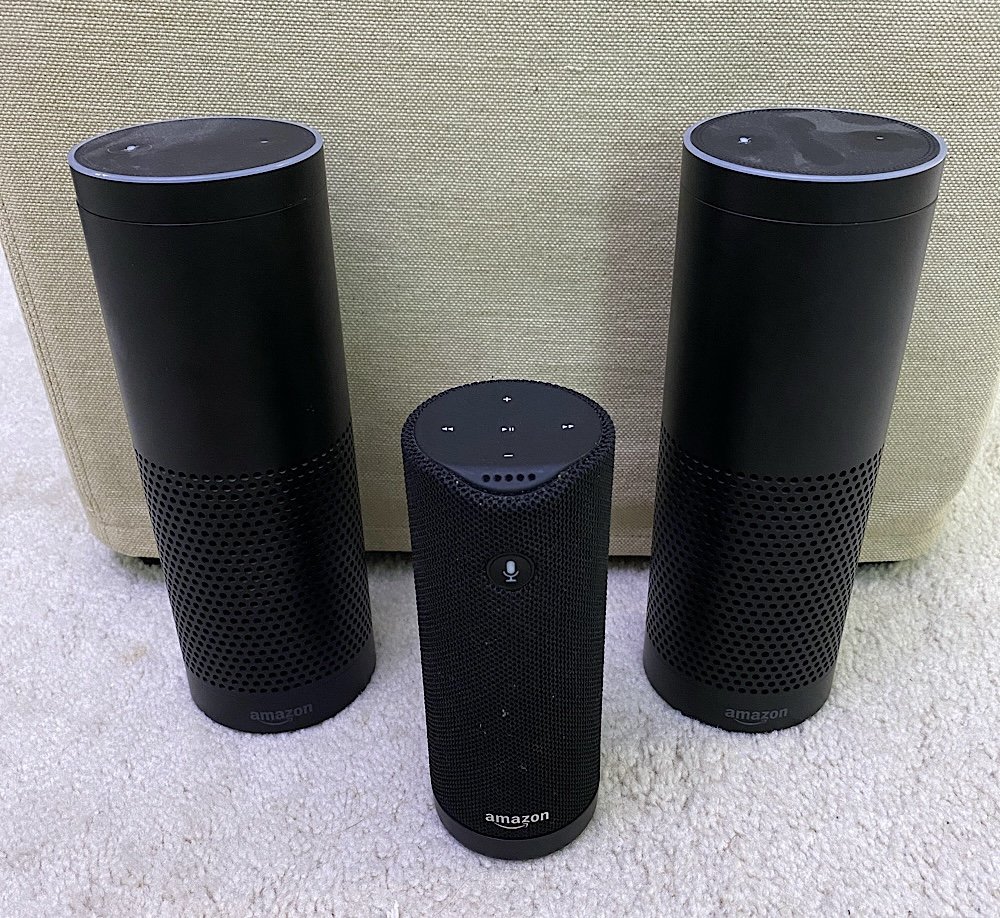
When we moved to the UK I purchased an Amazon Tap. The Tap is now discontinued portable speaker with Alexa. We used it around the house before we moved since the other echo was in transit. I packed it in our luggage and when we arrived in England and got our internet we had a music speaker. Even now we mostly use the smart speaker for listening to music and setting timers. Right after we moved simply having a speaker in the empty house was the goal.

Once we were settled in the wired Amazon Echo ended up in our bedroom. The Tap wound up in the kitchen so we could move it around and use it when we needed to. One of the advantages of the tap was that you could disable the always listening mode of Alexa. That way you could turn it on only when you wanted it to do something. It was less convenient but more secure. That was a selling point for me. Then we just got lazy and left it on all the time to unknowingly call out for it and have it not hear us two or three times before it reacted.

When I was debating on building out and an Internet of things network in the house I purchased another Amazon Ech Plus or whatever they called it. It was the version of the Echo that had the ability to become a home hub. That went into the guest room/my office.

Over time I kept reading stories of the privacy concerns people had with the the Echo speakers. I also experienced one or two shall we say oddities with the speakers that made me think it was listening a little more then you realise it should be. I convinced M to use a plain old “dumb” Bluetooth speaker for music in the Kitchen. I was able to get her one for £25. I also purchased myself a portable Bluetooth Speaker so I could listen to my audiobooks. With that new speaker I unplugged the bedroom echo. With M’s Bluetooth Speaker I intended to unplug the Amazon Tap in the kitchen however I didn’t feel that M was comfortable enough with just the Bluetooth speaker to do that.

Around this time Apple did a funny thing. They released the HomePod mini. Based on my current threat model that was my opinion the answer to my technical challenge. We had some gift card money so I purchased a few of the Home Pod Mini’s at John Lewis when they came out. I immediately removed all three of the Echo’s that we had.

The home pod mini is not as feature rich as an Amazon Echo. For what we use it for it has so far been good enough. That’s another story for a different day. The reason I bring it up is it was the final piece to the puzzle that enabled me to throw out the Echo’s and still have a relatively safe alternative.

Technically I did not throw anything out. I gave one of them to my nephew and another to a friend of mine. I think we still have one left to give away or may have given it away already. I cannot recall. We also still have Amazon Fire’s that the girls use. I severely limit what they can do and there is no always on listening. So it’s not like I just stopped using Amazon hardwa. It’s that we don’t use their what has always been a bit spooky audio devices. And now if you’re thinking about it I am not a hypocrite. Apple’s privacy policy and how they use the recordings on the surface seems much more palatable then what Amazon does. That means at least for now I’m happy to leave Apple devices listening in the home and not Amazons.

At Least My Amazon Tap Is Ready For London

I followed a how to on Reddit for how to get my Tap working in the UK. It wasn’t straight forward like an Echo since it apparently is not sold in the UK. I was prepared for a challenge however it worked on the first attempt. For the next day i have to remember the time it gives me will be in GMT. MC and I are also going cold turkey and have the Tap giving us weather in Celsius. Apparently its a thing. Thankfully the Tap can convert stuff for us when we have no clue what it is telling us in Celsius.

Amazon, Why oh Why are You Using Smartpost?

I am very concerned about Amazon’s recent switch to Smartpost for some orders.  I have been a huge fan and customer for years and a Prime customer for many of those.  Recently I have noticed Amazon’s switch to Smartpost for some orders.  I was concerned because i have heard horror stories about Smartpost but didnt have any issues.  Now that has changed and my first delivery was missed purely because of Smartpost.  I wrote an email to Amazon.  In the event that they don’t read or reply to customer mail and before I forgot I wanted to paste the text of my mail into this post in the hopes that someone from Amazon may find it.  I get trying to cut costs, but Smartpost is just bad.  My example below is only the first example i have had with Amazon, but not the first i know of personally or professionally.

My wife pointed out that this order was formula and other supplies for the baby.  The whole reason we buy from Amazon is their price and the fact that we can rely delivery dates.  Yes we can goto the store nearby in a pinch if a delivery doesn’t happen but at that point why should I be ordering from Amazon at all for that stuff?

Email message read:

I have used Amazon Prime for years.  Very recently my family has started receiving packages via USPS Smartpost instead of directly from UPS for free prime shipping.  Today i was supposed to receive the order listed however USPS was unable to deliver it since no one was home.  Lets ignore the fact that someone was home and tried to buzz them for now.  I got an email telling me in order to reschedule delivery i need to goto a website and fill out a form to ask for re-delivery.  UPS or Fedex don’t require this.  They just try 3 times.  Also a more minor note that my building’s super accepts packages and i have never had a problem with other carriers until your switch to smart post.  Your switch to Smartpost is a step in the wrong direction compared to Amazon’s typical stellar service.

Not to make threads since i am one customer but continued experiences like this will lead me to look at alternative vendors.  I use Amazon for many things because of its ease of ordering and because I know I will get my stuff without question.  Starting to have delivery problems will get myself and probably others to rethink your services no matter how cheap the shipping costs are.

Apple Are You Kidding Me?

I have been a huge fan of Apple and the iPhone. I have always had my criticisms of the company. I have also said that I love my iPhone but would love to find another phone to replace it due to the restrictions Apple puts on the iPhone. This latest stunt by Apple may just get me to drop the iPhone and get something (anything) else. GV Mobile is an app I have used since it came out. It is an app that works with Google Voice. Before GV Mobile I used Grand Dialer that did similar things with the old Grand Central before Google turned it into Google Voice. Why then did Apple just decide to pull all apps that work with Google Voice? I paid for this app, now basically it is killed off? Yeah it will still work for a while but if anything in the OS breaks the app it wont work. This is crazy. How is this not big brother that Apple (or AT&T through Apple) just come in and turn off an app? And why, because it mimic’s iPhone features? So what, I choose to use those mimicked features. Thoughts are it is more likely that AT&T doesn’t want to lose revenue by free SMS via these apps. So can someone explain to me how App Stores are better for the consumer if the handset maker and the provider say what can and cannot be put on my phone? I prefer the day when i can find an app, download it and run it on my smart phone. Worked for years with Palm, Blackberry, and Windows Mobile. Now everyone has their own app stores. How is this progress for the consumer?

I was tempted to pre-order an Android powered My Touch with T-Mobile today. The only thing that stopped me was the fact that the My Touch doesn’t offer Wifi Calling (no android phone does yet). Apple / AT&T get your act together or you will lose a good customer, and I bet I am not the only one.

On a related note I was kind of pissed about what I consider similar crazy tactics by Amazon regarding the Kindle. At least Amazon apologized about what they did, and it doesn’t look like they will do it again. Apple you should learn something from Amazon!

UPDATE 7-31-2009: Finally the FCC is doing something. Questioning Apple, AT&T & Google about what is going on.

My Parents Are Becoming So Tech Savy It Scares Me Sometimes

We live in a very technical world now a days so I don’t know why it surprises me that my parents are slowly embracing modern tools. I am less surprised by my dad than my mom but it sometimes still takes getting used to.

My dad at least has a long history of having useful gadgets. He was the first person I remember to have a PDA. It was an old Sharp Wizard that I eventually inherited. I get my love of gadgets from him, but I think I take it to a whole new level. Of course there is alot cooler stuff out now.

My mom on the other hand is not tech savvy at all. I still get calls from my mom for help doing basic stuff on my dad’s GPS. Of course my sister who once programed for a living also calls me just as frequently about similar issues so I shouldn’t judge.

What is funny recently is that my dad had been dead against a smart phone for ages. At one point I got him a Treo 300 that he used for a year or so, but didn’t like the small keyboard. He ended up going back to a regular phone and an old style Palm handheld. He has had a palm handheld (minus the time with the Treo when it was Handspring) since they first came out in 1996. Recently, well actually over the past few years he has been asking about an all in one phone/PDA. The problem is he doesn’t like the little keyboards. Because of that he hasn’t switched his setup, but has really wanted to ditch his phone, PDA, and pager (yeah he still has one) for one device. His work was going to give him a Blackberry a while ago but he turned it down because again he didn’t want a keyboard. I showed him the iphone when I got it and we decided it wasn’t for him since he would have a problem with the lack of feedback on the virtual keyboard. Recently he has been wanting a new phone again, so he went to the Verizon Store (his carrier). I was surpassed when he came back and said he wanted a Blackberry Storm. He liked the feedback of the virtual keyboard, and the phone did everything else he needed. He even wanted to get the data plan to get work email. He spent about an hour with sales guy and ended up buying one. I now need to go over and migrate his palm data to the Blackberry. In some ways I am not surprised he got that phone and in others I am a bit surprised he has a phone as advanced (arguably) as the one I have!

My mom also surprised me with technology when she started asking me about the Amazon Kindle. Apparently Operah had a special about it and she was interested. My sisters mother in law gave my sister a Kindle and my sister lent it to my mom for a cruise she went on a few months ago. She really liked it since she didn’t have to pack a bunch of books. She took a while to get over some issues with it but apparently got the hang of it. For a while I was pondering upgrading to the Kindle 2 and she asked if she could have my old one if I did. At first I wasn’t going to upgrade. For me the price of the Kindle 2 was too much to be worth the upgrade from the first version. My mom’s birthday is coming up and I couldn’t figure out what to get her (and I still owe her a mothers day gift) so I asked if she wanted my Kindle for her birthday gift? She said yes, so I ordered a Kindle 2 for myself. The new one would be a waste for her, so I don’t feel so bad giving her the generation 1 version. I am excited for the new Kindle and hopeful my mom doesn’t run into any problems using the Kindle the next time she uses it.

In a later post I might write about part two of this post, about my progress at weaning both my mom and dad off AOL. They still use it for email. I setup a mail domain on Google Apps and created accounts for both of them. I just need to show them how to use the Gmail web interface and get them to tell people the new addresses.

Data, Data, Everywhere

I read allot about cloud computing now a days. It makes me laugh because before that I read about grid computing, or web based apps, or web 2.0, etc. Someone writes up some new buzz words. To me alot of these terms boil down to getting access to my stuff from anywhere. If that is in a cloud, grid or web app, I don’t care. I want ubiquitous access to my stuff.

I have written about some of the technologies that make this happen for me before because it is very important. Something so minor today that happened to me reminded me of how important this is.

Today as I was winding down at work and preparing to go home I was updating the tasks I need to work on the rest of the week. I use Remember The Milk (RTM) for my task management, and I was having problems with google gears updating my offline copy of data so I was syncing my data and verifying all my tasks I worked on were updated. After I closed Firefox and began to shut down my laptop to go home I realized I had 3 pieces of paper with notes I took in a meeting that I needed to update some tasks with new actions. To turn my laptop back on and boot it up would take like 15 minutes (don’t ask why XP takes that long, I don’t know), and putting the papers in my bag to take home was a good idea. The only issue was I knew I would forget to input the info when I got home. Knowing I had to do it while I remembered I grabbed my iPhone and opened my Remember The Milk app on it and sync’d down a replica copy of my data. I updated the most important items to RTM and put the few remaining notes that could wait a few days to add into my bag. It took a bit longer to enter info on the iPhone but everything was updated. I then made further updates on the Subway on the way home, and then re-synced the data when I got home on my Wifi connection. I could have done it walking from the Subway but it was just faster to use my WIFI connection. The entire process was entirely seamless. During the entire process I had my information up to date anywhere I need it. My home computer, phone, or work computer! To me that is the perfect example of having my stuff, data, whatever anywhere I need it to be.

RTM uses a web browser, Google Gears, and the iPhone with data synchronization to enable data everywhere. Other applications or tools I use have different methods.

I used to use VoodoPad as a personal wiki. Then I started using multiple computers. One of then happens to be a windows XP box so a Mac only app like VoodoPad no longer cut it. I needed the data in that wiki more than when I was just sitting at home. I tried Google Apps, then Zoho, and then I ended up with my own installation of Mediawiki. I secured the site and now I can access the wiki from any computer with an internet connection. No cloud needed. Just a simple web application worked. For some work related stuff that I want to track for just me I still use Zoho since they have a nicer GUI, and WYSIWYG editor.

For email I used to use a simple IMAP mail store, but I only had recent mail (past few months) online. Then I started using Google Apps and got addicted to having all my mail from all time in one place. I never thought I would ditch an application for a web browser as my email but I did. I had some things I didn’t like Google Apps for (I previously talked about it), so I ended up using Zimbra. Now I have all my personal mail in 01.com’s cloud. Not sure if it is really a cloud but that is what they call it. I can now access my mail from any browser (and it looks fantastic), any IMAP application, Outlook with the Zimbra plugin, or they even have their own app that sync’s data. And there is Mac version of the app too. I use the Exchange connector on my iPhone to sync all the address, mail, and calendar data from Zimbra to my phone. It automatically sync’s up when data changes. No need to plug in and sync. Knock on wood i haven’t had any noticeable issues with the syncing. I also sync the same data to my Address book & iCal on my Mac for offline editing. I can access that data anywhere, and I do use all the options I have to access it!

The last major application I use to access my data anywhere is probably the coolest. It is SugarSync. I have written about it before, so I won’t really go into why I like it. What I will say is I have started putting more data into my SugarSync replica. Jayson got me thinging about it when he started playing with the Amazon S3 cloud for backups of his personal data. I have used SugarSync to keep my office type documents backed up for a few months and I have loved it. I want to start using it or something like the S3 to backup all my important stuff. My close call a few months a go that almost cost me all of my backed up data got me thinking. Just having 2 hard drives wasn’t enough. I started putting my archive of photo’s onto the S3 today. I hope to calculate how much doing the same to video’s will cost. These systems (S3 or SugarSync) gives me access to my files from anywhere. I have used SugarSync to open files on my iPhone to grab information. It has been very useful. If I sync everything up in a cloud storage system I could use any computer just like I was at my own. Yes there are some pitfalls to that system (I like locally downloaded replica copies of stuff for ease of use) but overall it is a really cool idea that has worked for me!

Amazon MP3 Store

Since the iTunes store opened, I have been a customer. I have bought a bunch of music from the store over the years. I have still bought regular CD’s but recently that has been happening less and less. Out of all the online buying options I liked that Apple’s AAC format’s DRM would allow me to burn regular CD’s. But recently I have ran into issues with that option. I have wanted to play music bought from iTunes on my Nokia phone. In order for me to that I have to burn the music to a CD and then rip it back to iTunes as an MP3. By doing this I would lose quality. I knew this when I bought the music in the first place, but I didn’t think I would need to do the conversion ever so I figured what the heck. Well fast forward a few years and if I bought all my music as CD’s and just ripped them as MP3’s I wouldn’t be in this situation.

I know that the iTunes store does offer some MP3’s without any DRM, but the issue is the store only offers SOME MP3’s. I haven’t found a song I want to buy from iTunes that was in MP3 format. About a week ago I checked out the Amazon MP3 store. I have heard about the store since it came out, but the ease of use of the iTunes store kept me lazy and I never checked it out. Last week I picked up 1 single to try out. Amazon made it really easy to buy and import my completely DRM free MP3 into iTunes. I was very impressed, but how about the stores selection?

Yesterday I did some browsing for music. I searched the iTunes store and then searched the same music on the Amazon MP3 store. What I found was that most of the music I wanted was in both stores. I ended up buying the latest Stoke 9 album on the Amazon MP3 site. I actually was going to buy that album about a month ago but I held off because I wanted a DRM free version. Now I have it. I will say I am not a huge fan of the DRM in Amazon’s ebooks, but I buy them. That being said I am impressed with the DRM free music they offer. For now I am switching to the amazon store vs the itunes store for my music. I will wait for more music to be DRM free on the itunes store, but I am not holding my breath.

For the future, I don’t see myself buying any DRM enabled music. I will get it from amazon or another store that offer’s DRM free music, or I will buy the CD’s like I used to and just rip the music. This is a time where I will not let laziness win out anymore. Now I wait for a more open ebook reader like the Kindle, but until then I will be still buying DRM’d books.