Monitor Arms Makes My Desk Better

When I lived in New York and was single I had a rather large L-shaped desk. On one part of the desk I had a heavy duty monitor arm that held a 30 inch HP display. On the smaller part of the L I had another monitor arm with a 23 or 24 inch display that I used when I work from home. When I moved into M’s apartment I had to get rid of the smaller part of the desk and the L bracket that joined the two pieces together. There just wasn’t enough room for it all. I had bought of modular desk and added to it over time. When it came time to move all I took was the main base of the desk. It is what I’ve had ever since. I love that desk. By the time I had moved I switched to an Apple Cinnema display instead of the 30″ monitor so the big arm went away. The other one did too when I got rid of the smaller part of the desk.

For years my setup remained an Apple Cinema Display plugged into either a desktop or laptop. Since I’ve been in London I bought a second Dell 27 inch monitor. That way I can have my work laptop on one screen and my home computer on and other at the same time. It made for an extremely cluttered desk. It did not leave me a lot of surface area to do anything. With all this extra working from home this season and now the indefinite working from home due to the virus it finally dawned on me to take some sort of action.

I did some research and found a relatively inexpensive well reviewed dual monitor on arm. The review said it would hold the weight of my Apple Cinema Display even though the specs in the product description were unclear. The arm arrived early this week. It was trivial enough to mount my Dell monitor to it. Mounting an Apple Display is another story. It needed a special mounting bracket to do so. Since Amazon and Apple no longer carried the Apple VESA mount adapter kit I picked up one new on eBay. It arrived a few days later and after a little bit of fussing I got the adapter on the monitor. Mounting on the alarm was again pretty easy after that. I learned immediately after I put the monitor on the arm that this setup was not going to work. This particular monitor arm really would not hold the weight of an Apple Cinema Display.

My Apple Cinema display is easily 10 years old. It still works pretty well however it showing its age. I almost had to replace it a few months ago when the power cable was starting to fray and all the wires were exposed. A bunch of electrical tape later it’s still working. The only way use my work computer with it is with a special thunderbolt to USB C adapter. I’ve been pondering buying a new one for a while. With my monitor arm plans foiled I started researching other monitors. I settled for the newer version of a Dell 27 inch display I already had. The weight is about the same or lighter then what I already have so mounting wasn’t an issue. What I bought also looks pretty similar to what I have so there’s some symmetry there. Yes that actually matters a little to me.

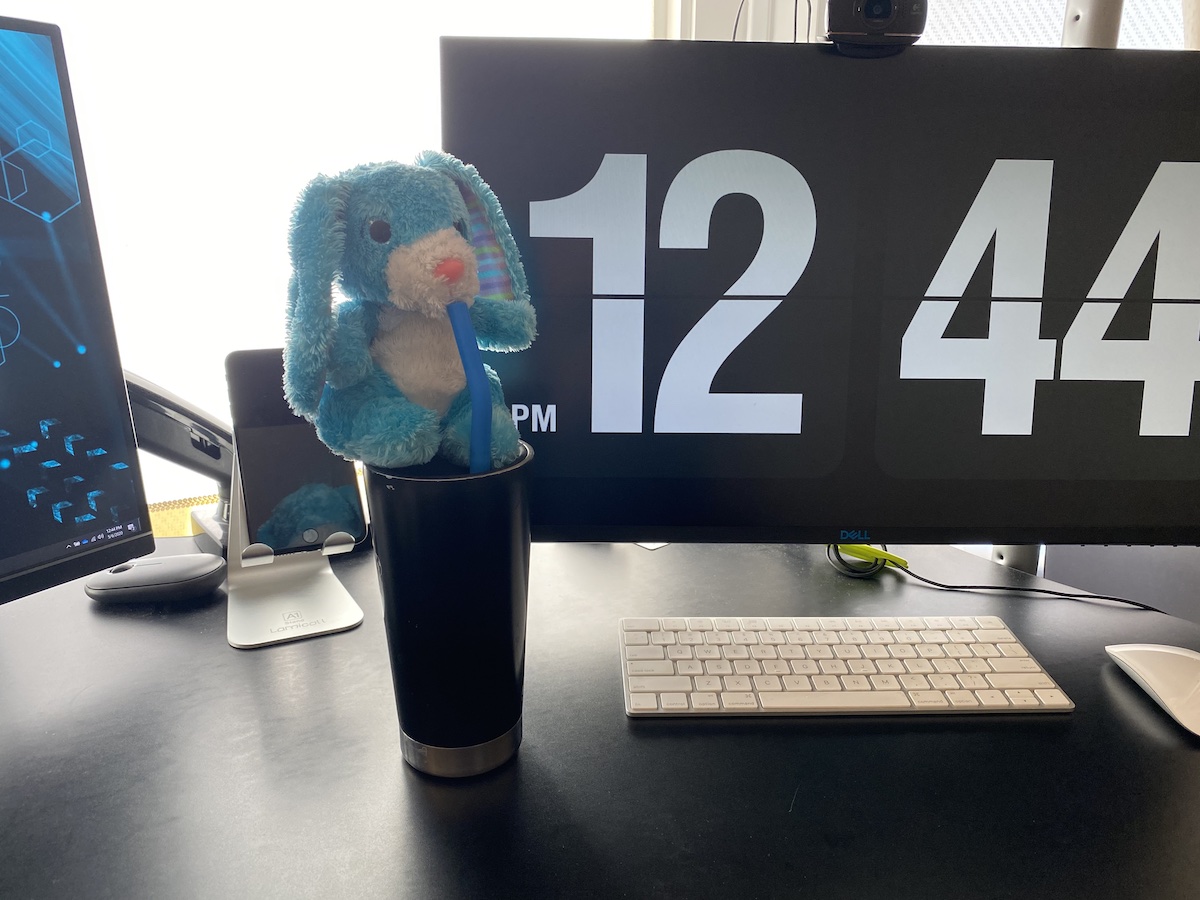
When the new Dell monitor arrived it was pretty trivial to get it mounted on the arm like the first Dell I had. Once that was done I wrapped the cables coming from the monitor in the innerduct I had lying around. Yes I have innerduck I bought and had lying around for the exact purpose of wrapping cables in. The innerduct made it look nicer. Once it was all put together I was pretty pleased with the end result. The only thing I forgot was I needed to plug in a WebCam on the monitor that replaced the Apple Cinema Display. I do video calls with work and it slipped my mind that the new monitor did not have a camera. Luckily I had one to use.

Now that I’ve finished the new setup and the desk is reconfigured I don’t know what took me so long to do it in the first place. It looks much better and is more functional than the old setup. The extra space i can get by easily moving the monitors up and out of the way is nice!

Bedtime Stories For Grown-Up’s

A few years ago I download the app Headspace. I didn’t do much with it at the time. I had tried a few meditation apps and haven’t really done very much with them. About two years ago I decided to really focus on things I could do to calm down and be more focused. I made a leap of faith and spent some money on an discounted annual subscription to headspace. I have been using it ever since. That’s not what I specifically want to talk about in this post. It is just the background.

A friend of mine who I sat next to in the office till about year ago was talking with me one day. He asked if I had the Headspace app. I told him I did. He asked if I’d ever tried their bedtime stories. I had seen them however I had not every tried them. He proceeded to tell me how awesome they were. He summed it up by saying basically you start listening to some story they tell you and wondering what the hell is this. Is this really going to do any thing for me? The next thing you know he said you wake up the next morning surprised that it worked.

Since I already subscribed to the app I figured I would give it a try. For years I have used a white noise machine when I was in New York. Since the machine wouldn’t travel to London I have been using a simulated raining sound from my Amazon Echo. I still figured this wouldn’t hurt to try to get me to sleep.

My friend was right. The first night I tried it my experience pretty much went the way he explained it. I have been using it ever since. There are a bunch of different “Sleepcasts” you could choose from. Some are more appropriate in certain weather or seasons. I do have some favourites. Headspace claims that they are suddenly different each night. And they are different. If you listen to some of them enough and do not goto sleep right away you can tell that much of the difference is that the segments of the story are presented in different orders. There are enough of the Sleepcasts that I like to keep the variety going. The good news is every few months the release three new ones. Almost always I will fall asleep before the story ends. Sometimes if I am unable to sleep I will get to the end and the story will stop. I could tap my phone and say I am still awake and it would play more. I haven’t done that yet. I usually just tried to fall sleep on my own after that. In almost all cases though I don’t make it to the end of the story. There are many nights I don’t remember getting passed the wind down in the very beginning of the story.

The headspace Sleepcasts are now my new Grown-up’s bedtime stories. M thinks I may be using them as a crutch. She does not believe in really using aids to get to sleep. She felt that way with the sleep sounds as well. She is cool with me doing it though. And sometimes is curious to what we will listen to. I do not care how much of a crutch it is if it helps consistently i will keep using it.

W Sisters (and me) Short on Shake Shack

I wrote this pre issolation and just haven’t gotten around to publishing it. Back in January I went with the girls to Shake Shack.  It is funny how a very NY thing is all over London.  There is one across the street from my office.  I have never been there however I have walked past it often. There is one in Covant Garden that we have been to a few times. There is also one we go past now and again in the mall at Stratford.  The girls like to goto Shake Shack now since they can play foozeball and ping pong.

The last time we went the cashier asked me if I had been here before.  What raced through my mind was proudly thinking “Yes.  I have even been to the original one in Madison Square Park the week it opened”.  I have no problem admitting I hate lines and Shake Shack was worth the hour wait at the time.  Since I am in England I was proud of my more subdued reply of simply “Yes” to his question.

Post photo is of the original Shake Shack in NYC. Not from the first time I was there. Some other time what feels like a lifetime ago.

W Sisters Meet Harry Potter

There are some things that I knew I would do with my kids even before I had kids. Star Wars was a huge success with them. I was suprised that i was able to watch it with them when we did. They liked it so much that last weekend they just asked to watch Return of The Jedi.

Doctor Who they took to a bit less. They were a bit scared to the point the walked out on the first episode with the 13th Doctor. They still get their Doctor Who fix via action figures and other memorabilia we have in the house.

M and I have both tried to read the Lion the Witch & The Wardrobe to them. The girls have not been into it. I also tried to read the Hobbit. It was over a year ago so i likely should try again. When I did try they were not into it.

I have avoided watching the Harry Potter movies with the girls. I wanted to rad the books with them first. Around when the isolation started M began reading the Big Friendly Giant to the girls. It inspired me to go out and order Harry Potter and the Philosophers Stone. When we moved to England I forgot that i left a box of books and games at my sisters house. In that cache of stuff was my Harry Potter books. I have all of them in hard cover. Since I didn’t have those I settled for a paperback version.

M finished the BFG last night. As I was wrapping up work tonight the girls asked if I could start Harry Potter with them. I of course agreed. I read them the first chapter tonight. They had lots of questions. I had to try very hard not to answer. I did not want to ruin anything for them.

Going to bed T took the book with her so she could read ahead! So many parenting dreams coming true!!!

Chocolate Bunny Tasting

baileys-chocolate

As M and I were getting the Easter baskets ready for the girls last night I realized how much extra chocolate we had. M mentioned she usually donates it to the school. With school closed we had a tone of it. We treated ourselves to some Lindt Hazelnut chocolate bunny. I also wanted some alcohol and had to think about what to best pair with the bunny. I settled on Baileys. It paired very well. I almost felt like I was a contestant on Top Chef with my prize desert. Well almost…

The Return of Writing

A recurring theme for me in my writing is to talk about my writing. I think the reason the topic comes up is I go through a very visible cycle of writing and not writing. Other than periods of lack of motivation I cannot figure out the pattern. There are different ways that I write. The most public being this blog. I also privatly journal. I use an app called Day One. I have for years. I love it. Besides journalling about things I am finding that I use Day One too log where I have gone and what I have done. It easy since you can geo-tag entries and you can also attach photos to them. It paints a good picture of what I’ve done on a day. Even when I have been less consistent sometimes about actually writing about things I have done.

In the past three or four years I have also taken to writing actions in a paper notebook. The intention is to then complete things and check them off on the day. Anything else goes into my electronic task list. I have read that the tactile act of physically writing helps in memory. As much as I like the idea of physically writing it was something that I would only do every now and again. I would go a few days and then stop for long periods of time. Right around the time of the lockdown I started writing actions out on paper more consistently. I know that I started doing it daily after the lockdown. I did try to do it more frequently even before the lockdown. I remember packing my notebook in my book bag I took to go into the office in March.

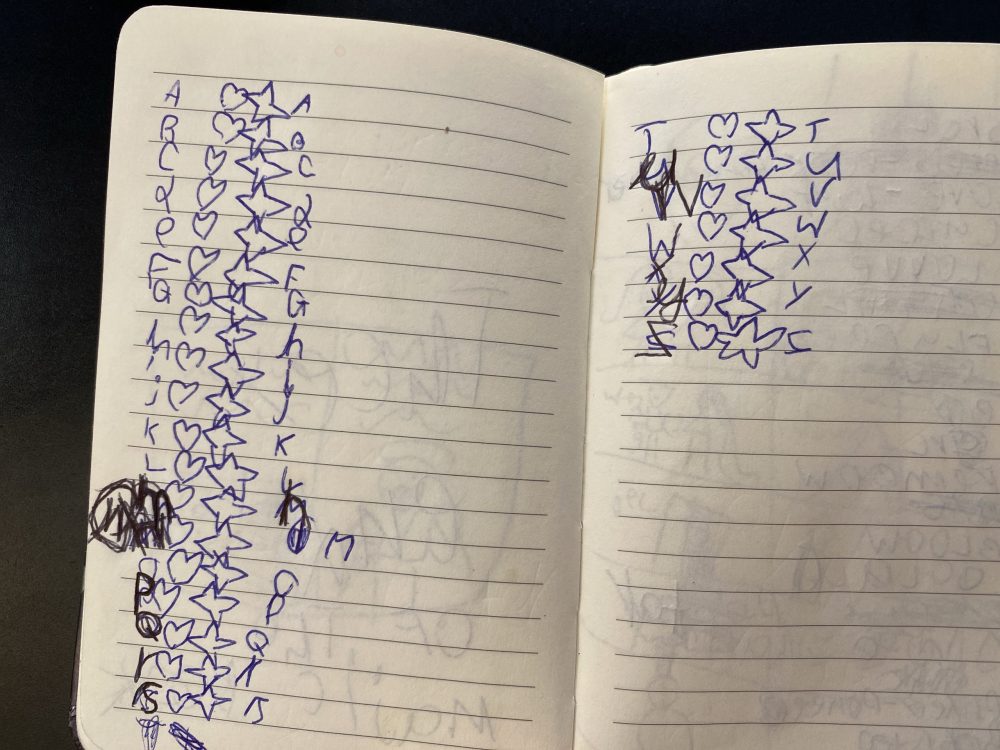
Through April, May, and June my physical writing consisted of writing out action lists of things I remembered that I needed to do that may or may not have already been in my electronic to-do list. It was my way of clearing my mind of things I was thinking needed done. sometimes the actions were already in my to do list. As I would think of things I would write them down. If I would complete something I would check it off the list. If I didn’t finish it that day I put it on my Trello board (my electronic task list) to work on later I will mark a T where I would normally check the completed action. If I didn’t do the action and I didn’t put it on a Trello board I would simply mark it with an X. I thought it was simple enough.

I have for years had an aversion to paper. When I finished a day of writing in the notebook I would take a picture of it and save the file as a PDF. That way I have all of my actions/notes stored electronically. I still kept the physical notebooks however if I lost them or decided to part with them I had the PDF’s. Sometime along the way in May or June I started adding things I had done already to my daily list. Just as an FYI so I knew it happened. After I started doing that I realised if I have all these PDFs of what I did it is a good indication of what happened on that day. I started adding those PDFs to my Day One journal. The OCD in me later realised after a few weeks that my Day One journal would start getting very large in size. Each PDF file was about 250 kB. I already bloat my journal with photos of things that happen on the day. I wanted to avoid adding about 2 MB of size to the journal a week. My solution was to take the hand written notes and write them out into my daily Day One Journal entry. At first it felt like a good idea. Again the act of writing or typing is good for memory or so I have read. Inevitably I grew tired of it. That daily process evolved then into me dictating out what I had written into Dragon Anywhere. I would then paste the dictation into Day One. The thing with dictating was that it was very easy to do. What I had written was very simple and short since when writing I was trying to limit what I wrote to as little as possible yet still trigger my memory. It was hard to say so few words about the topic since dictating was so easy. I found myself starting to elaborate more on each line that I have written. After a few days that turned into a Complete Journal entry of what went on for the day all be it in bulleted format instead of paragraphs. It was still pretty complete. Instead of having to sit and write free form things I thought about for a daily recap I now had an agenda for me to discuss if I want to.

At the time I am writing this I have been journalling in that way for about two weeks. This week I found that I slacked off a little and had to go back to several days and go through the process. Luckily I was able to recall enough of what’s going on by what I wrote. It feels like that I could go several days and not lose that much detail. Any more than that and it’s probably not worth it. I am liking the new style of writing because I have the notebook with me everywhere and using it gives me that physical touch I don not get with just a phone. I can see myself ditching the paper notebook and doing the same thing in an electronic format. Yet for now I do like the old school approach.

I have been putting my daily writing into moleskine notebooks. I am on my third Harry Potter special edition notebooks. I can get about three months worth into a full notebook. The first two notebooks spanned over a year each. At the time I was not writing in them daily. The one I am on now I hope to fill completely from now until sometime in the autumn.

In the same time I have been journalling more I have neglected my blog entries. It is not a conscious decision. I just don’t give myself enough time to write. Since writing for me is dictating in an app I need a quiet place alone to do it. M has said several times that she is okay with me dictating with her around. I am self-conscious about doing it so I do not. The routine I have gotten myself into lets me take my written bullet point journal and dictate it into a Day One entry takes about 5 to 15 minutes depending on how much I decide to elaborate on what I wrote out. That makes it relatively easy to do every day as long as I remember.

The blog on the other hand requires me to think of what I want to talk about. Then I dictate it. From there I do proof read and edit the entries. I have to make a lot of manual typing since the dictation is nowhere near perfect. For a private journal entry its perfectly fine. For something to publish on the internet it does need work after dictating. Once done writing and editing an entry I need to label it and find a suitable photograph to go along with the post. Then it is figuring out what I will post next. I know that I sometimes write a lot and then not at all for long periods of time I limit my posts to once a week. The big question that comes up in my mind when writing something such as this post is how long the lead time between when I write something and when I publish it. In some cases that has been months.

As of the Autumn 2020 this is my process. Since I wrote this post in late summer my process has changed a bit. Since marking that update in the Autumn of 2020 I am still loosely following the same pattern. Before that changed I figured I should finally post this entry before it has its own birthday. I am glad that I am keeping with the routine!

Using a From Email Address as Validation is Not a Security Measure

I have been on a mission as of late to migrate all of my login details for account’s I use email from one domain name I have to another. I decided to stop using the main domain name I have been using for years. One of the main drivers was cost. It’s pretty expensive each year to own it. It is a country specific one and not cheap like a .com. It is also no longer as relevant for me.  I  loved its simplicity. It just didn’t make sense to keep having it long term.  It is paid for through 2021 or something. I have time to confirm I’ve captured every account and moved it.

In the process of doing this I am also closing accounts I don’t need anymore. It’s a great spring cleaning in the autumn. I originally wrote this in the fall of 2019.

When I attempted to change the email address I used with NordVPN I realized they do not have an option to do that in their online portal. I have  come across this issue a bunch of times going through this change process. Eventhough it’s annoying I typically open a case to request a change and its done pretty quickly.

For my own security reasons I use a unique email address for every account that I create online. This allows me to know when my information is being sold or if an email is authentic. It also protects me if one provider is compromised and the account details are sold or published online. There’s lots of times where I recieve a message that looks semi-legitimate. It is only when I look and see it’s going to a completely different email address than I gave them that I know it’s fake.

This setup makes things more secure from fishing or other exploits. The downside is it is not so straight forward to get a message via one of these aliases I setup and reply back easly.  That is because my email provider Protonmail charges for each alias you use.  To get around that I use their catchall feature.  I can have unlimited inbound email addresses. The catch is I can only reply back coming from only 5 of them. Most of the mail I get other than personal mail I don’t really need to reply to. The trade off is worth it for me most of the time.

In this instance with NordVPN I was asked to reply to the support case via email. Ussually in this situation what I typically do is I have an email program that allows me to send outbound mail and I can edit an alias to match the email address I’m using with that vendor. It’s slightly annoying however if I don’t have to do it often it’s not that big of a deal.

There were challenges in validating my account with the NordVPN. That required several emails back and forth. In one instance when I was away from my desk I got lazy and just replied from my generic catchall address. That exposed my default address to the vendor. I wasn’t that concerned about revealing that address to them however it was sloppy for me. What was silly was their reply. After two more rounds of back-and-forth I was told I need to send a response from the original email address since that was the one on file with them.

What seems silly to me is this company was relying on an email “from address” as some sort of security validation? Whenever I do send them mail  I’m literally cutting and pasting the contents to a new message and spoofing the address. Anyone can do that. Yet somehow they feel that if I  recieve their message it isn’t enough. In my case i am spoofing an address of my own so thats not bad.  What is bad is mail spoofing is super easy and this company somehow thinks its a securty function to get mail from a specific address.

If you are going to insist on a security measure why are they not having a secure ticket portal that my login to their service gets me into?  Or a built in chat system within their app amoung other things that are more secure than email.

I found this whole experience dealing with this VPN provider to be very frustrating. I am only writting about it because of the hypocritical things they said.  Do not tell me you are a security company and then rely on a “reply to” as a validation you are speaking to the right person.  Another thing they did was they wanted me to send old credit card details in cleartext email.  Yes the card was 2 years old however still dont say you are a security company and ask for PII in a clear text email.

The situations been sorted. I have updated my email address eventually. I’ve been using NordVPN provider for years. This extremely poor experience has left me looking for a new provider when this one runs out. It’s partly due to just the bad communication back and forth. And part of it is the hypocrisy of claiming that they are a security company and doing some of the most unsecure methods to communicate.

UPDATE: Just as I started to write this post in late 2019 it came out that NordVPN had two seperate public incidents where they were compromised. That along with this story got me to move providers 4 months before my contract term ended with NordVPN.

Enhanced Working From Home Now With Snacks

On day one of our Social Distancing (last Thursday) M made popcorn for the girls on their first day of home schooling. I got to get some too. Before social distancing made working from home WFH a common thing for everyone I never got treats. The staying inside most of the time isn’t great but the treats are at least a nice touch. Thanks M!

My 17th Blog-aversary

If my blog was a person it would be able to drive. I cannot believe I have been keeping this Blog since March 2003. It feels like yesterday and a lifetime ago all at the same time. There were plenty of times I didn’t write much for months. There were other times where i was posting several times a week. I am happy with my queue of ideas and 1-2 posts a week. As it was in 2003 this site and writting has been a great relaxing outlet…

Notable posts, my first post ever. Then my first post I actually wrote anything meaningful.

Another notable detail that is only semi-geeky to talk about today is as of today I have well over 2,500 posts.

It’s Not You Fitbit, it’s Google, So I Guess it is You

When I last wrote about my Apple Watch Series 3 I thought I solved the challenge around using the smart watch versus a regular watch. The solution was to use both. Since then I’ve continued to use the Apple Watch as just a data device on my right wrist. I wear the regular one on the other. Surprisingly not many people even notice I am doing it. After a while I got used to it and it second nature now.

When the Apple Watch Series 4 came out the upgrade didn’t seem compelling enough for me to upgrade. I was tempted with the bigger screen but not enouhg to buy a new one for that reason alone. When the series 5 came out I was intrigued. The always on face was the single biggest issue I had previously with Apple Watches. Now that I can look at it and the time is always visible without having to lift it to my wrist and wait for it to light up. The always on plus the bigger screen on the smaller model was enough to make a compelling case for an upgrade. I treated myself to the 40 mm version.

When I bought my Series 5, the plan was to sell my Series 3 on eBay. I always try to make some of my purchase price back. One of my friends at work suggested using the Series III as a sleep tracker. I have been using my Fitbit for that. Until then I was happy with that solution. Then right around the time I was thinking about the new watch Google announced they were buying Fitbit. That immediately got me wanting to find a replacement for my Fitbit. I want to minimize as much Google exposure as possible. The thought of them having my health data was not cool.

The Fitbit sale development got me wanting to try my friends suggestion about using the watch as a sleep tracker. My issue was I did not want to use the same watch I used during the day, then all night. I was afraid I would forget to charge it right before bed and again in the morning. I would need to do both in order to get a full day and night sleep out of it.

I hesistated to waste potential extra money by not selling the Series III. That was until I tried to trade it in. The research I did said if I was lucky I would get hundred pounds out of it. If I wanted the dedicated sleep tracker I probably have to spend around that amount of money anyway. I wasnt sure of a good Fitbit alternative either. I opted to keep the Apple Watch Series 3 and see if it would work as a sleep watch.

I did a bunch of research on apps for tracking sleep like the Fitbit would. It turns out there were several options. I settled on Sleepmatic. Compared to the Fitbit I’m not sure how accurate it is. Its supposed to be pretty close. From what I can tell it’s good enough for my use. I was worried the bigger watch on my wrist at night wound not be comforatable. I was also worried about turning on the screen or pressing other functions while I slept. Neither in the end was a problem. I disabled the raise to turn on function. I do not recall having any issues with pressing anything by mistake after that.

By the time I wrote this post I had been using the Series III as a sleep tracker for several months. Overall I’m generally pretty happy with the switch. I’m extremely happy that I deleted my Fitbit account as well. As a side benefit I can use the watch regularly as a silent alarm. I was able to do the same thing with Fitbit however it required going onto the app on my phone to adjust anytime I needed to. User experience on that was mixed. For that reason I did not always use it. Making changes on the Apple Watch is trivial. Now I use it all the time.

Overall I’m happy with series 5 for everyday use and my new “sleep” tracker. Lastly I will note that I offered my wife the Series 3 before I used it. She declined. I would have liked that also since if we did that we would have had push to talk option!